
5.0 KiB
FAQ
I have an error / bug / strange client behavior, what can I do ?
If you notice an error or other malfunction in the mod or in its installation, then do not rush to create a problem report, try this couple of simple steps, this helps to solve a large number of different bugs:
- Completely remove Spotify so that there are no tails from the old versions of the client, this patch will do it for you in one click, after that, run the SpotX installation again, this way you will perform a clean installation, which helps to avoid a lot of bugs associated with outdated versions.
- Also, as an additional measure, look at your host file, it should not contain different URLs that can cause the client to work incorrectly, even if you are sure that you did not add anything to it, then go into it anyway and check it for sure, since Some ad blockers that you may have used in the past may have added entries to the host file automatically without your consent.
To quickly open the host file, press
Win + Rand enter%WinDir%\System32\Drivers\Etc\hosts, in order for the system to allow you to edit the file, you need to open it as an administrator. - If you still see errors, then install the original client and check this error there, if the error is present in the original client, then here you need to wait for a fix from the Spotify developers. To expedite resolution of a problem in the original client, please create a problem report on their support forum. In the meantime, you are waiting for a fix, you can temporarily return to the previous version of Spotify that worked for you and block updates in it, this instruction will help you with this.
It seems I have an old version of PowerShell 2.0, can I install a patch with it?
No, you will get something like this error
Screenshot
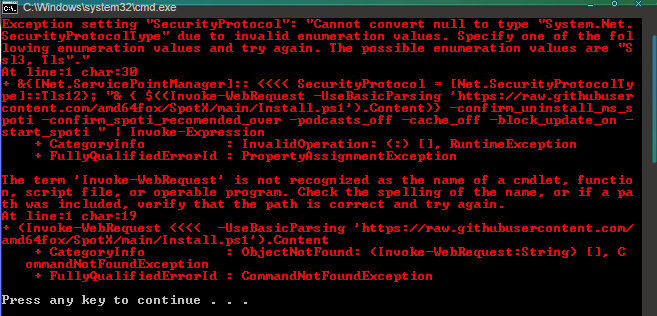
Do the following:
- Upgrade to NET Framework 4.8
- Upgrade to WMF 5.1
- Reboot your PC
How to downgrade Spotify version?
If you have problems with the patch after upgrading the client version, then use this tool to revert back to the working version.
SpotX is forcibly installing/updating an outdated version of Spotify, but a new version has already been released, how do I install it?
SpotX installs/updates the recommended version which is the most stable according to the author of the patch. If a new version has been released, and SpotX has not yet been updated, then you have two options:
- Stay on the recommended version and block automatic Spotify updates
- Install the latest version of Spotify and run
Usual installation, confirm during the installation that you want to continue with the installation with the version that has not been tested yet, but do not forget that mistakes are possible with it.
I got an error editing my hosts file, how can I fix it?
or
- Manually editing the hosts file, you need to open and remove all lines from it that relate to Spotify
My hosts file got corrupted during installation, how do I get it back?
If you need your old hosts file, then you can find a backup of it in the same folder named hosts.bak
I want to translate the installer into my language, how can I do that?
If you would like to translate the installer into your language, you can do so here, and if you notice a bug in current languages, you can report it here.
Can I use SpotX and Spicetify together?
Yes you can do this, for example:
- First install SpotX, then install Spicetify on top and customize it to your taste.
Or you can do the opposite.
- first install Spicetify, customize it to your taste, and then install SpotХ on top.
But if you use the second case, then when you try to use the Spicetify commands, my patch will be reset, you will need to install it on top again.
I have a premium account but I still want to use SpotX, is this possible?
Yes, there is such an opportunity, you need to run a special installation without ad blocking.