Sean (ANGRYxScotsman)andGitHub
e96f990c60
Sean (ANGRYxScotsman)andGitHub
e96f990c60
* Fix the same arrow-icon alignment issue on the "Read the Docs" button

Same root cause as the hero/final-CTA buttons: the label was plain
markdown text, which MDX wrapped in a <p>, and the icon was missing
the size/nudge applied elsewhere. Match it to the other two buttons.

* Rename known-issues page slug to knownissues

Update the sidebar config, nav dropdown, and every internal link that
pointed at /known-issues/ to match.

* Fix image paths in root-level markdown to match the new docs site

The Hugo docs site (docs/assets/images/...) has been replaced by the
Astro site (docs/src/assets/...); update CONTRIBUTING.md,
READMEITALIAN.md, and README.md to point at the new asset locations.

* Remove unused houston.webp asset

Leftover Starlight default-theme asset with no references anywhere
in the docs site.

* Fix docs site reference in generator docs

Updates `tools/devdocs-generator.md` to describe link generation correctly: links now point to the Astro/Starlight documentation site instead of the old Hugo site.

* Point docs homepage CTAs to guides hub

Updates the docs landing page CTA links to use `/guides/` instead of `/guides/getting-started/` in the hero action and both “Get Started”/“Read the Docs” buttons, routing users to the guides index.

* Add reusable YouTube embeds to docs guides

Introduces a new `YouTubeEmbed.astro` component for responsive 16:9 video embeds using the privacy-enhanced `youtube-nocookie.com` domain. The User Guide index and Tweaks guide now import and use this component instead of plain YouTube links, and the component includes styling that overrides Starlight’s iframe reset so embedded videos render at the correct size.

* Fix YouTube embed iframe height via not-content

Add the `not-content` class to the embed wrapper so Starlight's markdown reset no longer overrides `iframe { height: auto }`. Drop the `@layer starlight.core` wrapper and `!important` overrides that were compensating for the same issue.

* Clarify docs comments across Astro components

Adds and refines inline comments in the docs site config, custom Starlight components, and theme styles to better explain layout structure, navigation dropdown behavior, hero composition, and theme initialization. Also normalizes a few multi-line comments into single-line form for readability without changing functionality.

* Set secondary docs button background color

Update `.wu-btn-secondary` in the docs theme to use `var(--sl-color-gray-6)` instead of a transparent background, improving button visibility and contrast while keeping existing border and hover behavior.

* Move User Guides into docs dropdown

Updates the docs header navigation so the “User Guides” link is grouped under the existing “Documentation” dropdown instead of appearing as a separate top-level nav item. This keeps related documentation links together and simplifies the top navigation.

* Fix hero margin and center trust section

Remove the automatic 1.5rem top margin Starlight adds between the hero and the content column. Also flex-center the trust section so its content is properly aligned.

* Disable edit links in generated dev docs

Update `tools/devdocs-generator.ps1` to include `editUrl: false` in the frontmatter for generated tweak and feature docs pages. This prevents Starlight from showing edit links on these auto-generated pages.

* Move docs update PRs to pre-release flow

The docs Pages workflow is simplified to only build and deploy the docs site: it now triggers only on docs changes, drops extra permissions/default shell settings, and removes the dev-docs generation + auto-PR steps. The pre-release workflow now owns that automation by expanding its PR step to include generated code-reference docs alongside JSON link updates, with updated commit/title/body text and a documentation label.

* Shorten generated docs source note

Simplify the autogenerated DevDocs notice so generated pages only warn against direct edits while still linking back to the source file.

* Improve docs header dropdown behavior

Reworked the header nav dropdown triggers to use native `<details>/<summary>` instead of buttons, then updated menu visibility logic to use `details[open]` for no-JS support on touch and keyboard while preserving hover behavior. Also renamed the “Developer Docs” link to “Code Reference” and tightened related CSS comments.

* Refresh contribution and docs workflow docs

Updated contributor-facing docs to use consistent Markdown admonition blocks, cleaned Mermaid fence formatting, and fixed minor wording/capitalization in contribution steps. Clarified `devdocs-generator` behavior so workflow ownership is explicit: generation now documented as part of `pre-release.yaml` (via docs-update PR), while `docs.yaml` is documented as build/deploy only.

* Fix contributing guide grammar

Correct the "it's" to "its" typo in both contributing guides so the pull request guidance is consistent across the GitHub and docs versions.
6.7 KiB
Chris Titus Tech's Windows Utility



Questa utility è una raccolta di attività Windows che eseguo personalmente su ogni sistema che utilizzo. È progettata per snellire le installazioni, rimuovere i componenti superflui tramite ottimizzazioni, risolvere problemi tramite la configurazione, e riparare aggiornamenti di Windows. Sono estremamente selettivo riguardo ai contributi per mantenere questo progetto pulito ed efficiente.

💡 Come usarlo
Winutil deve essere eseguito con privilegi di amministratore, poiché apporta modifiche all'intero sistema. Per farlo, avvia PowerShell come amministratore. Ecco alcuni modi per procedere:
-
Metodo del menu di Start:
- Fai clic con il tasto destro sul menu Start.
- Scegli "Windows PowerShell (esegui come Amministratore)" (per Windows 10) o "Terminale (esegui come Amministratore)" (per Windows 11).
-
Metodo tramite ricerca:
- Premi il tasto Windows.
- Digita "PowerShell" o "Terminal" (per Windows 11).
- Premi
Ctrl + Shift + Inviooppure fai clic con il tasto destro e seleziona "Esegui come amministratore" per avviarlo con privilegi elevati.
Comando di avvio
Branch stabile (Consigliato)
irm "https://christitus.com/win" | iex
Branch Sviluppatore
irm "https://christitus.com/windev" | iex
Automazione
Winutil supporta anche preset predefiniti che applicano automaticamente configurazioni comuni:
StandardMinimalAdvanced
Esempio:
& ([ScriptBlock]::Create((irm "https://christitus.com/win"))) -Preset Standard
Per vedere esattamente cosa fa ogni preset, consulta: https://github.com/ChrisTitusTech/winutil/blob/main/config/preset.json
In caso di problemi, consulta i Problemi noti o Apri una segnalazione
🎓 Documentazione
Documentazione ufficiale di WinUtil
Tutorial su YouTube
Articolo su ChrisTitus.com
🛠️ Build & Sviluppo
Note
Winutil è uno script piuttosto esteso, per questo è suddiviso in più file che vengono combinati in un unico file
.ps1tramite un compilatore personalizzato. Questo rende la manutenzione del progetto molto più semplice.
Ottieni una copia del codice sorgente. Puoi farlo tramite l'interfaccia di GitHub (Code > Download ZIP), oppure clonando (scaricando) la repo tramite git.
Se git è installato, esegui i seguenti comandi in una finestra PowerShell per clonare e accedere alla directory del progetto:
git clone --depth 1 "https://github.com/ChrisTitusTech/winutil.git"
cd winutil
Per compilare il progetto, esegui lo script di compilazione in una finestra PowerShell (i permessi di amministratore NON sono richiesti):
.\Compile.ps1
Troverai un nuovo file chiamato winutil.ps1, creato dallo script Compile.ps1. Ora puoi eseguirlo come amministratore e apparirà una nuova finestra. Goditi la tua versione compilata di WinUtil :)
Tip
Per ulteriori informazioni sull'utilizzo di WinUtil e su come contribuire allo sviluppo, ti invitiamo a leggere le Linee guida per i contributi. Se non sai da dove iniziare o hai domande, puoi chiedere sul nostro Server Discord della community; i membri attivi del progetto risponderanno appena possibile.
💖 Supporto
- Per sostenere il progetto moralmente e mentalmente, non dimenticare di lasciare una ⭐️!
- Wrapper EXE a 10$ su https://www.cttstore.com/windows-toolbox
💖 Sponsor
Questi sono gli sponsor che aiutano a mantenere vivo il progetto con contributi mensili.


🏅 Grazie a tutti i collaboratori
Un ringraziamento speciale per aver dedicato il vostro tempo ad aiutare Winutil a crescere. Grazie mille! Continuate così 🍻.
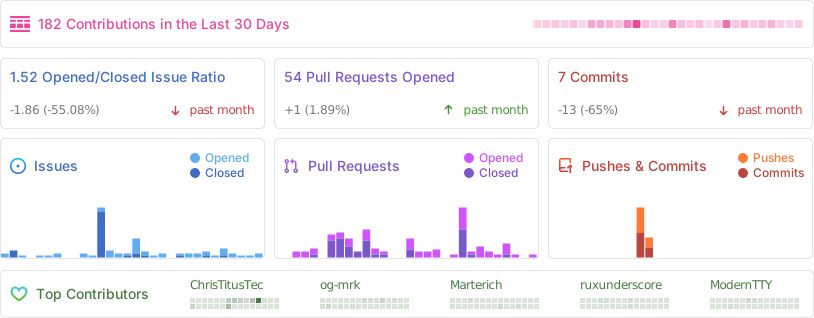
📊 Statistiche GitHub