Compare commits
| Author | SHA1 | Date | |
|---|---|---|---|
 Chris Titus Tech Chris Titus Tech
|
a8db21b2ef | ||
|
Chris Titus Tech
|
787937d402 | ||
|
Chris Titus Tech
|
91ec6aca3b | ||
|
Chris Titus Tech
|
02ba930b20 | ||
|
Chris Titus Tech
|
56bd18f2cd | ||
|
Chris Titus Tech
|
5c8adf3c9f | ||
|
Chris Titus Tech
|
075bc0772c | ||
|
Chris Titus Tech
|
b315e6338a | ||
|
Chris Titus Tech
|
c5b1cd027a | ||
|
Chris Titus Tech
|
be85ecb2db | ||
|
Chris Titus Tech
|
73fb487e58 | ||
|
Chris Titus Tech
|
7abb4ae5fe | ||
|
Chris Titus Tech
|
df75cd8c6f | ||
|
Chris Titus
|
751b7ef79c | ||
|
Chris Titus
|
689cf656c0 | ||
|
Chris Titus
|
114f671237 | ||
|
Chris Titus
|
81aee4ead9 |
@@ -1,6 +1,2 @@
|
||||
# Chris rules EVERYTHING (including paths listed below)
|
||||
* @ChrisTitusTech
|
||||
|
||||
# Seanh1917 (ANGRYxScotsmans) is the docs guy
|
||||
docs/ @ChrisTitusTech @seanh1995
|
||||
tools/devdocs-generator.* @ChrisTitusTech @seanh1995
|
||||
* @ChrisTitusTech
|
||||
@@ -2,7 +2,7 @@
|
||||
|
||||
## Our Pledge
|
||||
|
||||
We, as members, contributors, and leaders, pledge to make participation in our
|
||||
We as members, contributors, and leaders pledge to make participation in our
|
||||
community a harassment-free experience for everyone, regardless of age, body
|
||||
size, visible or invisible disability, ethnicity, sex characteristics, gender
|
||||
identity and expression, level of experience, education, socio-economic status,
|
||||
@@ -106,7 +106,7 @@ Violating these terms may lead to a permanent ban.
|
||||
### 4. Permanent Ban
|
||||
|
||||
**Community Impact**: Demonstrating a pattern of violation of community
|
||||
standards, including sustained inappropriate behavior, harassment of an
|
||||
standards, including sustained inappropriate behavior, harassment of an
|
||||
individual, or aggression toward or disparagement of classes of individuals.
|
||||
|
||||
**Consequence**: A permanent ban from any sort of public interaction within
|
||||
|
||||
@@ -5,13 +5,13 @@
|
||||
* Test the latest changes to WinUtil by running the pre-release and reporting issues you are encountering to help us continually improve WinUtil!
|
||||
|
||||
#### **Run the latest pre-release**
|
||||
```ps1
|
||||
irm https://christitus.com/windev | iex
|
||||
```
|
||||
|
||||
```ps1
|
||||
irm https://christitus.com/windev | iex
|
||||
```
|
||||
!!! bug "Keep in mind"
|
||||
|
||||
> [!CAUTION]
|
||||
> **Keep in mind:** This is a pre-release and should be treated as such. It exists for developers to test the utility and report or fix bugs before they get added to the stable release. Don't use it in production!
|
||||
This is a pre-release and should be treated as such. It exists for developers to test the utility and report or fix bugs before they get added to the stable release. Don't use it in production!
|
||||
|
||||
## Issues
|
||||
|
||||
@@ -21,19 +21,19 @@ irm https://christitus.com/windev | iex
|
||||
|
||||
* Pull requests are now handled directly on the **MAIN branch**. This was done since we can now select specific releases to launch via releases in GitHub.
|
||||
|
||||
* If you're doing code changes, then you can submit a PR to the `main` branch.
|
||||
* If you're doing code changes, then you can submit a PR to `main` branch, but I am very selective about these.
|
||||
|
||||
> [!IMPORTANT]
|
||||
> Do not use a code formatter, make massive amounts of line changes, or make multiple feature changes. EACH FEATURE CHANGE SHOULD BE ITS OWN PULL REQUEST!
|
||||
>
|
||||
> Do not open a pull request that adds support for other languages to WinUtil for now, until we decide how we want to move forward with language support.
|
||||
!!! warning "Important"
|
||||
|
||||
Do not use a code formatter, make massive amounts of line changes, or make multiple feature changes. EACH FEATURE CHANGE SHOULD BE IT'S OWN PULL REQUEST!
|
||||
|
||||
* When creating pull requests, it is essential to thoroughly document all changes made. This includes, but is not limited to, documenting any additions made to the `tweaks` section and corresponding `undo tweak`, so users are able to remove the newly added tweaks if necessary, and comprehensive documentation is required for all code changes. Document your changes and briefly explain why you made your changes in your Pull Request Description. Failure to adhere to this format may result in the denial of the pull request. Additionally, any code lacking sufficient documentation may also be denied.
|
||||
|
||||
* By following these guidelines, we can maintain a high standard of quality and ensure that the codebase remains organized and well-documented.
|
||||
|
||||
> [!NOTE]
|
||||
> When creating a function, please include "WPF" or "WinUtil" in the file name so it can be loaded into the runspace.
|
||||
!!! note
|
||||
|
||||
When creating a function, please include "WPF" or "WinUtil" in the file name so it can be loaded into the runspace.
|
||||
|
||||
## Walk through
|
||||
|
||||
@@ -45,34 +45,37 @@ irm https://christitus.com/windev | iex
|
||||
|
||||
### Overview
|
||||
|
||||
```mermaid
|
||||
``` mermaid
|
||||
%%{init: {"flowchart": {"curve": "cardinal"}} }%%
|
||||
graph TD
|
||||
A[Fork Project] --> B[Clone Repository];
|
||||
B --> C[Create New Branch];
|
||||
C --> D[Make Changes];
|
||||
D --> G[Test Changes];
|
||||
G --> H{Tests Passed?};
|
||||
H -->|Yes| E[Commit Changes];
|
||||
H -->|No| J[Fix Issues];
|
||||
J --> G;
|
||||
E --> F[Push Branch];
|
||||
F --> K[Create Pull Request];
|
||||
K --> L[Fill out PR template];
|
||||
A[Fork Project] --> B[Clone Repository];
|
||||
B --> C[Create New Branch];
|
||||
C --> D[Make Changes];
|
||||
D --> G[Test Changes];
|
||||
G --> H{Tests Passed?};
|
||||
H -->|Yes| E[Commit Changes];
|
||||
H -->|No| J[Fix Issues];
|
||||
J --> G;
|
||||
E --> F[Push Branch];
|
||||
F --> K[Create Pull Request];
|
||||
K --> L[Fill out PR template];
|
||||
classDef default stroke:#333,stroke-width:4px,font-size:12pt;
|
||||
```
|
||||
!!! info
|
||||
|
||||
> [!NOTE]
|
||||
> This is a diagram to guide you through the process. It may vary depending on the type of change you're making.
|
||||
This is a diagram to guide you through the process. It may vary depending on the type of change you're making.
|
||||
|
||||
### Fork the Repo
|
||||
* Fork the WinUtil Repository [here](https://github.com/ChrisTitusTech/winutil) to create a copy that will be available in your repository list.
|
||||
|
||||

|
||||

|
||||
|
||||

|
||||
|
||||
### Clone the Fork
|
||||
> [!TIP]
|
||||
> While you can make your changes directly through the Web, we recommend cloning the repo to your device using the application GitHub Desktop (available in WinUtil) to test your fork easily.
|
||||
!!! tip
|
||||
|
||||
While you can make your changes directly through the Web, we recommend cloning the repo to your device using the application GitHub Desktop (available in WinUtil) to test your fork easily.
|
||||
|
||||
* Install GitHub Desktop if it is not already installed.
|
||||
* Log in using the same GitHub account you used to fork WinUtil.
|
||||
@@ -84,35 +87,31 @@ graph TD
|
||||
|
||||
### Testing your changes
|
||||
|
||||
* To test to see if your changes work as intended, run the following commands in a PowerShell terminal as admin:
|
||||
* To test to see if your changes work as intended run following commands in a powershell terminal as admin:
|
||||
|
||||
* Change the directory where you are running the commands to the forked project.
|
||||
* `cd {path to the folder with the compile.ps1}`
|
||||
* Run the following command to compile and run WinUtil:
|
||||
* `.\Compile.ps1 -run`
|
||||
|
||||

|
||||
|
||||
|
||||
Open PowerShell as Administrator.
|
||||

|
||||
|
||||
* After seeing that your changes work properly, feel free to commit the changes to the repository and make a PR. For help on that, follow the documentation below.
|
||||
|
||||
|
||||
### Committing the changes
|
||||
* Before committing your changes, please discard changes made to the `winutil.ps1` file, like the following:
|
||||
|
||||

|
||||

|
||||
|
||||
* Now, commit your changes once you are happy with the result.
|
||||
|
||||

|
||||

|
||||
|
||||
* Push the changes to upload them to your fork on GitHub.
|
||||
* Push the changes to upload them to your fork on github.com.
|
||||
|
||||

|
||||

|
||||
|
||||
### Making a PR
|
||||
* To make a PR on your repo under a new branch linking to the main branch, a button will show and say Preview and Create pull request. Click that button and fill in all the information that is provided on the template. Once all the information is filled in correctly, check your PR to make sure there is no WinUtil.ps1 file attached to the PR. Once everything is good, make the PR and wait for Chris (the maintainer) to accept or deny your PR. Once it is accepted by Chris, you will be able to see your changes in the "/windev" build.
|
||||
* To make a PR on your repo under a new branch linking to the main branch, a button will show and say Preview and Create pull request. Click that button and fill in all the information that is provided on the template. Once all the information is filled in correctly, check your PR to make sure there is not a WinUtil.ps1 file attached to the PR. Once everything is good, make the PR and wait for Chris (the maintainer) to accept or deny your PR. Once it is accepted by Chris, you will be able to see your changes in the "/windev" build.
|
||||
* If you do not see your feature in the main "/win" build, that is fine. All new changes go into the /windev build to make sure everything is working OK before going fully public.
|
||||
* Congratulations! You just submitted your first PR. Thank you so much for contributing to WinUtil.
|
||||
|
||||
@@ -1,28 +0,0 @@
|
||||
title: "[App Suggestion] "
|
||||
body:
|
||||
- type: input
|
||||
attributes:
|
||||
label: "Application Link"
|
||||
description: "Provide a link where this application can downloaded officially"
|
||||
- type: checkboxes
|
||||
attributes:
|
||||
label: "Rules Checklist"
|
||||
description: "You should agree with next rules"
|
||||
options:
|
||||
- label: "This application is popular enough, so is not considered as niche"
|
||||
required: true
|
||||
- label: "This application is not considered bloatware"
|
||||
required: true
|
||||
- label: "This application is free to access"
|
||||
required: true
|
||||
- label: "This application should be included on majority of fresh installed systems"
|
||||
required: true
|
||||
- label: "This application is present on WinGet (check winstall.app or do 'winget search your-app' in terminal)"
|
||||
required: true
|
||||
- type: checkboxes
|
||||
attributes:
|
||||
label: "Check for denied applications"
|
||||
options:
|
||||
- label: "Yes, I checked PRs, issues and discussions for existing suggestions and their result"
|
||||
required: true
|
||||
|
||||
@@ -1,61 +1,62 @@
|
||||
name: "Bug report"
|
||||
description: "Report a bug to help us identify and fix issues in the project."
|
||||
title: "[Bug Report] - <your summary here>"
|
||||
labels: ["bug"]
|
||||
|
||||
body:
|
||||
- type: markdown
|
||||
attributes:
|
||||
value: |
|
||||
- Remember, we only support Windows 11. If you encounter problems on Windows 10, please consider upgrading to Windows 11.
|
||||
- For general questions, join our Community-driven [Discord Server](https://discord.gg/RUbZUZyByQ).
|
||||
# 🐞 **Issue Report**
|
||||
Thank you for taking the time to report an issue! Please provide as much detail as possible to help us address the problem efficiently.
|
||||
|
||||
## ⚠️ **IMPORTANT**
|
||||
- 🛠️ **Supported environments only:** We only support Windows 11.
|
||||
- 💡 For general questions, use the [Discussions section](https://github.com/Christitustech/winutil/discussions) or join our Community-driven [Discord Server](https://discord.gg/RUbZUZyByQ).
|
||||
|
||||
- type: checkboxes
|
||||
id: read_issues
|
||||
attributes:
|
||||
label: "I have read the known issues"
|
||||
description: "You [better do](https://winutil.christitus.com/knownissues/), cause your issue can be already there"
|
||||
label: ⚙️ Issue Checklist
|
||||
options:
|
||||
- label: Yes, I did
|
||||
required: true
|
||||
|
||||
- type: input
|
||||
id: winutil_version
|
||||
attributes:
|
||||
label: "Version of WinUtil"
|
||||
description: "Provide a version that you are using when issue submitted (it can be found in right corner of app)"
|
||||
- label: I have read the guidelines.
|
||||
- label: I checked for duplicate issues.
|
||||
- label: I searched for existing discussions.
|
||||
- label: I checked for an existing pull request that addresses this issue.
|
||||
validations:
|
||||
required: true
|
||||
|
||||
- type: dropdown
|
||||
- type: input
|
||||
id: affected_part
|
||||
attributes:
|
||||
label: What part of WinUtil are you having issues with?
|
||||
options:
|
||||
- Program Install Tab
|
||||
- Tweaks Tab
|
||||
- Config Tab
|
||||
- Updates Tab
|
||||
- Win11 Creator Tab
|
||||
label: 📜 What part of Winutil are you having issues with?
|
||||
placeholder: "e.g., Tweaks, etc."
|
||||
validations:
|
||||
required: false
|
||||
required: true
|
||||
|
||||
- type: textarea
|
||||
id: issue_description
|
||||
attributes:
|
||||
label: Provide a clear and concise description of the issue.
|
||||
label: 📝 Provide a clear and concise description of the issue.
|
||||
validations:
|
||||
required: true
|
||||
|
||||
- type: textarea
|
||||
id: tweaks_applied
|
||||
id: steps_to_reproduce
|
||||
attributes:
|
||||
label: List the tweaks you applied before the issue occurred.
|
||||
label: 🔄 Steps to reproduce the issue.
|
||||
placeholder: "e.g., Step 1: ..., Step 2: ..."
|
||||
validations:
|
||||
required: false
|
||||
required: true
|
||||
|
||||
- type: textarea
|
||||
id: error_output
|
||||
attributes:
|
||||
label: Paste the full error output (if available) or Screenshot or Video.
|
||||
label: ❌ Paste the full error output (if available).
|
||||
placeholder: "Include any relevant logs or error messages."
|
||||
|
||||
- type: textarea
|
||||
id: additional_context
|
||||
attributes:
|
||||
label: 🖼️ Additional context.
|
||||
placeholder: "Include screenshots, code blocks (use triple backticks ```), or any other relevant information."
|
||||
validations:
|
||||
required: false
|
||||
|
||||
@@ -2,7 +2,4 @@ blank_issues_enabled: false
|
||||
contact_links:
|
||||
- name: 💻 Community Discord
|
||||
url: https://discord.gg/RUbZUZyByQ
|
||||
about: Join our Community Discord server to chat with other users in the WinUtil community.
|
||||
- name: Suggest an application
|
||||
url: https://github.com/ChrisTitusTech/winutil/discussions/new?category=app-suggestion
|
||||
about: If you want to suggest an application to be added, create a discussion with given template
|
||||
about: Join our Community Discord server to chat with other users in the Winutil community.
|
||||
|
||||
@@ -1,6 +1,5 @@
|
||||
name: "Feature request"
|
||||
description: "Suggest a new feature or improvement for the project."
|
||||
title: "[Feature Request] - <your summary here>"
|
||||
labels: ["enhancement"]
|
||||
|
||||
body:
|
||||
@@ -12,12 +11,47 @@ body:
|
||||
|
||||
## ⚠️ **IMPORTANT**
|
||||
- 🛠️ **Supported environments only:** We only support Windows 11.
|
||||
- 💡 For general questions, use the [Discussions section](https://github.com/ChrisTitusTech/winutil/discussions) or join our Community-driven [Discord Server](https://discord.gg/RUbZUZyByQ).
|
||||
- 💡 For general questions, use the [Discussions section](https://github.com/Christitustech/winutil/discussions) or join our Community-driven [Discord Server](https://discord.gg/RUbZUZyByQ).
|
||||
|
||||
- type: checkboxes
|
||||
attributes:
|
||||
label: ⚙️ Issue Checklist
|
||||
options:
|
||||
- label: I have read the guidelines.
|
||||
- label: I checked for duplicate issues.
|
||||
- label: I searched for existing discussions.
|
||||
- label: I checked for an existing pull request that addresses this request.
|
||||
validations:
|
||||
required: true
|
||||
|
||||
- type: textarea
|
||||
id: problem_statement
|
||||
attributes:
|
||||
label: ❓ Is your feature request related to a problem?
|
||||
placeholder: "Provide a clear and concise description of the issue you're facing. Example: 'I'm always frustrated when [...]'"
|
||||
validations:
|
||||
required: false
|
||||
|
||||
- type: textarea
|
||||
id: proposed_solution
|
||||
attributes:
|
||||
label: 💡 Describe the solution you'd like
|
||||
placeholder: "Provide a clear and concise description."
|
||||
placeholder: "Provide a clear and concise description of what you want to happen."
|
||||
validations:
|
||||
required: true
|
||||
|
||||
- type: textarea
|
||||
id: alternatives
|
||||
attributes:
|
||||
label: 🔄 Describe alternatives you've considered
|
||||
placeholder: "Provide details on any alternative solutions or features you've thought about."
|
||||
validations:
|
||||
required: false
|
||||
|
||||
- type: textarea
|
||||
id: additional_context
|
||||
attributes:
|
||||
label: 🖼️ Additional context
|
||||
placeholder: "Include screenshots, code blocks (use triple backticks ```), or any other relevant information."
|
||||
validations:
|
||||
required: false
|
||||
|
||||
@@ -1,11 +1,9 @@
|
||||
<!--Before you make this PR have you followed the docs here? - https://winutil.christitus.com/contributing/ -->
|
||||
<!--Documentation is auto-generated from configs - no manual documentation updates needed -->
|
||||
|
||||
## Type of Change
|
||||
- [ ] New feature
|
||||
- [ ] Bug fix
|
||||
- [ ] Documentation update
|
||||
- [ ] Refactor
|
||||
- [ ] UI/UX improvement
|
||||
|
||||
<!-- This automatically adds labels to your PR based on the selections above. -->
|
||||
|
||||
@@ -1,105 +0,0 @@
|
||||
# Chris Titus Tech's Windows Utility
|
||||
|
||||
[](https://github.com/ChrisTitusTech/winutil/releases/latest)
|
||||

|
||||
[](https://discord.gg/RUbZUZyByQ)
|
||||
[](https://winutil.christitus.com/)
|
||||
|
||||
Questa utility è una raccolta di attività Windows che eseguo personalmente su ogni sistema che utilizzo. È progettata per snellire le *installazioni*, rimuovere i componenti superflui tramite *ottimizzazioni*, risolvere problemi tramite la *configurazione*, e riparare *aggiornamenti* di Windows. Sono estremamente selettivo riguardo ai contributi per mantenere questo progetto pulito ed efficiente.
|
||||
|
||||

|
||||
|
||||
## 💡 Come usarlo
|
||||
|
||||
Winutil deve essere eseguito con privilegi di amministratore, poiché apporta modifiche all'intero sistema. Per farlo, avvia PowerShell come amministratore. Ecco alcuni modi per procedere:
|
||||
|
||||
1. **Metodo del menu di Start:**
|
||||
- Fai clic con il tasto destro sul menu Start.
|
||||
- Scegli "Windows PowerShell (esegui come Amministratore)" (per Windows 10) o "Terminale (esegui come Amministratore)" (per Windows 11).
|
||||
|
||||
2. **Metodo tramite ricerca:**
|
||||
- Premi il tasto Windows.
|
||||
- Digita "PowerShell" o "Terminal" (per Windows 11).
|
||||
- Premi `Ctrl + Shift + Invio` oppure fai clic con il tasto destro e seleziona "Esegui come amministratore" per avviarlo con privilegi elevati.
|
||||
|
||||
### Comando di avvio
|
||||
|
||||
#### Branch stabile (Consigliato)
|
||||
|
||||
```ps1
|
||||
irm "https://christitus.com/win" | iex
|
||||
```
|
||||
#### Branch Sviluppatore
|
||||
|
||||
```ps1
|
||||
irm "https://christitus.com/windev" | iex
|
||||
```
|
||||
|
||||
### Automazione
|
||||
|
||||
Winutil supporta anche preset predefiniti che applicano automaticamente configurazioni comuni:
|
||||
|
||||
- `Standard`
|
||||
- `Minimal`
|
||||
- `Advanced`
|
||||
|
||||
Esempio:
|
||||
|
||||
```powershell
|
||||
& ([ScriptBlock]::Create((irm "https://christitus.com/win"))) -Preset Standard
|
||||
```
|
||||
|
||||
Per vedere esattamente cosa fa ogni preset, consulta:
|
||||
https://github.com/ChrisTitusTech/winutil/blob/main/config/preset.json
|
||||
|
||||
In caso di problemi, consulta i [Problemi noti](https://winutil.christitus.com/knownissues/) o [Apri una segnalazione](https://github.com/ChrisTitusTech/winutil/issues)
|
||||
|
||||
## 🎓 Documentazione
|
||||
|
||||
### [Documentazione ufficiale di WinUtil](https://winutil.christitus.com/)
|
||||
|
||||
### [Tutorial su YouTube](https://www.youtube.com/watch?v=6UQZ5oQg8XA)
|
||||
|
||||
### [Articolo su ChrisTitus.com](https://christitus.com/windows-tool/)
|
||||
|
||||
## 🛠️ Build & Sviluppo
|
||||
|
||||
> [!NOTE]
|
||||
> Winutil è uno script piuttosto esteso, per questo è suddiviso in più file che vengono combinati in un unico file `.ps1` tramite un compilatore personalizzato. Questo rende la manutenzione del progetto molto più semplice.
|
||||
|
||||
Ottieni una copia del codice sorgente. Puoi farlo tramite l'interfaccia di GitHub (**Code** > **Download ZIP**), oppure clonando (scaricando) la repo tramite git.
|
||||
|
||||
Se git è installato, esegui i seguenti comandi in una finestra PowerShell per clonare e accedere alla directory del progetto:
|
||||
```ps1
|
||||
git clone --depth 1 "https://github.com/ChrisTitusTech/winutil.git"
|
||||
cd winutil
|
||||
```
|
||||
|
||||
Per compilare il progetto, esegui lo script di compilazione in una finestra PowerShell (i permessi di amministratore NON sono richiesti):
|
||||
```ps1
|
||||
.\Compile.ps1
|
||||
```
|
||||
|
||||
Troverai un nuovo file chiamato `winutil.ps1`, creato dallo script `Compile.ps1`. Ora puoi eseguirlo come amministratore e apparirà una nuova finestra. Goditi la tua versione compilata di WinUtil :)
|
||||
|
||||
> [!TIP]
|
||||
> Per ulteriori informazioni sull'utilizzo di WinUtil e su come contribuire allo sviluppo, ti invitiamo a leggere le [Linee guida per i contributi](https://winutil.christitus.com/contributing/). Se non sai da dove iniziare o hai domande, puoi chiedere sul nostro [Server Discord della community](https://discord.gg/RUbZUZyByQ); i membri attivi del progetto risponderanno appena possibile.
|
||||
|
||||
## 💖 Supporto
|
||||
- Per sostenere il progetto moralmente e mentalmente, non dimenticare di lasciare una ⭐️!
|
||||
- Wrapper EXE a 10$ su https://www.cttstore.com/windows-toolbox
|
||||
|
||||
## 💖 Sponsor
|
||||
|
||||
Questi sono gli sponsor che aiutano a mantenere vivo il progetto con contributi mensili.
|
||||
|
||||
<!-- sponsors --><a href="https://github.com/dwelfusius"><img src="https://github.com/dwelfusius.png" width="60px" alt="Avatar utente: " /></a><a href="https://github.com/mews-se"><img src="https://github.com/mews-se.png" width="60px" alt="Avatar utente: Martin Stockzell" /></a><a href="https://github.com/jdiegmueller"><img src="https://github.com/jdiegmueller.png" width="60px" alt="Avatar utente: Jason A. Diegmueller" /></a><a href="https://github.com/robertsandrock"><img src="https://github.com/robertsandrock.png" width="60px" alt="Avatar utente: RMS" /></a><a href="https://github.com/paulsheets"><img src="https://github.com/paulsheets.png" width="60px" alt="Avatar utente: Paul" /></a><a href="https://github.com/djones369"><img src="https://github.com/djones369.png" width="60px" alt="Avatar utente: Dave J (WhamGeek)" /></a><a href="https://github.com/anthonymendez"><img src="https://github.com/anthonymendez.png" width="60px" alt="Avatar utente: Anthony Mendez" /></a><a href="https://github.com/FatBastard0"><img src="https://github.com/FatBastard0.png" width="60px" alt="Avatar utente: " /></a><a href="https://github.com/DursleyGuy"><img src="https://github.com/DursleyGuy.png" width="60px" alt="Avatar utente: DursleyGuy" /></a><a href="https://github.com/DwayneTheRockLobster1"><img src="https://github.com/DwayneTheRockLobster1.png" width="60px" alt="Avatar utente: " /></a><a href="https://github.com/KieraKujisawa"><img src="https://github.com/KieraKujisawa.png" width="60px" alt="Avatar utente: Kiera Meredith" /></a><a href="https://github.com/andrewpayne68"><img src="https://github.com/andrewpayne68.png" width="60px" alt="Avatar utente: Andrew P" /></a><!-- sponsors -->
|
||||
|
||||
## 🏅 Grazie a tutti i collaboratori
|
||||
Un ringraziamento speciale per aver dedicato il vostro tempo ad aiutare Winutil a crescere. Grazie mille! Continuate così 🍻.
|
||||
|
||||
[](https://github.com/ChrisTitusTech/winutil/graphs/contributors)
|
||||
|
||||
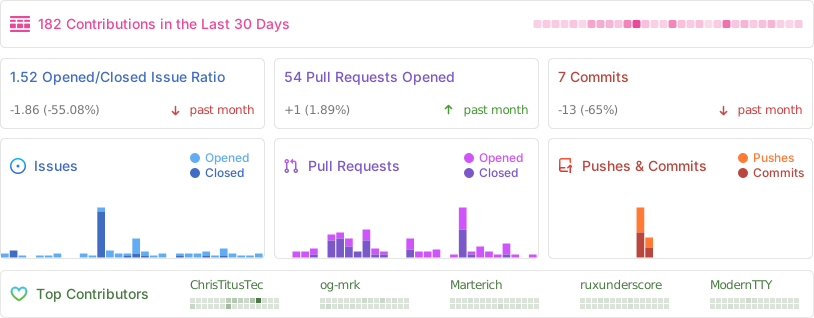
## 📊 Statistiche GitHub
|
||||
|
||||
|
||||
@@ -1,7 +1,5 @@
|
||||
# Security Policy
|
||||
|
||||
If you find a security issue, please post it in the Issues tab. If you think it should be private, you can email me at contact@christitus.com.
|
||||
If you find a security issue please make post it in the issues tab. If you think it should be private you can email me at contact@christitus.com.
|
||||
|
||||
For immediate response check out our Discord server:
|
||||
|
||||
[](https://discord.gg/RUbZUZyByQ)
|
||||
For immediate response check out our discord server @ [](https://discord.gg/RUbZUZyByQ)
|
||||
|
||||
@@ -1,3 +0,0 @@
|
||||
# Copilot Instructions
|
||||
|
||||
Read `AGENTS.md` in the repository root for operating instructions before doing anything else.
|
||||
@@ -1,18 +1,18 @@
|
||||
tag-prefix: ''
|
||||
categories:
|
||||
- title: 'Features'
|
||||
- title: '🚀 Features'
|
||||
labels:
|
||||
- 'feature'
|
||||
- 'enhancement'
|
||||
- 'new feature'
|
||||
- title: 'Bug Fixes'
|
||||
- title: '🐛 Bug Fixes'
|
||||
labels:
|
||||
- 'hotfix'
|
||||
- 'bugfix'
|
||||
- 'bug'
|
||||
- title: 'Documentation'
|
||||
- title: '📚 Documentation'
|
||||
label: 'documentation'
|
||||
- title: 'UI/UX Improvements'
|
||||
- title: '🎨 UI/UX Improvements'
|
||||
label: 'ui update'
|
||||
change-template: '- $TITLE @$AUTHOR (#$NUMBER)'
|
||||
template: |
|
||||
|
||||
@@ -1,4 +1,4 @@
|
||||
name: Auto-merge Automated Update PRs
|
||||
name: Auto-merge Docs PRs
|
||||
|
||||
on:
|
||||
pull_request:
|
||||
@@ -8,24 +8,23 @@ on:
|
||||
|
||||
jobs:
|
||||
auto-merge:
|
||||
if: (github.event.pull_request.head.ref == 'docs-update' || github.event.pull_request.head.ref == 'sponsors-update') && (github.event.pull_request.user.login == 'ChrisTitusTech' || github.event.pull_request.user.login == 'github-actions[bot]')
|
||||
if: github.event.pull_request.head.ref == 'docs-update' && github.event.pull_request.user.login == 'github-actions[bot]'
|
||||
runs-on: ubuntu-latest
|
||||
permissions:
|
||||
pull-requests: write
|
||||
contents: write
|
||||
steps:
|
||||
- name: Checkout
|
||||
uses: actions/checkout@v7
|
||||
uses: actions/checkout@v6
|
||||
|
||||
- name: Auto-approve PR
|
||||
if: github.event.pull_request.user.login == 'github-actions[bot]'
|
||||
run: gh pr review "$PR_NUMBER" --approve
|
||||
env:
|
||||
PR_NUMBER: ${{ github.event.pull_request.number }}
|
||||
GH_TOKEN: ${{ secrets.AUTO_MERGE }}
|
||||
|
||||
- name: Enable auto-merge
|
||||
run: gh pr merge "$PR_NUMBER" --squash --delete-branch --admin
|
||||
run: gh pr merge "$PR_NUMBER" --squash --auto --delete-branch
|
||||
env:
|
||||
PR_NUMBER: ${{ github.event.pull_request.number }}
|
||||
GH_TOKEN: ${{ secrets.AUTO_MERGE }}
|
||||
GH_TOKEN: ${{ secrets.GITHUB_TOKEN }}
|
||||
|
||||
@@ -9,7 +9,7 @@ jobs:
|
||||
runs-on: ubuntu-latest
|
||||
steps:
|
||||
- name: Checkout repository
|
||||
uses: actions/checkout@v7
|
||||
uses: actions/checkout@v6
|
||||
|
||||
- name: Check if PR was merged
|
||||
if: github.event.pull_request.merged == true
|
||||
@@ -18,11 +18,10 @@ jobs:
|
||||
- name: Extract Discussion Number & Close If any Were Found
|
||||
env:
|
||||
GITHUB_TOKEN: ${{ secrets.GITHUB_TOKEN }}
|
||||
PR_BODY: ${{ github.event.pull_request.body }}
|
||||
if: github.event.pull_request.merged == true
|
||||
id: extract-discussion
|
||||
run: |
|
||||
pr_body="$PR_BODY"
|
||||
pr_body="${{ github.event.pull_request.body }}"
|
||||
discussion_ids=$(echo "$pr_body" | grep -oP '(?i)(resolve|fix|close)[s|d]? #\K[0-9]+')
|
||||
|
||||
if [ -z "$discussion_ids" ]; then
|
||||
|
||||
@@ -17,11 +17,11 @@ jobs:
|
||||
uses: actions/stale@v10
|
||||
with:
|
||||
# A list of labels to reference when looking through issues,
|
||||
# and only when one (or even more) of these labels is found.
|
||||
# and only when one (or even more) of these labels are found..
|
||||
# then skip this issue, and never try to stale and/or close it.
|
||||
exempt-issue-labels: "Keep Issue Open"
|
||||
# Split it into two weeks, after one week, the issue will be marked as stale,
|
||||
# after another week have passed without any update, the issue will then be closed.
|
||||
# Split it into two weeks, after one week the issue will be marked as stale,
|
||||
# after another week have pasted without any update.. the issue will then be closed.
|
||||
days-before-issue-stale: 90
|
||||
days-before-issue-close: 365
|
||||
# NEVER mark PRs as Stale or Close + this workflow should never have write permissions on PRs, EVER!
|
||||
|
||||
@@ -13,9 +13,9 @@ jobs:
|
||||
runs-on: windows-latest
|
||||
steps:
|
||||
- name: Checkout Sources
|
||||
uses: actions/checkout@v7
|
||||
uses: actions/checkout@v6
|
||||
|
||||
- name: Compile and Syntax check winutil.ps1
|
||||
- name: Compile and Syntaxcheck winutil.ps1
|
||||
shell: pwsh
|
||||
run: |
|
||||
Set-ExecutionPolicy Bypass -Scope Process -Force; ./Compile.ps1
|
||||
|
||||
@@ -1,4 +1,4 @@
|
||||
name: Deploy Astro site to Pages
|
||||
name: Deploy Hugo site to Pages
|
||||
|
||||
on:
|
||||
push:
|
||||
@@ -6,34 +6,101 @@ on:
|
||||
- main
|
||||
paths:
|
||||
- "docs/**"
|
||||
- "config/tweaks.json"
|
||||
- "config/feature.json"
|
||||
- "functions/**"
|
||||
workflow_dispatch:
|
||||
|
||||
permissions:
|
||||
contents: read
|
||||
contents: write
|
||||
pages: write
|
||||
id-token: write
|
||||
pull-requests: write
|
||||
|
||||
concurrency:
|
||||
group: "pages"
|
||||
cancel-in-progress: false
|
||||
|
||||
defaults:
|
||||
run:
|
||||
shell: bash
|
||||
|
||||
jobs:
|
||||
build:
|
||||
if: github.repository == 'ChrisTitusTech/winutil'
|
||||
runs-on: ubuntu-latest
|
||||
env:
|
||||
HUGO_VERSION: 0.147.7
|
||||
HUGO_ENVIRONMENT: production
|
||||
TZ: America/Chicago
|
||||
steps:
|
||||
- name: Install Hugo CLI
|
||||
run: |
|
||||
wget -O ${{ runner.temp }}/hugo.deb https://github.com/gohugoio/hugo/releases/download/v${HUGO_VERSION}/hugo_extended_${HUGO_VERSION}_linux-amd64.deb \
|
||||
&& sudo dpkg -i ${{ runner.temp }}/hugo.deb
|
||||
- name: Checkout
|
||||
uses: actions/checkout@v7
|
||||
uses: actions/checkout@v6
|
||||
with:
|
||||
submodules: recursive
|
||||
fetch-depth: 0
|
||||
persist-credentials: false
|
||||
- name: Setup Pages
|
||||
id: pages
|
||||
uses: actions/configure-pages@v5
|
||||
- name: Generate Dev Docs from JSON
|
||||
shell: pwsh
|
||||
run: |
|
||||
Set-Location tools
|
||||
./devdocs-generator.ps1
|
||||
|
||||
- name: Install, build, and upload your site
|
||||
uses: withastro/action@v6
|
||||
- name: Create Pull Request 🚀
|
||||
id: cpr
|
||||
uses: peter-evans/create-pull-request@v6
|
||||
with:
|
||||
path: docs
|
||||
token: ${{ secrets.GITHUB_TOKEN }}
|
||||
commit-message: 'Update generated documentation'
|
||||
title: 'chore: Update Generated Dev Docs'
|
||||
body: 'Automated update of generated documentation from JSON sources'
|
||||
branch: docs-update
|
||||
delete-branch: true
|
||||
labels: |
|
||||
automated
|
||||
documentation
|
||||
|
||||
- name: Check outputs
|
||||
run: |
|
||||
echo "Pull Request Number - ${{ steps.cpr.outputs.pull-request-number }}"
|
||||
echo "Pull Request URL - ${{ steps.cpr.outputs.pull-request-url }}"
|
||||
|
||||
- name: Install Node.js dependencies
|
||||
run: "cd docs && [[ -f package-lock.json || -f npm-shrinkwrap.json ]] && npm ci || true"
|
||||
- name: Cache Restore
|
||||
id: cache-restore
|
||||
uses: actions/cache/restore@v5
|
||||
with:
|
||||
path: |
|
||||
${{ runner.temp }}/hugo_cache
|
||||
key: hugo-${{ github.run_id }}
|
||||
restore-keys: hugo-
|
||||
- name: Build with Hugo
|
||||
run: |
|
||||
hugo \
|
||||
--gc \
|
||||
--minify \
|
||||
--cleanDestinationDir \
|
||||
--source docs \
|
||||
--cacheDir "${{ runner.temp }}/hugo_cache"
|
||||
- name: Cache Save
|
||||
id: cache-save
|
||||
uses: actions/cache/save@v5
|
||||
with:
|
||||
path: |
|
||||
${{ runner.temp }}/hugo_cache
|
||||
key: ${{ steps.cache-restore.outputs.cache-primary-key }}
|
||||
- name: Upload artifact
|
||||
uses: actions/upload-pages-artifact@v4
|
||||
with:
|
||||
path: ./docs/public
|
||||
|
||||
deploy:
|
||||
if: github.repository == 'ChrisTitusTech/winutil'
|
||||
@@ -45,4 +112,4 @@ jobs:
|
||||
steps:
|
||||
- name: Deploy to GitHub Pages
|
||||
id: deployment
|
||||
uses: actions/deploy-pages@v5
|
||||
uses: actions/deploy-pages@v4
|
||||
|
||||
@@ -0,0 +1,115 @@
|
||||
name: Issue slash commands
|
||||
|
||||
on:
|
||||
issue_comment:
|
||||
types: [created, edited]
|
||||
|
||||
jobs:
|
||||
issueCommands:
|
||||
# Skip this job if the comment was created/edited on a PR
|
||||
if: ${{ !github.event.issue.pull_request }}
|
||||
runs-on: ubuntu-latest
|
||||
permissions:
|
||||
issues: write
|
||||
pull-requests: none
|
||||
contents: read
|
||||
|
||||
steps:
|
||||
- run: echo "command=false" >> $GITHUB_ENV
|
||||
|
||||
- name: Check for /label command
|
||||
id: check_label_command
|
||||
run: |
|
||||
if [[ "${{ contains(github.event.comment.body, '/label') }}" == "true" ]]; then
|
||||
echo "command=true" >> $GITHUB_ENV
|
||||
LABEL_NAME=$(echo "${{ github.event.comment.body }}" | awk -F"/label" '/\/label/ { match($2, /'\''([^'\'']*)'\''/, arr); if (arr[1] != "") print arr[1] }')
|
||||
echo "label_command=true" >> $GITHUB_ENV
|
||||
echo "label_name=${LABEL_NAME}" >> $GITHUB_ENV
|
||||
else
|
||||
echo "label_command=false" >> $GITHUB_ENV
|
||||
fi
|
||||
|
||||
- name: Check for /unlabel command
|
||||
id: check_unlabel_command
|
||||
run: |
|
||||
if [[ "${{ contains(github.event.comment.body, '/unlabel') }}" == "true" ]]; then
|
||||
echo "command=true" >> $GITHUB_ENV
|
||||
UNLABEL_NAME=$(echo "${{ github.event.comment.body }}" | awk -F"/unlabel" '/\/unlabel/ { match($2, /'\''([^'\'']*)'\''/, arr); if (arr[1] != "") print arr[1] }')
|
||||
echo "unlabel_command=true" >> $GITHUB_ENV
|
||||
echo "unlabel_name=${UNLABEL_NAME}" >> $GITHUB_ENV
|
||||
else
|
||||
echo "unlabel_command=false" >> $GITHUB_ENV
|
||||
fi
|
||||
|
||||
- name: Check for /close command
|
||||
id: check_close_command
|
||||
run: |
|
||||
if [[ "${{ contains(github.event.comment.body, '/close') }}" == "true" ]]; then
|
||||
echo "command=true" >> $GITHUB_ENV
|
||||
echo "close_command=true" >> $GITHUB_ENV
|
||||
echo "reopen_command=false" >> $GITHUB_ENV
|
||||
else
|
||||
echo "close_command=false" >> $GITHUB_ENV
|
||||
fi
|
||||
|
||||
- name: Check for /open or /reopen command
|
||||
id: check_reopen_command
|
||||
run: |
|
||||
if [[ "${{ contains(github.event.comment.body, '/open') }}" == "true" ]] || [[ "${{ contains(github.event.comment.body, '/reopen') }}" == "true" ]]; then
|
||||
echo "command=true" >> $GITHUB_ENV
|
||||
echo "reopen_command=true" >> $GITHUB_ENV
|
||||
echo "close_command=false" >> $GITHUB_ENV
|
||||
else
|
||||
echo "reopen_command=false" >> $GITHUB_ENV
|
||||
fi
|
||||
|
||||
- name: Check if the user is allowed
|
||||
id: check_user
|
||||
if: env.command == 'true'
|
||||
run: |
|
||||
ALLOWED_USERS=("ChrisTitusTech" "og-mrk" "Marterich" "MyDrift-user" "Real-MullaC" "CodingWonders" "GabiNun")
|
||||
if [[ " ${ALLOWED_USERS[@]} " =~ " ${{ github.event.comment.user.login }} " ]]; then
|
||||
echo "user=true" >> $GITHUB_ENV
|
||||
else
|
||||
exit 0
|
||||
fi
|
||||
|
||||
- name: Close issue
|
||||
if: env.close_command == 'true'
|
||||
env:
|
||||
GITHUB_TOKEN: ${{ secrets.GITHUB_TOKEN }}
|
||||
ISSUE_NUMBER: ${{ github.event.issue.number }}
|
||||
run: |
|
||||
echo Closing the issue...
|
||||
if [[ "${{ contains(github.event.comment.body, 'not planned') }}" == "true" ]]; then
|
||||
gh issue close $ISSUE_NUMBER --repo ${{ github.repository }} --reason 'not planned'
|
||||
else
|
||||
gh issue close $ISSUE_NUMBER --repo ${{ github.repository }}
|
||||
fi
|
||||
|
||||
- name: Reopen issue
|
||||
if: env.reopen_command == 'true'
|
||||
env:
|
||||
GITHUB_TOKEN: ${{ secrets.GITHUB_TOKEN }}
|
||||
ISSUE_NUMBER: ${{ github.event.issue.number }}
|
||||
run: |
|
||||
echo Reopening the issue...
|
||||
gh issue reopen $ISSUE_NUMBER --repo ${{ github.repository }}
|
||||
|
||||
- name: Label issue
|
||||
if: env.label_command == 'true'
|
||||
env:
|
||||
GITHUB_TOKEN: ${{ secrets.GITHUB_TOKEN }}
|
||||
ISSUE_NUMBER: ${{ github.event.issue.number }}
|
||||
run: |
|
||||
echo Labeling the issue...
|
||||
gh issue edit $ISSUE_NUMBER --repo ${{ github.repository }} --add-label "${{ env.label_name }}"
|
||||
|
||||
- name: Remove labels
|
||||
if: env.unlabel_command == 'true'
|
||||
env:
|
||||
GITHUB_TOKEN: ${{ secrets.GITHUB_TOKEN }}
|
||||
ISSUE_NUMBER: ${{ github.event.issue.number }}
|
||||
run: |
|
||||
echo Unlabeling the issue...
|
||||
gh issue edit $ISSUE_NUMBER --repo ${{ github.repository }} --remove-label "${{ env.unlabel_name }}"
|
||||
@@ -13,7 +13,7 @@ jobs:
|
||||
contents: read # Often needed for github-script
|
||||
steps:
|
||||
- name: Check PR body for Type of Change
|
||||
uses: actions/github-script@v9
|
||||
uses: actions/github-script@v8
|
||||
with:
|
||||
script: |
|
||||
const prBody = context.payload.pull_request.body || '';
|
||||
|
||||
@@ -3,7 +3,6 @@ name: Pre-Release WinUtil
|
||||
permissions:
|
||||
contents: write
|
||||
actions: read
|
||||
pull-requests: write
|
||||
|
||||
on:
|
||||
workflow_dispatch: # Manual trigger added
|
||||
@@ -11,13 +10,11 @@ on:
|
||||
jobs:
|
||||
build-runspace:
|
||||
runs-on: windows-latest
|
||||
outputs:
|
||||
version: ${{ steps.extract_version.outputs.version }}
|
||||
env:
|
||||
CERTIFICATE_BASE64: ${{ secrets.CERTIFICATE_BASE64 }}
|
||||
steps:
|
||||
- name: Checkout Repository
|
||||
uses: actions/checkout@v7
|
||||
uses: actions/checkout@v6
|
||||
|
||||
- name: Generate Dev Docs and Update JSON Links
|
||||
shell: pwsh
|
||||
@@ -25,43 +22,30 @@ jobs:
|
||||
Set-Location tools
|
||||
./devdocs-generator.ps1
|
||||
|
||||
- name: Commit Updated JSON Links
|
||||
shell: pwsh
|
||||
run: |
|
||||
git config user.name "github-actions[bot]"
|
||||
git config user.email "github-actions[bot]@users.noreply.github.com"
|
||||
git add config/tweaks.json config/feature.json
|
||||
$changes = git diff --cached --quiet; if ($LASTEXITCODE -ne 0) {
|
||||
git commit -m "Update documentation links in JSON configs"
|
||||
git push
|
||||
} else {
|
||||
Write-Host "No JSON link changes to commit"
|
||||
}
|
||||
|
||||
- name: Compile project
|
||||
shell: pwsh
|
||||
run: |
|
||||
Set-ExecutionPolicy Bypass -Scope Process -Force; ./Compile.ps1
|
||||
continue-on-error: false # Directly fail the job on error, removing the need for a separate check
|
||||
|
||||
- name: Create Pull Request for Updated Docs and JSON Links
|
||||
id: cpr
|
||||
uses: peter-evans/create-pull-request@v8
|
||||
with:
|
||||
token: ${{ secrets.AUTO_MERGE }}
|
||||
commit-message: 'chore: Update generated dev docs and JSON links'
|
||||
title: 'chore: Update generated dev docs and JSON links'
|
||||
body: 'Automated update of generated documentation and JSON config links from pre-release build'
|
||||
branch: docs-update
|
||||
delete-branch: true
|
||||
add-paths: |
|
||||
docs/src/content/docs/code-reference/
|
||||
config/tweaks.json
|
||||
config/feature.json
|
||||
labels: |
|
||||
automated
|
||||
documentation
|
||||
skip-changelog
|
||||
|
||||
- name: Check outputs
|
||||
shell: bash
|
||||
run: |
|
||||
echo "Pull Request Number - ${{ steps.cpr.outputs.pull-request-number }}"
|
||||
echo "Pull Request URL - ${{ steps.cpr.outputs.pull-request-url }}"
|
||||
|
||||
- name: Set Version to Todays Date
|
||||
id: extract_version
|
||||
run: |
|
||||
$version = (Get-Date -Format "yy.MM.dd")
|
||||
echo "VERSION=$version" >> $env:GITHUB_ENV
|
||||
echo "version=$version" >> $env:GITHUB_OUTPUT
|
||||
shell: pwsh
|
||||
|
||||
- name: Create Tag
|
||||
@@ -84,56 +68,23 @@ jobs:
|
||||
}
|
||||
shell: pwsh
|
||||
|
||||
- name: Upload compiled script
|
||||
uses: actions/upload-artifact@v7
|
||||
with:
|
||||
name: winutil-ps1
|
||||
path: ./winutil.ps1
|
||||
|
||||
release:
|
||||
needs: build-runspace
|
||||
runs-on: ubuntu-latest
|
||||
steps:
|
||||
- name: Download compiled script
|
||||
uses: actions/download-artifact@v8
|
||||
with:
|
||||
name: winutil-ps1
|
||||
|
||||
- name: Set version from build job
|
||||
run: echo "VERSION=${{ needs.build-runspace.outputs.version }}" >> $GITHUB_ENV
|
||||
|
||||
- name: Generate Release Notes
|
||||
id: generate_notes
|
||||
uses: release-drafter/release-drafter@v7
|
||||
uses: release-drafter/release-drafter@v6
|
||||
env:
|
||||
GITHUB_TOKEN: ${{ secrets.GITHUB_TOKEN }}
|
||||
with:
|
||||
config-name: release-drafter.yml
|
||||
version: ${{ env.VERSION }}
|
||||
|
||||
- name: Remove Automated Updates from Release Notes
|
||||
id: filter_notes
|
||||
shell: pwsh
|
||||
env:
|
||||
RELEASE_NOTES: ${{ steps.generate_notes.outputs.body }}
|
||||
run: |
|
||||
$filteredNotes = ($env:RELEASE_NOTES -split '\r?\n' | Where-Object {
|
||||
$_ -notmatch '(?i)Update (Generated Dev Docs|Sponsors)'
|
||||
}) -join "`n"
|
||||
|
||||
$delimiter = [guid]::NewGuid().ToString()
|
||||
"body<<$delimiter" >> $env:GITHUB_OUTPUT
|
||||
$filteredNotes >> $env:GITHUB_OUTPUT
|
||||
$delimiter >> $env:GITHUB_OUTPUT
|
||||
|
||||
- name: Create and Upload Release
|
||||
id: create_release
|
||||
uses: softprops/action-gh-release@v3
|
||||
uses: softprops/action-gh-release@v2
|
||||
with:
|
||||
tag_name: ${{ env.VERSION }}
|
||||
name: Pre-Release ${{ env.VERSION }}
|
||||
body: |
|
||||
${{ steps.filter_notes.outputs.body }}
|
||||
${{ steps.generate_notes.outputs.body }}
|
||||
|
||||

|
||||
append_body: false
|
||||
|
||||
@@ -11,7 +11,7 @@ jobs:
|
||||
|
||||
steps:
|
||||
- name: Checkout code
|
||||
uses: actions/checkout@v7
|
||||
uses: actions/checkout@v6
|
||||
|
||||
- name: Check if winutil.ps1 exists
|
||||
id: check_existence
|
||||
|
||||
@@ -12,7 +12,7 @@ jobs:
|
||||
if: (github.event_name == 'schedule' && github.repository == 'ChrisTitusTech/winutil') || (github.event_name != 'schedule')
|
||||
steps:
|
||||
- name: Checkout 🛎️
|
||||
uses: actions/checkout@v7
|
||||
uses: actions/checkout@v6
|
||||
with:
|
||||
persist-credentials: false
|
||||
|
||||
@@ -24,17 +24,15 @@ jobs:
|
||||
|
||||
- name: Create Pull Request 🚀
|
||||
id: cpr
|
||||
uses: peter-evans/create-pull-request@v8
|
||||
uses: peter-evans/create-pull-request@v6
|
||||
with:
|
||||
token: ${{ secrets.AUTO_MERGE }}
|
||||
token: ${{ secrets.GITHUB_TOKEN }}
|
||||
commit-message: 'Update sponsors in README'
|
||||
title: 'chore: Update Sponsors README'
|
||||
body: 'Automated update of sponsors section'
|
||||
branch: sponsors-update
|
||||
delete-branch: true
|
||||
labels: |
|
||||
automated
|
||||
skip-changelog
|
||||
labels: automated
|
||||
|
||||
- name: Check outputs
|
||||
run: |
|
||||
|
||||
@@ -8,43 +8,32 @@ jobs:
|
||||
name: PS Script Analyzer
|
||||
runs-on: ubuntu-latest
|
||||
steps:
|
||||
- uses: actions/checkout@v7
|
||||
- name: Install PSScriptAnalyzer
|
||||
run: |
|
||||
Set-PSRepository -Name PSGallery -InstallationPolicy Trusted
|
||||
Install-Module -Name PSScriptAnalyzer -RequiredVersion 1.20.0 -Scope CurrentUser -Force
|
||||
Import-Module PSScriptAnalyzer -RequiredVersion 1.20.0 -Force
|
||||
Get-Module PSScriptAnalyzer | Select-Object Name, Version, Path
|
||||
shell: pwsh
|
||||
- name: Run PSScriptAnalyzer
|
||||
run: |
|
||||
$results = Invoke-ScriptAnalyzer -Path . -Settings ./lint/PSScriptAnalyser.ps1 -Recurse
|
||||
if ($results) {
|
||||
$results | Format-Table -AutoSize | Out-String -Width 4096 | Write-Host
|
||||
} else {
|
||||
Write-Host "PSScriptAnalyzer found no diagnostics."
|
||||
}
|
||||
shell: pwsh
|
||||
- uses: actions/checkout@v6
|
||||
- name: lint
|
||||
uses: devblackops/github-action-psscriptanalyzer@master
|
||||
with:
|
||||
sendComment: false
|
||||
settingsPath: lint/PSScriptAnalyser.ps1
|
||||
failOnErrors: false
|
||||
failOnWarnings: false
|
||||
failOnInfos: false
|
||||
test:
|
||||
runs-on: windows-latest
|
||||
|
||||
steps:
|
||||
- name: Checkout code
|
||||
uses: actions/checkout@v7
|
||||
uses: actions/checkout@v6
|
||||
|
||||
- name: Install Pester
|
||||
run: |
|
||||
Set-ExecutionPolicy -ExecutionPolicy Bypass -Scope Process
|
||||
Install-Module -Name Pester -RequiredVersion 5.8.0 -Force -SkipPublisherCheck -AllowClobber
|
||||
Import-Module Pester -RequiredVersion 5.8.0 -Force
|
||||
Get-Module Pester | Select-Object Name, Version, Path
|
||||
Install-Module -Name Pester -Force -SkipPublisherCheck -AllowClobber
|
||||
shell: pwsh
|
||||
|
||||
- name: Run Pester tests
|
||||
run: |
|
||||
Set-ExecutionPolicy -ExecutionPolicy Bypass -Scope Process
|
||||
Import-Module Pester -RequiredVersion 5.8.0 -Force
|
||||
Invoke-Pester -Path 'pester/*.Tests.ps1' -Output Detailed -CI
|
||||
Invoke-Pester -Path 'pester/*.Tests.ps1' -Output Detailed
|
||||
|
||||
shell: pwsh
|
||||
env:
|
||||
|
||||
@@ -1,15 +1,62 @@
|
||||
# winutil
|
||||
### VSCode ###
|
||||
|
||||
# Configuration folder
|
||||
.vscode/
|
||||
.idea/
|
||||
|
||||
### Visual Studio ###
|
||||
|
||||
# Visual Studio user-specific files
|
||||
.vs/
|
||||
|
||||
winutil.pdb
|
||||
|
||||
### Preprocessor Hashes ###
|
||||
.preprocessor_hashes.json
|
||||
|
||||
### Windows ###
|
||||
|
||||
# Folder config file
|
||||
[Dd]esktop.ini
|
||||
|
||||
# Ignore Generated XAML Files
|
||||
xaml/inputApp.xaml
|
||||
xaml/inputFeatures.xaml
|
||||
xaml/inputTweaks.xaml
|
||||
|
||||
# Executables and Configs
|
||||
winget.msixbundle
|
||||
pester.ps1
|
||||
*.psd*
|
||||
ooshutup10.cfg
|
||||
winutil.exe.config
|
||||
Microsoft.UI.Xaml*
|
||||
license1.xml
|
||||
winutil.ps1
|
||||
|
||||
# Libraries
|
||||
System.Management.Automation.dll
|
||||
Microsoft.PowerShell.ConsoleHost.dll
|
||||
|
||||
winutil.exe.config
|
||||
winutil.ps1
|
||||
binary/
|
||||
testResults.xml
|
||||
# Compressed files
|
||||
*.zip
|
||||
|
||||
# general software/os specific
|
||||
desktop.ini
|
||||
### MacOS ###
|
||||
|
||||
# General
|
||||
.DS_Store
|
||||
True
|
||||
test.ps1
|
||||
winutil.ps1
|
||||
|
||||
.vscode/
|
||||
.idea/
|
||||
# temporary excludes for docs
|
||||
.github/site/
|
||||
|
||||
binary/
|
||||
|
||||
.preprocessor_hashes.json
|
||||
|
||||
# Hugo Files
|
||||
docs/public/
|
||||
docs/.hugo_build.lock
|
||||
docs/resources/
|
||||
|
||||
@@ -1,182 +0,0 @@
|
||||
# AGENTS.md
|
||||
|
||||
Drop-in operating instructions for coding agents. Read this file before every task.
|
||||
|
||||
**Working code only. Finish the job. Plausibility is not correctness.**
|
||||
|
||||
`SPEC.md` in the repository root is the project contract — read it for what WinUtil is and how it's architected. This file covers how to work on it.
|
||||
|
||||
## 0. Non-Negotiables
|
||||
|
||||
These rules override everything else in this file when in conflict:
|
||||
|
||||
1. **Do not edit `winutil.ps1` directly.** It is generated build output (see SPEC.md's Build Model). Change source files and compile.
|
||||
2. **Do not commit `winutil.ps1`.** It is ignored locally and generated by GitHub Actions for releases.
|
||||
3. **Never touch `docs/src/content/docs/code-reference/tweaks/` or `docs/src/content/docs/code-reference/features/`.** Both are auto-generated (see SPEC.md's Docs Site). Edit the source JSON (`config/tweaks.json`, `config/feature.json`) or the relevant PowerShell function file instead. Other hand-written pages under `code-reference/` (e.g. `architecture.mdx`) are not touched by the generator and may be edited directly.
|
||||
4. **Never fabricate.** Do not invent file paths, function names, command output, test results, commit hashes, or API behavior. Read the file or run the command.
|
||||
5. **Disagree when the premise is wrong.** Say what is wrong before acting on it.
|
||||
6. **Stop when genuinely ambiguous.** If two interpretations would produce materially different diffs, ask before editing.
|
||||
7. **Touch only what the task requires.** No drive-by refactors, formatting sweeps, or unrelated cleanup.
|
||||
8. **Verify before saying done.** A plausible-looking diff is not proof.
|
||||
|
||||
## 1. Key Commands
|
||||
|
||||
- Compile:
|
||||
```powershell
|
||||
.\Compile.ps1
|
||||
```
|
||||
- Compile and run GUI:
|
||||
```powershell
|
||||
.\Compile.ps1 -Run
|
||||
```
|
||||
- Install the supported Pester version (one-time). `-SkipPublisherCheck` is required because Windows ships an inbox Pester 3.4.0 that is catalog-signed, and PowerShell Gallery's Pester 5.8.0 is Authenticode-signed — `Install-Module` refuses the upgrade without it. This does not skip download integrity (still HTTPS + NuGet package hash verification); `-Repository PSGallery` pins the trusted source explicitly rather than relying on whatever repositories happen to be registered:
|
||||
```powershell
|
||||
Install-Module -Name Pester -RequiredVersion 5.8.0 -Repository PSGallery -Scope CurrentUser -Force -SkipPublisherCheck
|
||||
```
|
||||
- Run tests:
|
||||
```powershell
|
||||
Import-Module Pester -RequiredVersion 5.8.0 -Force
|
||||
Invoke-Pester -Path 'pester/*.Tests.ps1' -Output Detailed -CI
|
||||
```
|
||||
- Run Script Analyzer with project settings when available. If a locally compiled `winutil.ps1` exists, delete it first — `lint/PSScriptAnalyser.ps1` only excludes rules, not files, so `-Recurse` would also lint the generated script and produce noise against line numbers that don't map to any source file:
|
||||
```powershell
|
||||
Invoke-ScriptAnalyzer -Path . -Settings .\lint\PSScriptAnalyser.ps1 -Recurse
|
||||
```
|
||||
- Docs site dev server (run from `docs/`; see Section 2 for why this goes through Docker):
|
||||
```powershell
|
||||
docker compose up winutil-astro
|
||||
```
|
||||
- Docs site production build (run from `docs/`):
|
||||
```powershell
|
||||
docker compose run --rm winutil-astro npm run build
|
||||
```
|
||||
|
||||
Prefer the narrowest useful verification while iterating. Use the full relevant check before finishing.
|
||||
|
||||
## 2. Dependency Installs, Builds, And Dev Servers
|
||||
|
||||
Given the current wave of npm/pnpm/yarn supply-chain worms (malicious postinstall/preinstall scripts, credential-stealing packages): **never run npm/pnpm/yarn/npx directly on the host, full stop.** The docs site (`docs/`) is the only npm-based project in this repo; always run its tooling inside Docker via `docs/Dockerfile` and `docs/docker-compose.yml` (service `winutil-astro`).
|
||||
|
||||
- Never run `npm install`, `npm run <script>`, `npx <pkg>`, `pnpm`, or `yarn` directly on the host shell in `docs/`. Use `docker compose run --rm winutil-astro <command>` / `docker compose up winutil-astro` instead (see Section 1 for the exact commands).
|
||||
- If a task needs a new docs dependency, add it to `docs/package.json` yourself, then rebuild the image and drop the `node_modules` volume so it repopulates from the new image (run from `docs/`): `docker compose build winutil-astro`, then `docker compose down -v`. Docker only seeds a named volume from the image the first time it's created, so a plain rebuild silently leaves the old `node_modules` in place. Don't install packages on the host, even temporarily, "just to check something."
|
||||
- If Docker isn't available on the host, propose the install command for the current OS and wait for confirmation before running it — don't fall back to running npm on the host instead. If the daemon just isn't running (Docker is installed but not started), tell the user rather than trying to start it yourself.
|
||||
- Treat any `postinstall`/`preinstall` lifecycle script in a new dependency as worth flagging to the user before installing — summarize what it does.
|
||||
- Don't put real secrets anywhere under `docs/`. `docs/.dockerignore` only trims what `docker build` copies into the image — it does not affect the `docker compose` bind mount, which exposes the entire `docs/` directory (including any `.env` file) inside the container for every dev/build/preview command (see the next bullet). There is no "keep it out unless mounted" middle ground here.
|
||||
- The container mounts `docs/` as a volume, so file edits on the host are reflected inside the container immediately — no rebuild needed for normal code changes, only when `docs/package.json`/`docs/package-lock.json` change (see the rebuild-and-drop-volume steps above).
|
||||
- This Docker requirement is specific to `docs/`. The rest of the repo is PowerShell (`Compile.ps1`, Pester, Script Analyzer) and runs directly on the host per Section 1.
|
||||
|
||||
## 3. Source Of Truth
|
||||
|
||||
For changes that affect the compiled WinUtil script, make them only in the source files described in SPEC.md's Repository Layout — never in `winutil.ps1` itself. If behavior changes require the compiled script to change, update the source files and run `.\Compile.ps1` only to verify generation.
|
||||
|
||||
This scoping applies to compiled-script behavior only. Repository metadata — `AGENTS.md`, `SPEC.md`, `CLAUDE.md`/`GEMINI.md`/`.github/copilot-instructions.md`, `.github/workflows/`, and the root `.gitignore` — is edited directly when a task requires it, per the other sections of this file.
|
||||
|
||||
## 4. Before Editing
|
||||
|
||||
- State the plan in one or two sentences before editing. For non-trivial work, include the verification you intend to run.
|
||||
- Read the files you will touch and the files that call them.
|
||||
- Match existing patterns even when a different greenfield design would be cleaner.
|
||||
- Surface assumptions when they affect behavior, compatibility, or user data.
|
||||
- If two approaches have meaningful tradeoffs, name them before choosing. Trivial tasks can proceed directly.
|
||||
|
||||
## 5. Coding Guidelines
|
||||
|
||||
- Prefer the minimum code that solves the stated problem.
|
||||
- Keep PowerShell functions in one function file when practical, with the file name matching the primary function name.
|
||||
- Use approved PowerShell verb-noun names and follow the existing `WPF` / `WinUtil` naming conventions; keep UI event handler names aligned with XAML element names per SPEC.md's UI And Event Contract.
|
||||
- Use `$sync` for shared state and UI references, consistent with SPEC.md's Runtime Model.
|
||||
- Update WPF controls through the UI dispatcher when running work in a background runspace.
|
||||
- Keep config-driven features in JSON when they fit the existing schema instead of hard-coding lists in PowerShell; follow SPEC.md's Configuration Contract for required fields and key-renaming rules.
|
||||
- Preserve undo/original-state data for tweaks so users can reverse changes.
|
||||
- Do not add abstractions, configurability, hooks, or "future extensibility" unless the task needs them now.
|
||||
- Clean up orphans created by your own changes, such as unused variables or functions made obsolete by the edit.
|
||||
- Avoid broad formatting-only edits, especially in JSON config files, XAML, docs, and generated output.
|
||||
|
||||
## 6. Runtime And Safety Rules
|
||||
|
||||
- WinUtil performs system-level Windows changes; treat registry, services, AppX removal, package manager, Windows Update, ISO, and unattended setup changes as high-risk (see SPEC.md's Safety Requirements).
|
||||
- Prefer existing helper functions for WinGet, Chocolatey, registry, services, progress, and UI updates.
|
||||
- Keep tweaks reversible where the schema supports it by including original values or original states.
|
||||
- Never modify a user's original ISO in-place; follow existing copy/mount/export patterns.
|
||||
- Avoid storing credentials, secrets, or machine-specific paths in repo files.
|
||||
- Preserve logging and user feedback patterns for long-running or destructive operations.
|
||||
|
||||
## 7. Surgical Changes
|
||||
|
||||
- Do not improve adjacent code, comments, formatting, imports, or docs unless required.
|
||||
- Do not refactor working code because you are already in the file.
|
||||
- Do not delete pre-existing dead code unless asked; mention it in the summary if relevant.
|
||||
- Keep diffs reviewable. Every changed line should trace to the user's request.
|
||||
- If a change starts spreading across unrelated areas, pause and reassess the plan.
|
||||
|
||||
## 8. Verification
|
||||
|
||||
Define success in terms that can be checked, then check it.
|
||||
|
||||
- For compile/build changes, run `.\Compile.ps1`.
|
||||
- For GUI behavior changes, run `.\Compile.ps1 -Run` when practical and verify the affected path manually.
|
||||
- For config changes, run the compile check and relevant Pester tests.
|
||||
- For function changes, run the relevant Pester tests or add/update focused tests when practical.
|
||||
- For docs-only changes, proofread the changed files and skip runtime tests unless docs generation is affected.
|
||||
- Read command output. Do not report tests as passing unless they actually passed.
|
||||
- If verification fails, fix the cause rather than weakening the test.
|
||||
|
||||
If a check cannot be run, say exactly why and what residual risk remains. See SPEC.md's Testing And CI for what GitHub Actions runs on every push.
|
||||
|
||||
## 9. Generated Files And Git Hygiene
|
||||
|
||||
- Treat local `winutil.ps1` changes as disposable compile output.
|
||||
- Never stage or commit `winutil.ps1`, `binary/`, or anything else ignored by the root `.gitignore` or `docs/.gitignore` — read those files rather than assuming. `docs/public/` is tracked source for static assets, not generated output.
|
||||
- Do not remove `.gitignore` rules that keep generated artifacts out of Git.
|
||||
- Before finishing, check `git status --short` and separate your changes from pre-existing user changes.
|
||||
- Do not revert user changes unless explicitly asked.
|
||||
- Commit messages, when requested, should be descriptive: short subject under 72 characters, body explaining why when needed.
|
||||
- When committing, split changes into small, logical commits rather than one large commit, so each commit's diff is reviewable as a single group of related changes.
|
||||
|
||||
## 10. Documentation Expectations
|
||||
|
||||
- Update `docs/src/content/docs/guides/` when user-facing behavior changes.
|
||||
- Update `docs/src/content/docs/code-reference/architecture.mdx` and other hand-written developer docs when architecture, build flow, config schema, or contribution workflow changes — but never hand-edit the auto-generated `code-reference/tweaks/` or `code-reference/features/` subfolders (see Non-Negotiables).
|
||||
- Keep sidebar entries in `docs/astro.config.mjs` in sync with page slugs (see SPEC.md's Docs Site).
|
||||
- Keep README changes brief and high-level.
|
||||
- Put detailed user and developer documentation under `docs/`.
|
||||
- Keep SPEC.md aligned with project/architecture changes, and this file aligned with process changes.
|
||||
|
||||
## 11. Communication Style
|
||||
|
||||
- Be direct and concise. Start with the answer or action.
|
||||
- No flattery, filler, ceremonial closings, or fake certainty.
|
||||
- Use bullets only when they improve scanning.
|
||||
- Report what changed, how it was verified, and anything not done.
|
||||
- If the user asks for a review, lead with findings and file/line references.
|
||||
|
||||
## 12. When To Ask
|
||||
|
||||
Ask before proceeding when:
|
||||
|
||||
- The request has two plausible interpretations and the choice materially changes behavior or files touched.
|
||||
- The change affects release generation, generated artifacts, migrations, or high-risk Windows behavior in a way the user did not specify.
|
||||
- You need credentials, secrets, production resources, or access you do not have.
|
||||
- The user's stated goal conflicts with the literal request.
|
||||
|
||||
Proceed without asking when:
|
||||
|
||||
- The task is trivial and reversible.
|
||||
- Ambiguity can be resolved by reading the code or running a local command.
|
||||
- The user already answered the question in this session.
|
||||
|
||||
## 13. Project Learnings
|
||||
|
||||
When the user corrects an agent approach, add or tighten one concrete rule here before ending the session. Keep this section short and prune rules that no longer matter.
|
||||
|
||||
- Keep `winutil.ps1` generated-only: change source files, compile to verify, and never stage the generated script.
|
||||
- Keep WinUtil runtime logging in the existing timestamped `%LocalAppData%\winutil\logs\winutil_*.log` session file; do not create a separate root `winutil.log`.
|
||||
- Import Pester 5.8.0 before running tests so `Invoke-Pester -Output Detailed -CI` does not resolve to Windows' inbox Pester 3.4.0.
|
||||
- Keep package install/uninstall process launches simple unless explicitly requested; do not add a separate stdout/stderr process logging helper for winget or Chocolatey.
|
||||
- When the active log file is owned by `Start-Transcript`, do not call `Add-Content` against that file; write to host output so the transcript captures the line in the same log file without recording a terminating-error diagnostic.
|
||||
- Keep UI helpers such as `Invoke-WPFUIThread` and `Set-WinUtilTweaksProgressIndicator` safe to call without a window; the `-Preset` and `-Config` paths run the workflows before the form is created and before PresentationCore is loaded.
|
||||
- Log install/uninstall package names and package-manager IDs before queuing background runspace work; do not rely on runspace host output for the package identity.
|
||||
- For Win11 Creator, start each new ISO modification in a fresh `WinUtil_Win11ISO_*` temp directory; existing-work detection is only for resuming/exporting already modified media.
|
||||
- For Win11 Creator driver injection, keep offline WIM servicing to one mount, one `/Add-Driver`, and one commit; do not export editions or run unrelated WIM cleanup, and reject damaged metadata before ISO export.
|
||||
- For Script Analyzer cleanup, fix actionable source warnings first and do not globally suppress accepted convention warnings such as plural names, `ShouldProcess` on UI helpers, `$global:sync`, or compile-time cross-file false positives.
|
||||
- For DNS DHCP reset, keep the cmdlet reset and explicitly set IPv4 and IPv6 DNS source to DHCP.
|
||||
@@ -1,46 +1,144 @@
|
||||
param (
|
||||
[switch]$Run
|
||||
[switch]$Run,
|
||||
[string]$Arguments
|
||||
)
|
||||
|
||||
if ((Get-Item ".\winutil.ps1" -ErrorAction SilentlyContinue).IsReadOnly) {
|
||||
Remove-Item ".\winutil.ps1" -Force
|
||||
}
|
||||
|
||||
$OFS = "`r`n"
|
||||
$scriptname = "winutil.ps1"
|
||||
$workingdir = $PSScriptRoot
|
||||
|
||||
# Variable to sync between runspaces
|
||||
$sync = [Hashtable]::Synchronized(@{})
|
||||
$sync.configs = @{}
|
||||
|
||||
$script = (Get-Content -Path scripts\start.ps1) -replace '#{replaceme}', (Get-Date -Format 'yy.MM.dd')
|
||||
function Update-Progress {
|
||||
param (
|
||||
[Parameter(Mandatory, position=0)]
|
||||
[string]$StatusMessage,
|
||||
|
||||
$script += Get-ChildItem -Path functions -Recurse -File | ForEach-Object {
|
||||
Get-Content -Path $_.FullName -Raw
|
||||
[Parameter(Mandatory, position=1)]
|
||||
[ValidateRange(0,100)]
|
||||
[int]$Percent,
|
||||
|
||||
[Parameter(position=2)]
|
||||
[string]$Activity = "Compiling"
|
||||
)
|
||||
|
||||
Write-Progress -Activity $Activity -Status $StatusMessage -PercentComplete $Percent
|
||||
}
|
||||
|
||||
Get-ChildItem config | ForEach-Object {
|
||||
$obj = Get-Content -Path $_.FullName -Raw | ConvertFrom-Json
|
||||
Update-Progress "Pre-req: Running Preprocessor..." 0
|
||||
|
||||
if ($_.Name -eq "applications.json") {
|
||||
$fixed = [ordered]@{}
|
||||
foreach ($p in $obj.PSObject.Properties) {
|
||||
$fixed["WPFInstall$($p.Name)"] = $p.Value
|
||||
# Dot source the 'Invoke-Preprocessing' Function from 'tools/Invoke-Preprocessing.ps1' Script
|
||||
$preprocessingFilePath = ".\tools\Invoke-Preprocessing.ps1"
|
||||
. $preprocessingFilePath
|
||||
|
||||
$excludedFiles = @()
|
||||
|
||||
# Add directories only if they exist
|
||||
if (Test-Path '.\.git\') { $excludedFiles += '.\.git\' }
|
||||
if (Test-Path '.\binary\') { $excludedFiles += '.\binary\' }
|
||||
|
||||
# Add files that should always be excluded
|
||||
$excludedFiles += @(
|
||||
'.\.gitignore',
|
||||
'.\.gitattributes',
|
||||
'.\.github\CODEOWNERS',
|
||||
'.\LICENSE',
|
||||
"$preprocessingFilePath",
|
||||
'*.png',
|
||||
'.\.preprocessor_hashes.json'
|
||||
)
|
||||
|
||||
$msg = "Pre-req: Code Formatting"
|
||||
Invoke-Preprocessing -WorkingDir "$workingdir" -ExcludedFiles $excludedFiles -ProgressStatusMessage $msg
|
||||
|
||||
# Create the script in memory.
|
||||
Update-Progress "Pre-req: Allocating Memory" 0
|
||||
$script_content = [System.Collections.Generic.List[string]]::new()
|
||||
|
||||
Update-Progress "Adding: Version" 10
|
||||
$script_content.Add($(Get-Content "scripts\start.ps1").replace('#{replaceme}',"$(Get-Date -Format yy.MM.dd)"))
|
||||
|
||||
Update-Progress "Adding: Functions" 20
|
||||
Get-ChildItem "functions" -Recurse -File | ForEach-Object {
|
||||
$script_content.Add($(Get-Content $psitem.FullName))
|
||||
}
|
||||
Update-Progress "Adding: Config *.json" 40
|
||||
Get-ChildItem "config" | Where-Object {$psitem.extension -eq ".json"} | ForEach-Object {
|
||||
$json = (Get-Content $psitem.FullName -Raw)
|
||||
$jsonAsObject = $json | ConvertFrom-Json
|
||||
|
||||
# Add 'WPFInstall' as a prefix to every entry-name in 'applications.json' file
|
||||
if ($psitem.Name -eq "applications.json") {
|
||||
foreach ($appEntryName in $jsonAsObject.PSObject.Properties.Name) {
|
||||
$appEntryContent = $jsonAsObject.$appEntryName
|
||||
$jsonAsObject.PSObject.Properties.Remove($appEntryName)
|
||||
$jsonAsObject | Add-Member -MemberType NoteProperty -Name "WPFInstall$appEntryName" -Value $appEntryContent
|
||||
}
|
||||
$obj = [pscustomobject]$fixed
|
||||
}
|
||||
|
||||
$json = $obj | ConvertTo-Json -Depth 10
|
||||
# Line 90 requires no whitespace inside the here-strings, to keep formatting of the JSON in the final script.
|
||||
$json = @"
|
||||
$($jsonAsObject | ConvertTo-Json -Depth 3)
|
||||
"@
|
||||
|
||||
$sync.configs[$_.BaseName] = $obj
|
||||
$script += "`$sync.configs.$($_.BaseName) = @'`r`n$json`r`n'@ | ConvertFrom-Json"
|
||||
$sync.configs.$($psitem.BaseName) = $json | ConvertFrom-Json
|
||||
$script_content.Add($(Write-Output "`$sync.configs.$($psitem.BaseName) = @'`r`n$json`r`n'@ `| ConvertFrom-Json" ))
|
||||
}
|
||||
|
||||
$xaml = Get-Content -Path xaml\inputXML.xaml -Raw
|
||||
$script += "`$inputXML = @'`r`n$xaml`r`n'@"
|
||||
# Read the entire XAML file as a single string, preserving line breaks
|
||||
$xaml = Get-Content "$workingdir\xaml\inputXML.xaml" -Raw
|
||||
|
||||
$autounattendXml = Get-Content -Path tools\autounattend.xml -Raw
|
||||
$script += "`$WinUtilAutounattendXml = @'`r`n$autounattendXml`r`n'@"
|
||||
Update-Progress "Adding: Xaml " 90
|
||||
|
||||
$script += Get-Content -Path scripts\main.ps1 -Raw
|
||||
# Add the XAML content to $script_content using a here-string
|
||||
$script_content.Add(@"
|
||||
`$inputXML = @'
|
||||
$xaml
|
||||
'@
|
||||
"@)
|
||||
|
||||
Set-Content -Path winutil.ps1 -Value $script
|
||||
Update-Progress "Adding: autounattend.xml" 95
|
||||
$autounattendRaw = Get-Content "$workingdir\tools\autounattend.xml" -Raw
|
||||
# Strip XML comments (<!-- ... -->, including multi-line)
|
||||
$autounattendRaw = [regex]::Replace($autounattendRaw, '<!--.*?-->', '', [System.Text.RegularExpressions.RegexOptions]::Singleline)
|
||||
# Drop blank lines and trim trailing whitespace per line
|
||||
$autounattendXml = ($autounattendRaw -split "`r?`n" |
|
||||
Where-Object { $_.Trim() -ne '' } |
|
||||
ForEach-Object { $_.TrimEnd() }) -join "`r`n"
|
||||
$script_content.Add(@"
|
||||
`$WinUtilAutounattendXml = @'
|
||||
$autounattendXml
|
||||
'@
|
||||
"@)
|
||||
|
||||
if ($Run) {
|
||||
.\Winutil.ps1
|
||||
$script_content.Add($(Get-Content "scripts\main.ps1"))
|
||||
|
||||
Update-Progress "Removing temporary files" 99
|
||||
Remove-Item "xaml\inputApp.xaml" -ErrorAction SilentlyContinue
|
||||
Remove-Item "xaml\inputTweaks.xaml" -ErrorAction SilentlyContinue
|
||||
Remove-Item "xaml\inputFeatures.xaml" -ErrorAction SilentlyContinue
|
||||
|
||||
Set-Content -Path "$scriptname" -Value ($script_content -join "`r`n") -Encoding ascii
|
||||
Write-Progress -Activity "Compiling" -Completed
|
||||
|
||||
Update-Progress -Activity "Validating" -StatusMessage "Checking winutil.ps1 Syntax" -Percent 0
|
||||
try {
|
||||
Get-Command -Syntax .\winutil.ps1 | Out-Null
|
||||
} catch {
|
||||
Write-Warning "Syntax Validation for 'winutil.ps1' has failed"
|
||||
Write-Host "$($Error[0])" -ForegroundColor Red
|
||||
exit 1
|
||||
}
|
||||
Write-Progress -Activity "Validating" -Completed
|
||||
|
||||
if ($run) {
|
||||
Set-ExecutionPolicy -Scope Process -ExecutionPolicy Bypass
|
||||
.\Winutil.ps1 $Arguments
|
||||
break
|
||||
}
|
||||
|
||||
@@ -1,3 +0,0 @@
|
||||
# GEMINI.md
|
||||
|
||||
Read `AGENTS.md` in the repository root for operating instructions before doing anything else.
|
||||
@@ -1,89 +1,88 @@
|
||||
# Chris Titus Tech's Windows Utility
|
||||
|
||||
[](https://github.com/ChrisTitusTech/winutil/releases/latest)
|
||||

|
||||
[](https://discord.gg/RUbZUZyByQ)
|
||||

|
||||
[](https://discord.gg/RUbZUZyByQ)
|
||||
[](https://winutil.christitus.com/)
|
||||
|
||||
A curated compilation of Windows system tasks streamline **installs**, debloat with **tweaks**, troubleshoot with **config**, and configure **Windows updates**. Run it fresh on every new Windows install.
|
||||
This utility is a compilation of Windows tasks I perform on each Windows system I use. It is meant to streamline *installs*, debloat with *tweaks*, troubleshoot with *config*, and fix Windows *updates*. I am extremely picky about any contributions to keep this project clean and efficient.
|
||||
|
||||

|
||||

|
||||
|
||||
## 💡 Usage
|
||||
|
||||
---
|
||||
Winutil must be run in Admin mode because it performs system-wide tweaks. To achieve this, run PowerShell as an administrator. Here are a few ways to do it:
|
||||
|
||||
## Quick Start
|
||||
1. **Start menu Method:**
|
||||
- Right-click on the start menu.
|
||||
- Choose "Windows PowerShell (Admin)" (for Windows 10) or "Terminal (Admin)" (for Windows 11).
|
||||
|
||||
> **WinUtil must be run as Administrator** Because it performs system-wide changes.
|
||||
2. **Search and Launch Method:**
|
||||
- Press the Windows key.
|
||||
- Type "PowerShell" or "Terminal" (for Windows 11).
|
||||
- Press `Ctrl + Shift + Enter` or Right-click and choose "Run as administrator" to launch it with administrator privileges.
|
||||
|
||||
Open PowerShell or Terminal as admin, then run:
|
||||
### Launch Command
|
||||
|
||||
#### Stable Branch (Recommended)
|
||||
|
||||
**Stable Branch (recommended)**
|
||||
```ps1
|
||||
irm https://christitus.com/win | iex
|
||||
irm "https://christitus.com/win" | iex
|
||||
```
|
||||
#### Dev Branch
|
||||
|
||||
**Development Branch**
|
||||
```ps1
|
||||
irm https://christitus.com/windev | iex
|
||||
irm "https://christitus.com/windev" | iex
|
||||
```
|
||||
|
||||
### How to open an admin terminal
|
||||
If you have Issues, refer to [Known Issues](https://winutil.christitus.com/knownissues/) or [Create Issue](https://github.com/ChrisTitusTech/winutil/issues)
|
||||
|
||||
- **Start menu:** Right-click Start → *Windows PowerShell (Admin)* or *Terminal (Admin)*
|
||||
- **Search:** Press the `Windows key`, and type `PowerShell` or `Terminal`, then `Ctrl + Shift + Enter`
|
||||
## 🎓 Documentation
|
||||
|
||||
---
|
||||
### [WinUtil Official Documentation](https://winutil.christitus.com/)
|
||||
|
||||
## Automation / Presets
|
||||
### [YouTube Tutorial](https://www.youtube.com/watch?v=6UQZ5oQg8XA)
|
||||
|
||||
Apply a predefined configuration without manual selection:
|
||||
### [ChrisTitus.com Article](https://christitus.com/windows-tool/)
|
||||
|
||||
```powershell
|
||||
& ([ScriptBlock]::Create((irm https://christitus.com/win))) -Preset Standard
|
||||
## 🛠️ Build & Develop
|
||||
|
||||
> [!NOTE]
|
||||
> Winutil is a relatively large script, so it's split into multiple files which're combined into a single `.ps1` file using a custom compiler. This makes maintaining the project a lot easier.
|
||||
|
||||
Get a copy of the source code, this can be done using GitHub UI (`Code -> Download ZIP`), or by cloning (downloading) the repo using git.
|
||||
|
||||
If git is installed, run the following commands under a PowerShell window to clone and move into project's directory:
|
||||
```ps1
|
||||
git clone --depth 1 "https://github.com/ChrisTitusTech/winutil.git"
|
||||
cd winutil
|
||||
```
|
||||
|
||||
| Preset | Description |
|
||||
|--------|-------------|
|
||||
| `Standard` | Balanced defaults for most users |
|
||||
| `Minimal` | Minimal changes to suit every user |
|
||||
| `Advanced` | Deep tweaks for power users |
|
||||
To build the project, run the Compile Script under a PowerShell window (admin permissions IS NOT required):
|
||||
```ps1
|
||||
.\Compile.ps1
|
||||
```
|
||||
|
||||
To view exactly what each preset does, see:
|
||||
https://github.com/ChrisTitusTech/winutil/blob/main/config/preset.json
|
||||
You'll see a new file named `winutil.ps1`, which's created by `Compile.ps1` script, now you can run it as admin and a new window will popup, enjoy your own compiled version of WinUtil :)
|
||||
|
||||
---
|
||||
> [!TIP]
|
||||
> For more info on using WinUtil and how to develop for it, please consider reading [the Contribution Guidelines](https://winutil.christitus.com/contributing/), if you don't know where to start, or have questions, you can ask over on our [Discord Community Server](https://discord.gg/RUbZUZyByQ) and active project members will answer when they can.
|
||||
|
||||
## Build & Develop
|
||||
|
||||
See https://github.com/ChrisTitusTech/winutil/blob/main/.github/CONTRIBUTING.md
|
||||
|
||||
---
|
||||
|
||||
## Resources
|
||||
|
||||
- [Official Documentation](https://winutil.christitus.com/)
|
||||
- [YouTube Tutorial](https://www.youtube.com/watch?v=6UQZ5oQg8XA)
|
||||
- [ChrisTitus.com Article](https://christitus.com/windows-tool/)
|
||||
- [Known Issues](https://winutil.christitus.com/knownissues/)
|
||||
- [Report an Issue](https://github.com/ChrisTitusTech/winutil/issues)
|
||||
|
||||
---
|
||||
|
||||
## Support
|
||||
|
||||
- Leave a ⭐ to show support!
|
||||
## 💖 Support
|
||||
- To morally and mentally support the project, make sure to leave a ⭐️!
|
||||
- EXE Wrapper for $10 @ https://www.cttstore.com/windows-toolbox
|
||||
|
||||
## Sponsors
|
||||
## 💖 Sponsors
|
||||
|
||||
These are the sponsors that help keep this project alive with monthly contributions.
|
||||
|
||||
<!-- sponsors --><a href="https://github.com/ysaito8015"><img src="https://github.com/ysaito8015.png" width="60px" alt="User avatar: Yusuke Saito" /></a><a href="https://github.com/dwelfusius"><img src="https://github.com/dwelfusius.png" width="60px" alt="User avatar: " /></a><a href="https://github.com/mews-se"><img src="https://github.com/mews-se.png" width="60px" alt="User avatar: Martin" /></a><a href="https://github.com/jdiegmueller"><img src="https://github.com/jdiegmueller.png" width="60px" alt="User avatar: Jason A. Diegmueller" /></a><a href="https://github.com/robertsandrock"><img src="https://github.com/robertsandrock.png" width="60px" alt="User avatar: RMS" /></a><a href="https://github.com/paulsheets"><img src="https://github.com/paulsheets.png" width="60px" alt="User avatar: Paul" /></a><a href="https://github.com/djones369"><img src="https://github.com/djones369.png" width="60px" alt="User avatar: Dave J (WhamGeek)" /></a><a href="https://github.com/anthonymendez"><img src="https://github.com/anthonymendez.png" width="60px" alt="User avatar: Anthony Mendez" /></a><a href="https://github.com/FatBastard0"><img src="https://github.com/FatBastard0.png" width="60px" alt="User avatar: " /></a><a href="https://github.com/DursleyGuy"><img src="https://github.com/DursleyGuy.png" width="60px" alt="User avatar: DursleyGuy" /></a><a href="https://github.com/DwayneTheRockLobster1"><img src="https://github.com/DwayneTheRockLobster1.png" width="60px" alt="User avatar: " /></a><a href="https://github.com/KieraKujisawa"><img src="https://github.com/KieraKujisawa.png" width="60px" alt="User avatar: Kiera Meredith" /></a><a href="https://github.com/andrewpayne68"><img src="https://github.com/andrewpayne68.png" width="60px" alt="User avatar: Andrew P" /></a><a href="https://github.com/seanh1995"><img src="https://github.com/seanh1995.png" width="60px" alt="User avatar: Sean (ANGRYxScotsman)" /></a><a href="https://github.com/Abs313a"><img src="https://github.com/Abs313a.png" width="60px" alt="User avatar: Abs" /></a><!-- sponsors -->
|
||||
<!-- sponsors --><a href="https://github.com/dwelfusius"><img src="https://github.com/dwelfusius.png" width="60px" alt="User avatar: " /></a><a href="https://github.com/mews-se"><img src="https://github.com/mews-se.png" width="60px" alt="User avatar: Martin Stockzell" /></a><a href="https://github.com/jdiegmueller"><img src="https://github.com/jdiegmueller.png" width="60px" alt="User avatar: Jason A. Diegmueller" /></a><a href="https://github.com/robertsandrock"><img src="https://github.com/robertsandrock.png" width="60px" alt="User avatar: RMS" /></a><a href="https://github.com/KenichiQaz"><img src="https://github.com/KenichiQaz.png" width="60px" alt="User avatar: Stefan" /></a><a href="https://github.com/paulsheets"><img src="https://github.com/paulsheets.png" width="60px" alt="User avatar: Paul" /></a><a href="https://github.com/djones369"><img src="https://github.com/djones369.png" width="60px" alt="User avatar: Dave J (WhamGeek)" /></a><a href="https://github.com/anthonymendez"><img src="https://github.com/anthonymendez.png" width="60px" alt="User avatar: Anthony Mendez" /></a><a href="https://github.com/FatBastard0"><img src="https://github.com/FatBastard0.png" width="60px" alt="User avatar: " /></a><a href="https://github.com/DursleyGuy"><img src="https://github.com/DursleyGuy.png" width="60px" alt="User avatar: DursleyGuy" /></a><a href="https://github.com/quaszi"><img src="https://github.com/quaszi.png" width="60px" alt="User avatar: " /></a><a href="https://github.com/DwayneTheRockLobster1"><img src="https://github.com/DwayneTheRockLobster1.png" width="60px" alt="User avatar: " /></a><a href="https://github.com/KieraKujisawa"><img src="https://github.com/KieraKujisawa.png" width="60px" alt="User avatar: Kiera Meredith" /></a><a href="https://github.com/andrewpayne68"><img src="https://github.com/andrewpayne68.png" width="60px" alt="User avatar: Andrew P" /></a><a href="https://github.com/nathanzilgo"><img src="https://github.com/nathanzilgo.png" width="60px" alt="User avatar: Nathan Fernandes Pedroza" /></a><!-- sponsors -->
|
||||
|
||||
---
|
||||
|
||||
## Contributors
|
||||
## 🏅 Thanks to all Contributors
|
||||
Thanks a lot for spending your time helping Winutil grow. Thanks a lot! Keep rocking 🍻.
|
||||
|
||||
[](https://github.com/ChrisTitusTech/winutil/graphs/contributors)
|
||||
|
||||
Thanks to everyone who has contributed time and effort to this project. Keep rocking 🍻
|
||||
## 📊 GitHub Stats
|
||||
|
||||

|
||||
|
||||
@@ -1,112 +0,0 @@
|
||||
# SPEC.md
|
||||
|
||||
Project contract for WinUtil — what the project is, how it's built, and how it runs. Written for anyone, human or AI, who needs to understand the project itself.
|
||||
|
||||
`AGENTS.md` in the repository root points here for these facts, and separately covers how an agent should behave while working in this repo. This file does not change based on who's reading it.
|
||||
|
||||
## Project Context
|
||||
|
||||
WinUtil is a Windows PowerShell utility with a WPF interface. The repository is maintained as modular source, but the distributed artifact is one compiled PowerShell script.
|
||||
|
||||
### Stack
|
||||
|
||||
- Language: Windows PowerShell / PowerShell.
|
||||
- UI: WPF via `xaml/inputXML.xaml`.
|
||||
- Configuration: JSON files under `config/`.
|
||||
- Tests: Pester tests under `pester/`.
|
||||
- Lint: PowerShell Script Analyzer with settings in `lint/PSScriptAnalyser.ps1`.
|
||||
- Docs: Astro + Starlight site under `docs/`, built independently of `Compile.ps1` (its own `package.json`/`node_modules`).
|
||||
- Release artifact: generated root `winutil.ps1`.
|
||||
|
||||
### Repository Layout
|
||||
|
||||
- `Compile.ps1`: build script that creates `winutil.ps1`.
|
||||
- `scripts/start.ps1`: startup/bootstrap segment used at the beginning of the compiled script.
|
||||
- `scripts/main.ps1`: main entrypoint appended at the end of the compiled script.
|
||||
- `functions/public/`: public/UI-facing PowerShell functions.
|
||||
- `functions/private/`: internal helper PowerShell functions.
|
||||
- `config/`: JSON configuration consumed at compile time and embedded into `$sync.configs`.
|
||||
- `xaml/inputXML.xaml`: WPF UI markup embedded into the compiled script.
|
||||
- `tools/autounattend.xml`: unattended setup XML embedded for Windows ISO workflows.
|
||||
- `pester/`: Pester tests for config and function checks.
|
||||
- `lint/PSScriptAnalyser.ps1`: PowerShell Script Analyzer settings.
|
||||
- `docs/`: Astro + Starlight documentation site, with its own `package.json` and build independent of `Compile.ps1`.
|
||||
- `winutil.ps1`: ignored generated build artifact.
|
||||
|
||||
## Goals
|
||||
|
||||
- Provide a single-script Windows utility that can be launched from PowerShell.
|
||||
- Keep development modular enough for contributors to work on functions, config, UI, docs, and tooling independently.
|
||||
- Make install, tweak, feature, repair, update, and ISO workflows discoverable from the WPF UI.
|
||||
- Keep common lists and options declarative in JSON config where possible.
|
||||
- Preserve a repeatable compile process so local builds and GitHub Actions builds produce the distributable script from the same inputs.
|
||||
|
||||
## Non-Goals
|
||||
|
||||
- `winutil.ps1` is not hand-maintained.
|
||||
- The project is not structured as a PowerShell module at runtime.
|
||||
- The GUI is not a separate packaged desktop application in this repository's normal release path.
|
||||
- Generated files should not be reviewed as source changes.
|
||||
|
||||
## Build Model
|
||||
|
||||
`Compile.ps1` combines the repository sources into `winutil.ps1` in this order:
|
||||
|
||||
1. Read `scripts/start.ps1` and replace `#{replaceme}` with the current `yy.MM.dd` build date.
|
||||
2. Append every file under `functions/` recursively.
|
||||
3. Convert each `config/*.json` file into embedded `$sync.configs` objects.
|
||||
4. Special-case `config/applications.json` so keys receive the `WPFInstall` prefix in compiled config.
|
||||
5. Embed `xaml/inputXML.xaml` into `$inputXML`.
|
||||
6. Embed `tools/autounattend.xml` into `$WinUtilAutounattendXml`.
|
||||
7. Append `scripts/main.ps1`.
|
||||
8. Write the result to root `winutil.ps1`.
|
||||
|
||||
Because the final script is concatenated, code cannot rely on runtime module imports or source-relative dot-sourcing unless the compiled script will also contain the required code/data.
|
||||
|
||||
## Runtime Model
|
||||
|
||||
- WinUtil runs in PowerShell on Windows and uses WPF for the UI.
|
||||
- Shared mutable state is stored in `$sync`, including configs, UI element references, runspace state, selections, and progress.
|
||||
- Long-running operations use runspaces or existing async patterns so the UI remains responsive.
|
||||
- UI updates from background work are dispatched back to the WPF UI thread.
|
||||
- Declarative features such as apps, tweaks, presets, DNS providers, and navigation stay in `config/*.json` unless code is required.
|
||||
|
||||
## UI And Event Contract
|
||||
|
||||
- UI layout lives in `xaml/inputXML.xaml`.
|
||||
- Named WPF controls are discovered and stored in `$sync`.
|
||||
- Button/action wiring follows a naming convention: an element named like `WPFThingButton` maps to a function named like `Invoke-WPFThingButton`.
|
||||
|
||||
## Configuration Contract
|
||||
|
||||
- Config files must remain valid JSON and compile cleanly through `ConvertFrom-Json`.
|
||||
- `config/applications.json` defines installable applications; each entry includes the fields expected by tests and UI code, such as package manager IDs, category, display content, description, and link.
|
||||
- `config/tweaks.json` defines Windows tweaks; registry and service changes include original values or original states when applicable so undo workflows can restore user systems.
|
||||
- Preset and navigation files reference valid config keys. Renaming a config key requires updating all presets, UI references, docs, and code paths together.
|
||||
|
||||
## Safety Requirements
|
||||
|
||||
- Registry, service, package manager, Windows Update, AppX removal, and ISO operations affect the host system and are treated as high-risk.
|
||||
- Tweak changes include undo metadata when the schema supports it, so changes stay reversible.
|
||||
- ISO workflows never modify the user's original ISO file; they work on copied/mounted content.
|
||||
|
||||
## Docs Site (Astro)
|
||||
|
||||
- `docs/` is an Astro + Starlight site, independent of `Compile.ps1`'s build (its own `package.json`/`node_modules`, deployed via the `docs.yaml` GitHub Actions workflow to GitHub Pages).
|
||||
- Pages live under `docs/src/content/docs/` (`.mdx`), organized into `guides/`, `code-reference/`, plus top-level pages like `faq.mdx`, `knownissues.mdx`, `contributing.mdx`, `index.mdx`.
|
||||
- `docs/src/content/docs/code-reference/tweaks/` and `.../features/` are auto-generated by `tools/devdocs-generator.ps1` from `config/tweaks.json`/`config/feature.json` and the relevant PowerShell function files. Other pages under `code-reference/` (e.g. `architecture.mdx`) are hand-written and untouched by the generator.
|
||||
- Sidebar entries in `docs/astro.config.mjs` must match actual page slugs under `docs/src/content/docs/`.
|
||||
- `docs/public/` is tracked source for static assets (favicons, etc.), not generated output. Generated/ignored paths are listed in `docs/.gitignore` (`dist/`, `.astro/`, `node_modules/`, local env files).
|
||||
- `docs/Dockerfile` and `docs/docker-compose.yml` (service `winutil-astro`) containerize the site's npm tooling; see AGENTS.md's Dependency Installs, Builds, And Dev Servers for why and how agents must use them instead of running npm on the host.
|
||||
|
||||
## Testing And CI
|
||||
|
||||
- `.\Compile.ps1` verifies the compiler can generate `winutil.ps1`.
|
||||
- `.\Compile.ps1 -Run` compiles and launches the generated utility for manual GUI verification.
|
||||
- Pester 5.8.0 runs the suite under `pester/*.Tests.ps1`. GitHub Actions (`unittests.yaml`) installs Pester 5.8.0 fresh and runs with `-CI`, which produces `testResults.xml` and exits non-zero on failure.
|
||||
- GitHub Actions also runs PowerShell Script Analyzer with `lint/PSScriptAnalyser.ps1` on every push.
|
||||
- The generated `winutil.ps1` may appear locally after compile. It remains ignored build output (see root `.gitignore`) and must not be committed.
|
||||
|
||||
## Release Artifact
|
||||
|
||||
GitHub Actions is responsible for producing the release `winutil.ps1` from repository sources. A release is considered valid only if the generated script came from the compile process, not from direct manual edits to `winutil.ps1`.
|
||||
@@ -21,13 +21,13 @@
|
||||
"Description": "Upgrade all applications to the latest version"
|
||||
},
|
||||
"WingetRadioButton": {
|
||||
"Content": "WinGet",
|
||||
"Content": "Winget",
|
||||
"Category": "__Package Manager",
|
||||
"Type": "RadioButton",
|
||||
"GroupName": "PackageManagerGroup",
|
||||
"Checked": true,
|
||||
"Order": "1",
|
||||
"Description": "Use WinGet for package management"
|
||||
"Description": "Use Winget for package management"
|
||||
},
|
||||
"ChocoRadioButton": {
|
||||
"Content": "Chocolatey",
|
||||
@@ -73,11 +73,12 @@
|
||||
"Order": "5",
|
||||
"Description": "Show the selected applications"
|
||||
},
|
||||
"WPFInstallFOSSInfo": {
|
||||
"Content": "Free and Open Source Software",
|
||||
"WPFToggleFOSSHighlight": {
|
||||
"Content": "Highlight FOSS",
|
||||
"Category": "__Selection",
|
||||
"Type": "Note",
|
||||
"Order": "0",
|
||||
"Description": "Information about the #FOSS label on application entries"
|
||||
"Type": "Toggle",
|
||||
"Checked": true,
|
||||
"Order": "6",
|
||||
"Description": "Toggle the green highlight for FOSS applications"
|
||||
}
|
||||
}
|
||||
|
||||
@@ -1,263 +0,0 @@
|
||||
{
|
||||
"WPFAppxMicrosoft_WindowsFeedbackHub": {
|
||||
"Category": "Microsoft Apps",
|
||||
"Content": "Feedback Hub",
|
||||
"Description": "Allows users to submit bug reports, feature suggestions, and diagnostic data directly to Microsoft.",
|
||||
"Panel": "0",
|
||||
"PackageId": "Microsoft.WindowsFeedbackHub",
|
||||
"StoreId": "9NBLGGH4R32N"
|
||||
},
|
||||
"WPFAppxMicrosoft_GetHelp": {
|
||||
"Category": "Microsoft Apps",
|
||||
"Content": "Get Help",
|
||||
"Description": "Provides access to automated troubleshooting guides, support documentation, and direct Microsoft customer assistance.",
|
||||
"Panel": "0",
|
||||
"PackageId": "Microsoft.GetHelp",
|
||||
"StoreId": "9PKDZBMV1H3T"
|
||||
},
|
||||
"WPFAppxMicrosoft_OutlookForWindows": {
|
||||
"Category": "Microsoft Apps",
|
||||
"Content": "Outlook for Windows",
|
||||
"Description": "Provides modern email management, calendar scheduling, and contact organization features.",
|
||||
"Panel": "0",
|
||||
"PackageId": "Microsoft.OutlookForWindows",
|
||||
"StoreId": "9NRX63209R7B"
|
||||
},
|
||||
"WPFAppxMSTeams": {
|
||||
"Category": "Microsoft Apps",
|
||||
"Content": "Microsoft Teams",
|
||||
"Description": "Facilitates instant messaging, video conferencing, file sharing, and workspace collaboration.",
|
||||
"Panel": "0",
|
||||
"PackageId": "MSTeams",
|
||||
"StoreId": "XP8BT8DW290MPQ"
|
||||
},
|
||||
"WPFAppxClipchamp_Clipchamp": {
|
||||
"Category": "Utilities & Productivity",
|
||||
"Content": "Clipchamp",
|
||||
"Description": "Provides a user-friendly video editor with built-in templates, effects, and timeline editing tools.",
|
||||
"Panel": "0",
|
||||
"PackageId": "Clipchamp.Clipchamp",
|
||||
"StoreId": "9P1J8S7CCWWT"
|
||||
},
|
||||
"WPFAppxMicrosoft_MicrosoftOfficeHub": {
|
||||
"Category": "Microsoft Apps",
|
||||
"Content": "Microsoft 365",
|
||||
"Description": "Serves as a centralized launcher and dashboard for accessing cloud-based Microsoft 365 apps and recent documents.",
|
||||
"Panel": "0",
|
||||
"PackageId": "Microsoft.MicrosoftOfficeHub",
|
||||
"StoreId": "9WZDNCRD29V9"
|
||||
},
|
||||
"WPFAppxMicrosoft_ZuneMusic": {
|
||||
"Category": "Utilities & Productivity",
|
||||
"Content": "Media Player",
|
||||
"Description": "Plays local audio and video files with modern playlist management and casting capabilities.",
|
||||
"Panel": "0",
|
||||
"PackageId": "Microsoft.ZuneMusic",
|
||||
"StoreId": "9WZDNCRFJ3PT"
|
||||
},
|
||||
"WPFAppxMicrosoft_BingSearch": {
|
||||
"Category": "Bing & Web Services",
|
||||
"Content": "Bing Search",
|
||||
"Description": "Integrates Microsoft Bing search capabilities and web services directly into the operating system.",
|
||||
"Panel": "1",
|
||||
"PackageId": "Microsoft.BingSearch",
|
||||
"StoreId": "9NZBF4GT040C"
|
||||
},
|
||||
"WPFAppxMicrosoftCorporationII_QuickAssist": {
|
||||
"Category": "Utilities & Productivity",
|
||||
"Content": "Quick Assist",
|
||||
"Description": "Enables secure remote technical support and screen sharing over an internet connection.",
|
||||
"Panel": "0",
|
||||
"PackageId": "MicrosoftCorporationII.QuickAssist",
|
||||
"StoreId": "9P7BP5VNWKX5"
|
||||
},
|
||||
"WPFAppxMicrosoft_WindowsDevHome": {
|
||||
"Category": "Developer Tools",
|
||||
"Content": "Dev Home",
|
||||
"Description": "Provides a specialized dashboard for software developer environment setups, repository syncing, and hardware widgets.",
|
||||
"Panel": "1",
|
||||
"PackageId": "Microsoft.Windows.DevHome",
|
||||
"StoreId": "9N8MHTPHNGVV"
|
||||
},
|
||||
"WPFAppxMicrosoft_WindowsCrossDevice": {
|
||||
"Category": "Microsoft Ecosystem",
|
||||
"Content": "Mobile Devices",
|
||||
"Description": "Manages system-level background connectivity with paired mobile devices. Removing this may disable cross-device features such as phone screen mirroring, file transfer, and mobile hotspot handoff integrated into Windows Settings.",
|
||||
"Panel": "0",
|
||||
"PackageId": "MicrosoftWindows.CrossDevice",
|
||||
"StoreId": "9NTXGKQ8P7N0"
|
||||
},
|
||||
"WPFAppxMicrosoft_Todos": {
|
||||
"Category": "Utilities & Productivity",
|
||||
"Content": "To Do",
|
||||
"Description": "Creates, tracks, and synchronizes personal tasks, smart lists, and daily reminders.",
|
||||
"Panel": "0",
|
||||
"PackageId": "Microsoft.Todos",
|
||||
"StoreId": "9NBLGGH5R558"
|
||||
},
|
||||
"WPFAppxMicrosoft_PowerAutomateDesktop": {
|
||||
"Category": "Developer Tools",
|
||||
"Content": "Power Automate",
|
||||
"Description": "Automates repetitive workflows and desktop tasks using low-code visual scripting.",
|
||||
"Panel": "1",
|
||||
"PackageId": "Microsoft.PowerAutomateDesktop",
|
||||
"StoreId": "9NFTCH6J7FHV"
|
||||
},
|
||||
"WPFAppxMicrosoft_YourPhone": {
|
||||
"Category": "Microsoft Ecosystem",
|
||||
"Content": "Phone Link",
|
||||
"Description": "Synchronizes text messages, phone notifications, photos, and calls from a mobile device to the desktop.",
|
||||
"Panel": "0",
|
||||
"PackageId": "Microsoft.YourPhone",
|
||||
"StoreId": "9NMPJ99VJBWV"
|
||||
},
|
||||
"WPFAppxMicrosoft_MicrosoftStickyNotes": {
|
||||
"Category": "Utilities & Productivity",
|
||||
"Content": "Sticky Notes",
|
||||
"Description": "Creates quick, floating text notes on the desktop that automatically sync across devices.",
|
||||
"Panel": "0",
|
||||
"PackageId": "Microsoft.MicrosoftStickyNotes",
|
||||
"StoreId": "9NBLGGH4QGHW"
|
||||
},
|
||||
"WPFAppxMicrosoft_WindowsSoundRecorder": {
|
||||
"Category": "Utilities & Productivity",
|
||||
"Content": "Sound Recorder",
|
||||
"Description": "Records and trims live audio inputs with simple microphone adjustment controls.",
|
||||
"Panel": "0",
|
||||
"PackageId": "Microsoft.WindowsSoundRecorder",
|
||||
"StoreId": "9WZDNCRFHWKN"
|
||||
},
|
||||
"WPFAppxMicrosoft_WindowsAlarms": {
|
||||
"Category": "Utilities & Productivity",
|
||||
"Content": "Clock",
|
||||
"Description": "Features world clocks, alarms, countdown timers, stopwatches, and dedicated focus session tracking.",
|
||||
"Panel": "0",
|
||||
"PackageId": "Microsoft.WindowsAlarms",
|
||||
"StoreId": "9WZDNCRFJ3PR"
|
||||
},
|
||||
"WPFAppxMicrosoft_Paint": {
|
||||
"Category": "Utilities & Productivity",
|
||||
"Content": "Paint",
|
||||
"Description": "Provides built-in digital sketching, basic image editing, and pixel-level graphic manipulation tools.",
|
||||
"Panel": "0",
|
||||
"PackageId": "Microsoft.Paint",
|
||||
"StoreId": "9PCFS5B6T72H"
|
||||
},
|
||||
"WPFAppxMicrosoft_WindowsNotepad": {
|
||||
"Category": "Utilities & Productivity",
|
||||
"Content": "Notepad",
|
||||
"Description": "Provides a lightweight text editor with multi-tab support for plain text files and code snippets.",
|
||||
"Panel": "0",
|
||||
"PackageId": "Microsoft.WindowsNotepad",
|
||||
"StoreId": "9MSMLRH6LZF3"
|
||||
},
|
||||
"WPFAppxMicrosoft_ScreenSketch": {
|
||||
"Category": "Utilities & Productivity",
|
||||
"Content": "Snipping Tool",
|
||||
"Description": "Captures screenshots or screen recordings with built-in markup, image cropping, and optical character recognition (OCR).",
|
||||
"Panel": "0",
|
||||
"PackageId": "Microsoft.ScreenSketch",
|
||||
"StoreId": "9MZ95KL8MR0L"
|
||||
},
|
||||
"WPFAppxMicrosoft_Copilot": {
|
||||
"Category": "Bing & Web Services",
|
||||
"Content": "Copilot",
|
||||
"Description": "Launches the Microsoft AI companion for contextual answers, creative writing assistance, and intelligent web search.",
|
||||
"Panel": "1",
|
||||
"PackageId": "Microsoft.Copilot",
|
||||
"StoreId": "9NHT9RB2F4HD"
|
||||
},
|
||||
"WPFAppxMicrosoft_WindowsCalculator": {
|
||||
"Category": "Utilities & Productivity",
|
||||
"Content": "Calculator",
|
||||
"Description": "Performs standard arithmetic, scientific operations, programming calculations, and unit conversions.",
|
||||
"Panel": "0",
|
||||
"PackageId": "Microsoft.WindowsCalculator",
|
||||
"StoreId": "9WZDNCRFHVN5"
|
||||
},
|
||||
"WPFAppxMicrosoft_WindowsCamera": {
|
||||
"Category": "Utilities & Productivity",
|
||||
"Content": "Camera",
|
||||
"Description": "Captures photographs and records video files via connected webcams or imaging hardware.",
|
||||
"Panel": "0",
|
||||
"PackageId": "Microsoft.WindowsCamera",
|
||||
"StoreId": "9WZDNCRFJBBG"
|
||||
},
|
||||
"WPFAppxMicrosoft_WindowsPhotos": {
|
||||
"Category": "Utilities & Productivity",
|
||||
"Content": "Photos",
|
||||
"Description": "Organizes, views, and crops local images with basic color adjustment and album creation tools.",
|
||||
"Panel": "0",
|
||||
"PackageId": "Microsoft.Windows.Photos",
|
||||
"StoreId": "9WZDNCRFJBH4"
|
||||
},
|
||||
"WPFAppxMicrosoft_BingNews": {
|
||||
"Category": "Bing & Web Services",
|
||||
"Content": "News",
|
||||
"Description": "Aggregates breaking news headlines, personalized article feeds, and world current events.",
|
||||
"Panel": "1",
|
||||
"PackageId": "Microsoft.BingNews",
|
||||
"StoreId": "9WZDNCRFHVFW"
|
||||
},
|
||||
"WPFAppxMicrosoft_BingWeather": {
|
||||
"Category": "Bing & Web Services",
|
||||
"Content": "Weather",
|
||||
"Description": "Displays local real-time weather tracking, radar maps, and historical meteorological forecasts.",
|
||||
"Panel": "1",
|
||||
"PackageId": "Microsoft.BingWeather",
|
||||
"StoreId": "9WZDNCRFJ3Q2"
|
||||
},
|
||||
"WPFAppxMicrosoft_GamingApp": {
|
||||
"Category": "Xbox & Gaming",
|
||||
"Content": "Xbox App",
|
||||
"Description": "Serves as the primary gaming library manager, social community interface, and PC Game Pass dashboard.",
|
||||
"Panel": "1",
|
||||
"PackageId": "Microsoft.GamingApp",
|
||||
"StoreId": "9MV0B5HZVK9Z"
|
||||
},
|
||||
"WPFAppxMicrosoft_XboxGamingOverlay": {
|
||||
"Category": "Xbox & Gaming",
|
||||
"Content": "Xbox Game Bar",
|
||||
"Description": "Provides customizable in-game status widgets, audio balancing sliders, system monitoring tools, and gameplay recording.",
|
||||
"Panel": "1",
|
||||
"PackageId": "Microsoft.XboxGamingOverlay",
|
||||
"StoreId": "9NZKPSTSNW4P"
|
||||
},
|
||||
"WPFAppxMicrosoft_XboxIdentityProvider": {
|
||||
"Category": "Xbox & Gaming",
|
||||
"Content": "Xbox Identity Provider",
|
||||
"Description": "Manages Xbox network user authentication and background account validation for connected titles. Warning: removing this may break Microsoft account sign-in for non-Xbox games and apps that rely on this authentication pipeline.",
|
||||
"Panel": "1",
|
||||
"PackageId": "Microsoft.XboxIdentityProvider",
|
||||
"StoreId": "9WZDNCRD1HKW"
|
||||
},
|
||||
"WPFAppxMicrosoft_XboxSpeechToTextOverlay": {
|
||||
"Category": "Xbox & Gaming",
|
||||
"Content": "Xbox Speech To Text Overlay",
|
||||
"Description": "Provides system-level live accessibility captions and voice-to-text translation for gaming chat networks.",
|
||||
"Panel": "1",
|
||||
"PackageId": "Microsoft.XboxSpeechToTextOverlay"
|
||||
},
|
||||
"WPFAppxMicrosoft_Xbox_TCUI": {
|
||||
"Category": "Xbox & Gaming",
|
||||
"Content": "Xbox TCUI",
|
||||
"Description": "Provides core account connection UI modules for single sign-on flows within game titles. Warning: removing this may break Microsoft account authentication in games and apps that do not otherwise require the Xbox app.",
|
||||
"Panel": "1",
|
||||
"PackageId": "Microsoft.Xbox.TCUI"
|
||||
},
|
||||
"WPFAppxMicrosoft_StartExperiencesApp": {
|
||||
"Category": "Bing & Web Services",
|
||||
"Content": "Start Experiences App",
|
||||
"Description": "Powers the Windows Widgets board, delivering a personalized feed of news, weather, sports, and finance content.",
|
||||
"Panel": "1",
|
||||
"PackageId": "Microsoft.StartExperiencesApp",
|
||||
"StoreId": "9PC1H9VN18CM"
|
||||
},
|
||||
"WPFAppxMicrosoft_MicrosoftSolitaireCollection": {
|
||||
"Category": "Xbox & Gaming",
|
||||
"Content": "Solitaire Collection",
|
||||
"Description": "Bundles built-in card game modes including Klondike, Spider, FreeCell, Pyramid, and TriPeaks alongside daily challenges.",
|
||||
"Panel": "1",
|
||||
"PackageId": "Microsoft.MicrosoftSolitaireCollection"
|
||||
}
|
||||
}
|
||||
@@ -3,110 +3,48 @@
|
||||
"Primary": "8.8.8.8",
|
||||
"Secondary": "8.8.4.4",
|
||||
"Primary6": "2001:4860:4860::8888",
|
||||
"Secondary6": "2001:4860:4860::8844",
|
||||
"DohTemplate": "https://dns.google/dns-query"
|
||||
"Secondary6": "2001:4860:4860::8844"
|
||||
},
|
||||
"Cloudflare":{
|
||||
"Primary": "1.1.1.1",
|
||||
"Secondary": "1.0.0.1",
|
||||
"Primary6": "2606:4700:4700::1111",
|
||||
"Secondary6": "2606:4700:4700::1001",
|
||||
"DohTemplate": "https://cloudflare-dns.com/dns-query"
|
||||
"Secondary6": "2606:4700:4700::1001"
|
||||
},
|
||||
"Cloudflare_Malware":{
|
||||
"Primary": "1.1.1.2",
|
||||
"Secondary": "1.0.0.2",
|
||||
"Primary6": "2606:4700:4700::1112",
|
||||
"Secondary6": "2606:4700:4700::1002",
|
||||
"DohTemplate": "https://security.cloudflare-dns.com/dns-query"
|
||||
"Secondary6": "2606:4700:4700::1002"
|
||||
},
|
||||
"Cloudflare_Malware_Adult":{
|
||||
"Primary": "1.1.1.3",
|
||||
"Secondary": "1.0.0.3",
|
||||
"Primary6": "2606:4700:4700::1113",
|
||||
"Secondary6": "2606:4700:4700::1003",
|
||||
"DohTemplate": "https://family.cloudflare-dns.com/dns-query"
|
||||
"Secondary6": "2606:4700:4700::1003"
|
||||
},
|
||||
"Open_DNS":{
|
||||
"Primary": "208.67.222.222",
|
||||
"Secondary": "208.67.220.220",
|
||||
"Primary6": "2620:119:35::35",
|
||||
"Secondary6": "2620:119:53::53",
|
||||
"DohTemplate": "https://doh.opendns.com/dns-query"
|
||||
"Secondary6": "2620:119:53::53"
|
||||
},
|
||||
"Quad9":{
|
||||
"Primary": "9.9.9.9",
|
||||
"Secondary": "149.112.112.112",
|
||||
"Primary6": "2620:fe::fe",
|
||||
"Secondary6": "2620:fe::9",
|
||||
"DohTemplate": "https://dns.quad9.net/dns-query"
|
||||
"Secondary6": "2620:fe::9"
|
||||
},
|
||||
"AdGuard_Ads_Trackers":{
|
||||
"Primary": "94.140.14.14",
|
||||
"Secondary": "94.140.15.15",
|
||||
"Primary6": "2a10:50c0::ad1:ff",
|
||||
"Secondary6": "2a10:50c0::ad2:ff",
|
||||
"DohTemplate": "https://dns.adguard-dns.com/dns-query"
|
||||
"Secondary6": "2a10:50c0::ad2:ff"
|
||||
},
|
||||
"AdGuard_Ads_Trackers_Malware_Adult":{
|
||||
"Primary": "94.140.14.15",
|
||||
"Secondary": "94.140.15.16",
|
||||
"Primary6": "2a10:50c0::bad1:ff",
|
||||
"Secondary6": "2a10:50c0::bad2:ff",
|
||||
"DohTemplate": "https://family.adguard-dns.com/dns-query"
|
||||
},
|
||||
"Mullvad":{
|
||||
"Primary": "194.242.2.2",
|
||||
"Secondary": "194.242.2.3",
|
||||
"Primary6": "2a07:e340::2",
|
||||
"Secondary6": "2a07:e340::3",
|
||||
"DohOnly": true,
|
||||
"DohTemplate": "https://dns.mullvad.net/dns-query",
|
||||
"SecondaryDohTemplate": "https://adblock.dns.mullvad.net/dns-query"
|
||||
},
|
||||
"Mullvad_Ads_Trackers":{
|
||||
"Primary": "194.242.2.3",
|
||||
"Secondary": "194.242.2.2",
|
||||
"Primary6": "2a07:e340::3",
|
||||
"Secondary6": "2a07:e340::2",
|
||||
"DohOnly": true,
|
||||
"DohTemplate": "https://adblock.dns.mullvad.net/dns-query",
|
||||
"SecondaryDohTemplate": "https://dns.mullvad.net/dns-query"
|
||||
},
|
||||
"Mullvad_Ads_Trackers_Malware":{
|
||||
"Primary": "194.242.2.4",
|
||||
"Secondary": "194.242.2.3",
|
||||
"Primary6": "2a07:e340::4",
|
||||
"Secondary6": "2a07:e340::3",
|
||||
"DohOnly": true,
|
||||
"DohTemplate": "https://base.dns.mullvad.net/dns-query",
|
||||
"SecondaryDohTemplate": "https://adblock.dns.mullvad.net/dns-query"
|
||||
},
|
||||
"Mullvad_Ads_Trackers_Malware_Social":{
|
||||
"Primary": "194.242.2.5",
|
||||
"Secondary": "194.242.2.4",
|
||||
"Primary6": "2a07:e340::5",
|
||||
"Secondary6": "2a07:e340::4",
|
||||
"DohOnly": true,
|
||||
"DohTemplate": "https://extended.dns.mullvad.net/dns-query",
|
||||
"SecondaryDohTemplate": "https://base.dns.mullvad.net/dns-query"
|
||||
},
|
||||
"Mullvad_Ads_Trackers_Malware_Adult_Gambling":{
|
||||
"Primary": "194.242.2.6",
|
||||
"Secondary": "194.242.2.5",
|
||||
"Primary6": "2a07:e340::6",
|
||||
"Secondary6": "2a07:e340::5",
|
||||
"DohOnly": true,
|
||||
"DohTemplate": "https://family.dns.mullvad.net/dns-query",
|
||||
"SecondaryDohTemplate": "https://extended.dns.mullvad.net/dns-query"
|
||||
},
|
||||
"Mullvad_Ads_Trackers_Malware_Adult_Gambling_Social":{
|
||||
"Primary": "194.242.2.9",
|
||||
"Secondary": "194.242.2.6",
|
||||
"Primary6": "2a07:e340::9",
|
||||
"Secondary6": "2a07:e340::6",
|
||||
"DohOnly": true,
|
||||
"DohTemplate": "https://all.dns.mullvad.net/dns-query",
|
||||
"SecondaryDohTemplate": "https://family.dns.mullvad.net/dns-query"
|
||||
"Secondary6": "2a10:50c0::bad2:ff"
|
||||
}
|
||||
}
|
||||
|
||||
@@ -1,6 +1,6 @@
|
||||
{
|
||||
"WPFFeaturesdotnet": {
|
||||
"Content": ".NET Framework (Versions 2, 3, 4) - Enable",
|
||||
"Content": "All .Net Framework (2,3,4)",
|
||||
"Description": ".NET and .NET Framework is a developer platform made up of tools, programming languages, and libraries for building many different types of applications.",
|
||||
"category": "Features",
|
||||
"panel": "1",
|
||||
@@ -9,31 +9,24 @@
|
||||
"NetFx3"
|
||||
],
|
||||
"InvokeScript": [],
|
||||
"link": "https://winutil.christitus.com/code-reference/features/features/dotnet"
|
||||
},
|
||||
"WPFFixesNTPPool": {
|
||||
"Content": "NTP Server - Enable",
|
||||
"Description": "Replaces the default Windows NTP server (time.windows.com) with pool.ntp.org for improved time synchronization accuracy and reliability.",
|
||||
"category": "Fixes",
|
||||
"panel": "1",
|
||||
"Type": "Button",
|
||||
"ButtonWidth": "300",
|
||||
"function": "Invoke-WPFFixesNTPPool",
|
||||
"link": "https://winutil.christitus.com/code-reference/features/fixes/ntppool"
|
||||
"link": "https://winutil.christitus.com/dev/features/features/dotnet"
|
||||
},
|
||||
"WPFFeatureshyperv": {
|
||||
"Content": "Hyper-V - Enable",
|
||||
"Content": "HyperV Virtualization",
|
||||
"Description": "Hyper-V is a hardware virtualization product developed by Microsoft that allows users to create and manage virtual machines.",
|
||||
"category": "Features",
|
||||
"panel": "1",
|
||||
"feature": [
|
||||
"Microsoft-Hyper-V-All"
|
||||
],
|
||||
"link": "https://winutil.christitus.com/code-reference/features/features/hyperv"
|
||||
"InvokeScript": [
|
||||
"bcdedit /set hypervisorschedulertype classic"
|
||||
],
|
||||
"link": "https://winutil.christitus.com/dev/features/features/hyperv"
|
||||
},
|
||||
"WPFFeatureslegacymedia": {
|
||||
"Content": "Legacy Media Components (WMP, DirectPlay) - Enable",
|
||||
"Description": "Enables legacy programs from previous versions of Windows.",
|
||||
"Content": "Legacy Media (WMP, DirectPlay)",
|
||||
"Description": "Enables legacy programs from previous versions of windows",
|
||||
"category": "Features",
|
||||
"panel": "1",
|
||||
"feature": [
|
||||
@@ -43,10 +36,10 @@
|
||||
"LegacyComponents"
|
||||
],
|
||||
"InvokeScript": [],
|
||||
"link": "https://winutil.christitus.com/code-reference/features/features/legacymedia"
|
||||
"link": "https://winutil.christitus.com/dev/features/features/legacymedia"
|
||||
},
|
||||
"WPFFeaturewsl": {
|
||||
"Content": "Windows Subsystem for Linux (WSL) - Enable",
|
||||
"Content": "Windows Subsystem for Linux",
|
||||
"Description": "Windows Subsystem for Linux is an optional feature of Windows that allows Linux programs to run natively on Windows without the need for a separate virtual machine or dual booting.",
|
||||
"category": "Features",
|
||||
"panel": "1",
|
||||
@@ -55,10 +48,10 @@
|
||||
"Microsoft-Windows-Subsystem-Linux"
|
||||
],
|
||||
"InvokeScript": [],
|
||||
"link": "https://winutil.christitus.com/code-reference/features/features/wsl"
|
||||
"link": "https://winutil.christitus.com/dev/features/features/wsl"
|
||||
},
|
||||
"WPFFeaturenfs": {
|
||||
"Content": "Network File System (NFS) - Enable",
|
||||
"Content": "NFS - Network File System",
|
||||
"Description": "Network File System (NFS) is a mechanism for storing files on a network.",
|
||||
"category": "Features",
|
||||
"panel": "1",
|
||||
@@ -74,10 +67,10 @@
|
||||
"nfsadmin client start",
|
||||
"nfsadmin client localhost config fileaccess=755 SecFlavors=+sys -krb5 -krb5i"
|
||||
],
|
||||
"link": "https://winutil.christitus.com/code-reference/features/features/nfs"
|
||||
"link": "https://winutil.christitus.com/dev/features/features/nfs"
|
||||
},
|
||||
"WPFFeatureRegBackup": {
|
||||
"Content": "Registry Backup (Daily Task 12:30am) - Enable",
|
||||
"Content": "Enable Daily Registry Backup Task 12.30am",
|
||||
"Description": "Enables daily registry backup, previously disabled by Microsoft in Windows 10 1803.",
|
||||
"category": "Features",
|
||||
"panel": "1",
|
||||
@@ -91,10 +84,10 @@
|
||||
Register-ScheduledTask -Action $action -Trigger $trigger -TaskName 'AutoRegBackup' -Description 'Create System Registry Backups' -User 'System'
|
||||
"
|
||||
],
|
||||
"link": "https://winutil.christitus.com/code-reference/features/features/regbackup"
|
||||
"link": "https://winutil.christitus.com/dev/features/features/regbackup"
|
||||
},
|
||||
"WPFFeatureEnableLegacyRecovery": {
|
||||
"Content": "Legacy F8 Boot Recovery - Enable",
|
||||
"Content": "Enable Legacy F8 Boot Recovery",
|
||||
"Description": "Enables Advanced Boot Options screen that lets you start Windows in advanced troubleshooting modes.",
|
||||
"category": "Features",
|
||||
"panel": "1",
|
||||
@@ -102,10 +95,10 @@
|
||||
"InvokeScript": [
|
||||
"bcdedit /set bootmenupolicy legacy"
|
||||
],
|
||||
"link": "https://winutil.christitus.com/code-reference/features/features/enablelegacyrecovery"
|
||||
"link": "https://winutil.christitus.com/dev/features/features/enablelegacyrecovery"
|
||||
},
|
||||
"WPFFeatureDisableLegacyRecovery": {
|
||||
"Content": "Legacy F8 Boot Recovery - Disable",
|
||||
"Content": "Disable Legacy F8 Boot Recovery",
|
||||
"Description": "Disables Advanced Boot Options screen that lets you start Windows in advanced troubleshooting modes.",
|
||||
"category": "Features",
|
||||
"panel": "1",
|
||||
@@ -113,17 +106,17 @@
|
||||
"InvokeScript": [
|
||||
"bcdedit /set bootmenupolicy standard"
|
||||
],
|
||||
"link": "https://winutil.christitus.com/code-reference/features/features/disablelegacyrecovery"
|
||||
"link": "https://winutil.christitus.com/dev/features/features/disablelegacyrecovery"
|
||||
},
|
||||
"WPFFeaturesSandbox": {
|
||||
"Content": "Windows Sandbox - Enable",
|
||||
"Content": "Windows Sandbox",
|
||||
"Description": "Windows Sandbox is a lightweight virtual machine that provides a temporary desktop environment to safely run applications and programs in isolation.",
|
||||
"category": "Features",
|
||||
"panel": "1",
|
||||
"feature": [
|
||||
"Containers-DisposableClientVM"
|
||||
],
|
||||
"link": "https://winutil.christitus.com/code-reference/features/features/sandbox"
|
||||
"link": "https://winutil.christitus.com/dev/features/features/sandbox"
|
||||
},
|
||||
"WPFFeatureInstall": {
|
||||
"Content": "Install Features",
|
||||
@@ -132,63 +125,52 @@
|
||||
"Type": "Button",
|
||||
"ButtonWidth": "300",
|
||||
"function": "Invoke-WPFFeatureInstall",
|
||||
"link": "https://winutil.christitus.com/code-reference/features/features/install"
|
||||
"link": "https://winutil.christitus.com/dev/features/features/install"
|
||||
},
|
||||
"WPFPanelAutologin": {
|
||||
"Content": "AutoLogon - Run",
|
||||
"Content": "Set Up Autologin",
|
||||
"category": "Fixes",
|
||||
"panel": "1",
|
||||
"Type": "Button",
|
||||
"ButtonWidth": "300",
|
||||
"function": "Invoke-WPFPanelAutologin",
|
||||
"link": "https://winutil.christitus.com/code-reference/features/fixes/autologin"
|
||||
"link": "https://winutil.christitus.com/dev/features/fixes/autologin"
|
||||
},
|
||||
"WPFFixesUpdate": {
|
||||
"Content": "Windows Update - Reset",
|
||||
"Content": "Reset Windows Update",
|
||||
"category": "Fixes",
|
||||
"panel": "1",
|
||||
"Type": "Button",
|
||||
"ButtonWidth": "300",
|
||||
"function": "Invoke-WPFFixesUpdate",
|
||||
"link": "https://winutil.christitus.com/code-reference/features/fixes/update"
|
||||
"link": "https://winutil.christitus.com/dev/features/fixes/update"
|
||||
},
|
||||
"WPFFixesNetwork": {
|
||||
"Content": "Network - Reset",
|
||||
"Content": "Reset Network",
|
||||
"category": "Fixes",
|
||||
"panel": "1",
|
||||
"Type": "Button",
|
||||
"ButtonWidth": "300",
|
||||
"function": "Invoke-WPFFixesNetwork",
|
||||
"link": "https://winutil.christitus.com/code-reference/features/fixes/network"
|
||||
"link": "https://winutil.christitus.com/dev/features/fixes/network"
|
||||
},
|
||||
"WPFPanelDISM": {
|
||||
"Content": "System Corruption Scan - Run",
|
||||
"Content": "System Corruption Scan",
|
||||
"category": "Fixes",
|
||||
"panel": "1",
|
||||
"Type": "Button",
|
||||
"ButtonWidth": "300",
|
||||
"function": "Invoke-WPFSystemRepair",
|
||||
"link": "https://winutil.christitus.com/code-reference/features/fixes/dism"
|
||||
"link": "https://winutil.christitus.com/dev/features/fixes/dism"
|
||||
},
|
||||
"WPFFixesWinget": {
|
||||
"Content": "WinGet - Reinstall",
|
||||
"Content": "WinGet Reinstall",
|
||||
"category": "Fixes",
|
||||
"panel": "1",
|
||||
"Type": "Button",
|
||||
"ButtonWidth": "300",
|
||||
"function": "Invoke-WPFFixesWinget",
|
||||
"link": "https://winutil.christitus.com/code-reference/features/fixes/winget"
|
||||
},
|
||||
"WPFPanelComputer": {
|
||||
"Content": "Computer Management",
|
||||
"category": "Legacy Windows Panels",
|
||||
"panel": "2",
|
||||
"Type": "Button",
|
||||
"ButtonWidth": "300",
|
||||
"InvokeScript": [
|
||||
"compmgmt.msc"
|
||||
],
|
||||
"link": "https://winutil.christitus.com/code-reference/features/legacy-windows-panels/computer"
|
||||
"link": "https://winutil.christitus.com/dev/features/fixes/winget"
|
||||
},
|
||||
"WPFPanelControl": {
|
||||
"Content": "Control Panel",
|
||||
@@ -199,18 +181,18 @@
|
||||
"InvokeScript": [
|
||||
"control"
|
||||
],
|
||||
"link": "https://winutil.christitus.com/code-reference/features/legacy-windows-panels/control"
|
||||
"link": "https://winutil.christitus.com/dev/features/legacy-windows-panels/control"
|
||||
},
|
||||
"WPFPanelMouse": {
|
||||
"Content": "Mouse Properties",
|
||||
"WPFPanelComputer": {
|
||||
"Content": "Computer Management",
|
||||
"category": "Legacy Windows Panels",
|
||||
"panel": "2",
|
||||
"Type": "Button",
|
||||
"ButtonWidth": "300",
|
||||
"InvokeScript": [
|
||||
"main.cpl"
|
||||
"compmgmt.msc"
|
||||
],
|
||||
"link": "https://winutil.christitus.com/code-reference/features/legacy-windows-panels/mouse"
|
||||
"link": "https://winutil.christitus.com/dev/features/legacy-windows-panels/computer"
|
||||
},
|
||||
"WPFPanelNetwork": {
|
||||
"Content": "Network Connections",
|
||||
@@ -221,7 +203,7 @@
|
||||
"InvokeScript": [
|
||||
"ncpa.cpl"
|
||||
],
|
||||
"link": "https://winutil.christitus.com/code-reference/features/legacy-windows-panels/network"
|
||||
"link": "https://winutil.christitus.com/dev/features/legacy-windows-panels/network"
|
||||
},
|
||||
"WPFPanelPower": {
|
||||
"Content": "Power Panel",
|
||||
@@ -232,7 +214,7 @@
|
||||
"InvokeScript": [
|
||||
"powercfg.cpl"
|
||||
],
|
||||
"link": "https://winutil.christitus.com/code-reference/features/legacy-windows-panels/power"
|
||||
"link": "https://winutil.christitus.com/dev/features/legacy-windows-panels/power"
|
||||
},
|
||||
"WPFPanelPrinter": {
|
||||
"Content": "Printer Panel",
|
||||
@@ -243,18 +225,7 @@
|
||||
"InvokeScript": [
|
||||
"Start-Process 'shell:::{A8A91A66-3A7D-4424-8D24-04E180695C7A}'"
|
||||
],
|
||||
"link": "https://winutil.christitus.com/code-reference/features/legacy-windows-panels/printer"
|
||||
},
|
||||
"WPFPanelPrograms": {
|
||||
"Content": "Programs and Features",
|
||||
"category": "Legacy Windows Panels",
|
||||
"panel": "2",
|
||||
"Type": "Button",
|
||||
"ButtonWidth": "300",
|
||||
"InvokeScript": [
|
||||
"appwiz.cpl"
|
||||
],
|
||||
"link": "https://winutil.christitus.com/code-reference/features/legacy-windows-panels/programs"
|
||||
"link": "https://winutil.christitus.com/dev/features/legacy-windows-panels/printer"
|
||||
},
|
||||
"WPFPanelRegion": {
|
||||
"Content": "Region",
|
||||
@@ -265,62 +236,7 @@
|
||||
"InvokeScript": [
|
||||
"intl.cpl"
|
||||
],
|
||||
"link": "https://winutil.christitus.com/code-reference/features/legacy-windows-panels/region"
|
||||
},
|
||||
"WPFPanelSecurity": {
|
||||
"Content": "Security and Maintenance",
|
||||
"category": "Legacy Windows Panels",
|
||||
"panel": "2",
|
||||
"Type": "Button",
|
||||
"ButtonWidth": "300",
|
||||
"InvokeScript": [
|
||||
"wscui.cpl"
|
||||
],
|
||||
"link": "https://winutil.christitus.com/code-reference/features/legacy-windows-panels/security"
|
||||
},
|
||||
"WPFPanelSound": {
|
||||
"Content": "Sound Settings",
|
||||
"category": "Legacy Windows Panels",
|
||||
"panel": "2",
|
||||
"Type": "Button",
|
||||
"ButtonWidth": "300",
|
||||
"InvokeScript": [
|
||||
"mmsys.cpl"
|
||||
],
|
||||
"link": "https://winutil.christitus.com/code-reference/features/legacy-windows-panels/sound"
|
||||
},
|
||||
"WPFPanelSystem": {
|
||||
"Content": "System Properties",
|
||||
"category": "Legacy Windows Panels",
|
||||
"panel": "2",
|
||||
"Type": "Button",
|
||||
"ButtonWidth": "300",
|
||||
"InvokeScript": [
|
||||
"sysdm.cpl"
|
||||
],
|
||||
"link": "https://winutil.christitus.com/code-reference/features/legacy-windows-panels/system"
|
||||
},
|
||||
"WPFPanelTimedate": {
|
||||
"Content": "Time and Date",
|
||||
"category": "Legacy Windows Panels",
|
||||
"panel": "2",
|
||||
"Type": "Button",
|
||||
"ButtonWidth": "300",
|
||||
"InvokeScript": [
|
||||
"timedate.cpl"
|
||||
],
|
||||
"link": "https://winutil.christitus.com/code-reference/features/legacy-windows-panels/timedate"
|
||||
},
|
||||
"WPFPanelFirewall": {
|
||||
"Content": "Windows Defender Firewall",
|
||||
"category": "Legacy Windows Panels",
|
||||
"panel": "2",
|
||||
"Type": "Button",
|
||||
"ButtonWidth": "300",
|
||||
"InvokeScript": [
|
||||
"firewall.cpl"
|
||||
],
|
||||
"link": "https://winutil.christitus.com/code-reference/features/legacy-windows-panels/firewall"
|
||||
"link": "https://winutil.christitus.com/dev/features/legacy-windows-panels/region"
|
||||
},
|
||||
"WPFPanelRestore": {
|
||||
"Content": "Windows Restore",
|
||||
@@ -331,33 +247,66 @@
|
||||
"InvokeScript": [
|
||||
"rstrui.exe"
|
||||
],
|
||||
"link": "https://winutil.christitus.com/code-reference/features/legacy-windows-panels/restore"
|
||||
"link": "https://winutil.christitus.com/dev/features/legacy-windows-panels/restore"
|
||||
},
|
||||
"WPFPanelSound": {
|
||||
"Content": "Sound Settings",
|
||||
"category": "Legacy Windows Panels",
|
||||
"panel": "2",
|
||||
"Type": "Button",
|
||||
"ButtonWidth": "300",
|
||||
"InvokeScript": [
|
||||
"mmsys.cpl"
|
||||
],
|
||||
"link": "https://winutil.christitus.com/dev/features/legacy-windows-panels/sound"
|
||||
},
|
||||
"WPFPanelSystem": {
|
||||
"Content": "System Properties",
|
||||
"category": "Legacy Windows Panels",
|
||||
"panel": "2",
|
||||
"Type": "Button",
|
||||
"ButtonWidth": "300",
|
||||
"InvokeScript": [
|
||||
"sysdm.cpl"
|
||||
],
|
||||
"link": "https://winutil.christitus.com/dev/features/legacy-windows-panels/system"
|
||||
},
|
||||
"WPFPanelTimedate": {
|
||||
"Content": "Time and Date",
|
||||
"category": "Legacy Windows Panels",
|
||||
"panel": "2",
|
||||
"Type": "Button",
|
||||
"ButtonWidth": "300",
|
||||
"InvokeScript": [
|
||||
"timedate.cpl"
|
||||
],
|
||||
"link": "https://winutil.christitus.com/dev/features/legacy-windows-panels/timedate"
|
||||
},
|
||||
"WPFWinUtilInstallPSProfile": {
|
||||
"Content": "CTT PowerShell Profile - Install",
|
||||
"Content": "Install CTT PowerShell Profile",
|
||||
"category": "Powershell Profile Powershell 7+ Only",
|
||||
"panel": "2",
|
||||
"Type": "Button",
|
||||
"ButtonWidth": "300",
|
||||
"function": "Invoke-WinUtilInstallPSProfile",
|
||||
"link": "https://winutil.christitus.com/code-reference/features/powershell-profile-powershell-7--only/installpsprofile"
|
||||
"link": "https://winutil.christitus.com/dev/features/powershell-profile-powershell-7--only/installpsprofile"
|
||||
},
|
||||
"WPFWinUtilUninstallPSProfile": {
|
||||
"Content": "CTT PowerShell Profile - Remove",
|
||||
"Content": "Uninstall CTT PowerShell Profile",
|
||||
"category": "Powershell Profile Powershell 7+ Only",
|
||||
"panel": "2",
|
||||
"Type": "Button",
|
||||
"ButtonWidth": "300",
|
||||
"function": "Invoke-WinUtilUninstallPSProfile",
|
||||
"link": "https://winutil.christitus.com/code-reference/features/powershell-profile-powershell-7--only/uninstallpsprofile"
|
||||
"link": "https://winutil.christitus.com/dev/features/powershell-profile-powershell-7--only/uninstallpsprofile"
|
||||
},
|
||||
"WPFWinUtilSSHServer": {
|
||||
"Content": "OpenSSH Server - Enable",
|
||||
"Content": "Enable OpenSSH Server",
|
||||
"category": "Remote Access",
|
||||
"panel": "2",
|
||||
"Type": "Button",
|
||||
"ButtonWidth": "300",
|
||||
"function": "Invoke-WPFSSHServer",
|
||||
"link": "https://winutil.christitus.com/code-reference/features/remote-access/sshserver"
|
||||
"link": "https://winutil.christitus.com/dev/features/remote-access/sshserver"
|
||||
}
|
||||
}
|
||||
|
||||
@@ -4,58 +4,21 @@
|
||||
"WPFTweaksConsumerFeatures",
|
||||
"WPFTweaksDisableExplorerAutoDiscovery",
|
||||
"WPFTweaksWPBT",
|
||||
"WPFTweaksDVR",
|
||||
"WPFTweaksLocation",
|
||||
"WPFTweaksServices",
|
||||
"WPFTweaksTelemetry",
|
||||
"WPFTweaksDeliveryOptimization",
|
||||
"WPFTweaksDiskCleanup",
|
||||
"WPFTweaksDeleteTempFiles",
|
||||
"WPFTweaksEndTaskOnTaskbar",
|
||||
"WPFTweaksRestorePoint"
|
||||
"WPFTweaksRestorePoint",
|
||||
"WPFTweaksPowershell7Tele"
|
||||
],
|
||||
"Minimal": [
|
||||
"WPFTweaksConsumerFeatures",
|
||||
"WPFTweaksDisableExplorerAutoDiscovery",
|
||||
"WPFTweaksWPBT",
|
||||
"WPFTweaksServices",
|
||||
"WPFTweaksTelemetry"
|
||||
],
|
||||
"Advanced": [
|
||||
"WPFTweaksRestorePoint",
|
||||
"WPFTweaksActivity",
|
||||
"WPFTweaksConsumerFeatures",
|
||||
"WPFTweaksDisableExplorerAutoDiscovery",
|
||||
"WPFTweaksWPBT",
|
||||
"WPFTweaksLocation",
|
||||
"WPFTweaksServices",
|
||||
"WPFTweaksTelemetry",
|
||||
"WPFTweaksDeliveryOptimization",
|
||||
"WPFTweaksDeleteTempFiles",
|
||||
"WPFTweaksEndTaskOnTaskbar",
|
||||
"WPFTweaksDisableStoreSearch",
|
||||
"WPFTweaksRevertStartMenu",
|
||||
"WPFTweaksWidget",
|
||||
"WPFTweaksRemoveOneDrive",
|
||||
"WPFTweaksWindowsAI",
|
||||
"WPFTweaksRightClickMenu"
|
||||
],
|
||||
"AppxDefault": [
|
||||
"WPFAppxMicrosoft_WindowsFeedbackHub",
|
||||
"WPFAppxMicrosoft_GetHelp",
|
||||
"WPFAppxMicrosoft_MicrosoftOfficeHub",
|
||||
"WPFAppxMicrosoft_WindowsCalculator",
|
||||
"WPFAppxClipchamp_Clipchamp",
|
||||
"WPFAppxMicrosoft_WindowsAlarms",
|
||||
"WPFAppxMicrosoftCorporationII_QuickAssist",
|
||||
"WPFAppxMicrosoft_WindowsSoundRecorder",
|
||||
"WPFAppxMicrosoft_MicrosoftStickyNotes",
|
||||
"WPFAppxMicrosoft_Todos",
|
||||
"WPFAppxMicrosoft_MicrosoftSolitaireCollection",
|
||||
"WPFAppxMicrosoft_PowerAutomateDesktop",
|
||||
"WPFAppxMicrosoft_WindowsDevHome",
|
||||
"WPFAppxMicrosoft_BingWeather",
|
||||
"WPFAppxMicrosoft_StartExperiencesApp",
|
||||
"WPFAppxMicrosoft_BingNews",
|
||||
"WPFAppxMicrosoft_Copilot",
|
||||
"WPFAppxMicrosoft_BingSearch"
|
||||
]
|
||||
}
|
||||
|
||||
@@ -1,125 +1,127 @@
|
||||
{
|
||||
"shared": {
|
||||
"AppEntryWidth": "220",
|
||||
"AppEntryFontSize": "13.2",
|
||||
"AppEntryIconSize": "28",
|
||||
"AppEntryMargin": "3",
|
||||
"AppEntryBorderThickness": "1",
|
||||
"CustomDialogFontSize": "12",
|
||||
"CustomDialogFontSizeHeader": "14",
|
||||
"CustomDialogLogoSize": "25",
|
||||
"CustomDialogWidth": "400",
|
||||
"CustomDialogHeight": "200",
|
||||
"FontSize": "12",
|
||||
"FontFamily": "Arial",
|
||||
"HeaderFontSize": "16",
|
||||
"HeaderFontFamily": "Consolas, Monaco",
|
||||
"CheckBoxBulletDecoratorSize": "14",
|
||||
"CheckBoxMargin": "15,0,0,2",
|
||||
"TabContentMargin": "5",
|
||||
"TabButtonFontSize": "14",
|
||||
"TabButtonWidth": "110",
|
||||
"TabButtonHeight": "26",
|
||||
"TabRowHeightInPixels": "50",
|
||||
"ToolTipWidth": "300",
|
||||
"IconFontSize": "14",
|
||||
"IconButtonSize": "35",
|
||||
"SettingsIconFontSize": "18",
|
||||
"CloseIconFontSize": "12",
|
||||
"GroupBorderBackgroundColor": "#232629",
|
||||
"ButtonFontSize": "12",
|
||||
"ButtonFontFamily": "Arial",
|
||||
"ButtonWidth": "200",
|
||||
"ButtonHeight": "25",
|
||||
"ConfigTabButtonFontSize": "14",
|
||||
"ConfigUpdateButtonFontSize": "14",
|
||||
"SearchBarWidth": "200",
|
||||
"SearchBarHeight": "26",
|
||||
"SearchBarTextBoxFontSize": "12",
|
||||
"SearchBarClearButtonFontSize": "14",
|
||||
"CheckboxMouseOverColor": "#999999",
|
||||
"ButtonBorderThickness": "1",
|
||||
"ButtonMargin": "1",
|
||||
"ButtonCornerRadius": "2"
|
||||
},
|
||||
"Light": {
|
||||
"AppInstallUnselectedColor": "#F7F7F7",
|
||||
"AppInstallHighlightedColor": "#CFCFCF",
|
||||
"AppInstallSelectedColor": "#C2C2C2",
|
||||
"ComboBoxForegroundColor": "#232629",
|
||||
"ComboBoxBackgroundColor": "#F7F7F7",
|
||||
"LabelboxForegroundColor": "#232629",
|
||||
"MainForegroundColor": "#232629",
|
||||
"MainBackgroundColor": "#F7F7F7",
|
||||
"LabelBackgroundColor": "#F7F7F7",
|
||||
"LinkForegroundColor": "#484848",
|
||||
"LinkHoverForegroundColor": "#232629",
|
||||
"ScrollBarBackgroundColor": "#4A4D52",
|
||||
"ScrollBarHoverColor": "#5A5D62",
|
||||
"ScrollBarDraggingColor": "#6A6D72",
|
||||
"ProgressBarForegroundColor": "#2E77FF",
|
||||
"ProgressBarBackgroundColor": "Transparent",
|
||||
"ButtonInstallBackgroundColor": "#F7F7F7",
|
||||
"ButtonTweaksBackgroundColor": "#F7F7F7",
|
||||
"ButtonConfigBackgroundColor": "#F7F7F7",
|
||||
"ButtonUpdatesBackgroundColor": "#F7F7F7",
|
||||
"ButtonWin11ISOBackgroundColor": "#F7F7F7",
|
||||
"ButtonAppxBackgroundColor": "#F7F7F7",
|
||||
"ButtonInstallForegroundColor": "#232629",
|
||||
"ButtonTweaksForegroundColor": "#232629",
|
||||
"ButtonConfigForegroundColor": "#232629",
|
||||
"ButtonUpdatesForegroundColor": "#232629",
|
||||
"ButtonWin11ISOForegroundColor": "#232629",
|
||||
"ButtonAppxForegroundColor": "#232629",
|
||||
"ButtonBackgroundColor": "#F5F5F5",
|
||||
"ButtonBackgroundPressedColor": "#1A1A1A",
|
||||
"ButtonBackgroundMouseoverColor": "#C2C2C2",
|
||||
"ButtonBackgroundSelectedColor": "#F0F0F0",
|
||||
"ButtonForegroundColor": "#232629",
|
||||
"ToggleButtonOnColor": "#2E77FF",
|
||||
"ToggleButtonOffColor": "#707070",
|
||||
"ToolTipBackgroundColor": "#F7F7F7",
|
||||
"BorderColor": "#232629",
|
||||
"BorderOpacity": "0.2"
|
||||
},
|
||||
"Dark": {
|
||||
"AppInstallUnselectedColor": "#232629",
|
||||
"AppInstallHighlightedColor": "#3C3C3C",
|
||||
"AppInstallSelectedColor": "#4C4C4C",
|
||||
"ComboBoxForegroundColor": "#F7F7F7",
|
||||
"ComboBoxBackgroundColor": "#1E3747",
|
||||
"LabelboxForegroundColor": "#5BDCFF",
|
||||
"MainForegroundColor": "#F7F7F7",
|
||||
"MainBackgroundColor": "#232629",
|
||||
"LabelBackgroundColor": "#232629",
|
||||
"LinkForegroundColor": "#ADD8E6",
|
||||
"LinkHoverForegroundColor": "#F7F7F7",
|
||||
"ScrollBarBackgroundColor": "#2E3135",
|
||||
"ScrollBarHoverColor": "#3B4252",
|
||||
"ScrollBarDraggingColor": "#5E81AC",
|
||||
"ProgressBarForegroundColor": "#6EFF72",
|
||||
"ProgressBarBackgroundColor": "Transparent",
|
||||
"ButtonInstallBackgroundColor": "#222222",
|
||||
"ButtonTweaksBackgroundColor": "#333333",
|
||||
"ButtonConfigBackgroundColor": "#444444",
|
||||
"ButtonUpdatesBackgroundColor": "#555555",
|
||||
"ButtonWin11ISOBackgroundColor": "#666666",
|
||||
"ButtonAppxBackgroundColor": "#777777",
|
||||
"ButtonInstallForegroundColor": "#F7F7F7",
|
||||
"ButtonTweaksForegroundColor": "#F7F7F7",
|
||||
"ButtonConfigForegroundColor": "#F7F7F7",
|
||||
"ButtonUpdatesForegroundColor": "#F7F7F7",
|
||||
"ButtonWin11ISOForegroundColor": "#F7F7F7",
|
||||
"ButtonAppxForegroundColor": "#F7F7F7",
|
||||
"ButtonBackgroundColor": "#1E3747",
|
||||
"ButtonBackgroundPressedColor": "#F7F7F7",
|
||||
"ButtonBackgroundMouseoverColor": "#3B4252",
|
||||
"ButtonBackgroundSelectedColor": "#5E81AC",
|
||||
"ButtonForegroundColor": "#F7F7F7",
|
||||
"ToggleButtonOnColor": "#2E77FF",
|
||||
"ToggleButtonOffColor": "#707070",
|
||||
"ToolTipBackgroundColor": "#2F373D",
|
||||
"BorderColor": "#2F373D",
|
||||
"BorderOpacity": "0.2"
|
||||
}
|
||||
"shared":{
|
||||
"AppEntryWidth": "200",
|
||||
"AppEntryFontSize": "11",
|
||||
"AppEntryMargin": "1,0,1,0",
|
||||
"AppEntryBorderThickness": "0",
|
||||
"CustomDialogFontSize": "12",
|
||||
"CustomDialogFontSizeHeader": "14",
|
||||
"CustomDialogLogoSize": "25",
|
||||
"CustomDialogWidth": "400",
|
||||
"CustomDialogHeight": "200",
|
||||
"FontSize": "12",
|
||||
"FontFamily": "Arial",
|
||||
"HeaderFontSize": "16",
|
||||
"HeaderFontFamily": "Consolas, Monaco",
|
||||
"CheckBoxBulletDecoratorSize": "14",
|
||||
"CheckBoxMargin": "15,0,0,2",
|
||||
"TabContentMargin": "5",
|
||||
"TabButtonFontSize": "14",
|
||||
"TabButtonWidth": "110",
|
||||
"TabButtonHeight": "26",
|
||||
"TabRowHeightInPixels": "50",
|
||||
"ToolTipWidth": "300",
|
||||
"IconFontSize": "14",
|
||||
"IconButtonSize": "35",
|
||||
"SettingsIconFontSize": "18",
|
||||
"CloseIconFontSize": "18",
|
||||
"GroupBorderBackgroundColor": "#232629",
|
||||
"ButtonFontSize": "12",
|
||||
"ButtonFontFamily": "Arial",
|
||||
"ButtonWidth": "200",
|
||||
"ButtonHeight": "25",
|
||||
"ConfigTabButtonFontSize": "14",
|
||||
"ConfigUpdateButtonFontSize": "14",
|
||||
"SearchBarWidth": "200",
|
||||
"SearchBarHeight": "26",
|
||||
"SearchBarTextBoxFontSize": "12",
|
||||
"SearchBarClearButtonFontSize": "14",
|
||||
"CheckboxMouseOverColor": "#999999",
|
||||
"ButtonBorderThickness": "1",
|
||||
"ButtonMargin": "1",
|
||||
"ButtonCornerRadius": "2"
|
||||
},
|
||||
"Light": {
|
||||
"AppInstallUnselectedColor": "#F7F7F7",
|
||||
"AppInstallHighlightedColor": "#CFCFCF",
|
||||
"AppInstallSelectedColor": "#C2C2C2",
|
||||
"AppInstallOverlayBackgroundColor":"#6A6D72",
|
||||
"ComboBoxForegroundColor": "#232629",
|
||||
"ComboBoxBackgroundColor": "#F7F7F7",
|
||||
"LabelboxForegroundColor": "#232629",
|
||||
"MainForegroundColor": "#232629",
|
||||
"MainBackgroundColor": "#F7F7F7",
|
||||
"LabelBackgroundColor": "#F7F7F7",
|
||||
"LinkForegroundColor": "#484848",
|
||||
"LinkHoverForegroundColor": "#232629",
|
||||
"ScrollBarBackgroundColor": "#4A4D52",
|
||||
"ScrollBarHoverColor": "#5A5D62",
|
||||
"ScrollBarDraggingColor": "#6A6D72",
|
||||
|
||||
"ProgressBarForegroundColor": "#2e77ff",
|
||||
"ProgressBarBackgroundColor": "Transparent",
|
||||
"ProgressBarTextColor": "#232629",
|
||||
"ButtonInstallBackgroundColor": "#F7F7F7",
|
||||
"ButtonTweaksBackgroundColor": "#F7F7F7",
|
||||
"ButtonConfigBackgroundColor": "#F7F7F7",
|
||||
"ButtonUpdatesBackgroundColor": "#F7F7F7",
|
||||
"ButtonWin11ISOBackgroundColor": "#F7F7F7",
|
||||
"ButtonInstallForegroundColor": "#232629",
|
||||
"ButtonTweaksForegroundColor": "#232629",
|
||||
"ButtonConfigForegroundColor": "#232629",
|
||||
"ButtonUpdatesForegroundColor": "#232629",
|
||||
"ButtonWin11ISOForegroundColor": "#232629",
|
||||
"ButtonBackgroundColor": "#F5F5F5",
|
||||
"ButtonBackgroundPressedColor": "#1A1A1A",
|
||||
"ButtonBackgroundMouseoverColor": "#C2C2C2",
|
||||
"ButtonBackgroundSelectedColor": "#F0F0F0",
|
||||
"ButtonForegroundColor": "#232629",
|
||||
"ToggleButtonOnColor": "#2e77ff",
|
||||
"ToggleButtonOffColor": "#707070",
|
||||
"ToolTipBackgroundColor": "#F7F7F7",
|
||||
"BorderColor": "#232629",
|
||||
"BorderOpacity": "0.2"
|
||||
|
||||
},
|
||||
"Dark": {
|
||||
"AppInstallUnselectedColor": "#232629",
|
||||
"AppInstallHighlightedColor": "#3C3C3C",
|
||||
"AppInstallSelectedColor": "#4C4C4C",
|
||||
"AppInstallOverlayBackgroundColor":"#2E3135",
|
||||
"ComboBoxForegroundColor": "#F7F7F7",
|
||||
"ComboBoxBackgroundColor": "#1E3747",
|
||||
"LabelboxForegroundColor": "#5bdcff",
|
||||
"MainForegroundColor": "#F7F7F7",
|
||||
"MainBackgroundColor": "#232629",
|
||||
"LabelBackgroundColor": "#232629",
|
||||
"LinkForegroundColor": "#add8e6",
|
||||
"LinkHoverForegroundColor": "#F7F7F7",
|
||||
"ScrollBarBackgroundColor": "#2E3135",
|
||||
"ScrollBarHoverColor": "#3B4252",
|
||||
"ScrollBarDraggingColor": "#5E81AC",
|
||||
|
||||
"ProgressBarForegroundColor": "#222222",
|
||||
"ProgressBarBackgroundColor": "Transparent",
|
||||
"ProgressBarTextColor": "#232629",
|
||||
"ButtonInstallBackgroundColor": "#222222",
|
||||
"ButtonTweaksBackgroundColor": "#333333",
|
||||
"ButtonConfigBackgroundColor": "#444444",
|
||||
"ButtonUpdatesBackgroundColor": "#555555",
|
||||
"ButtonWin11ISOBackgroundColor": "#666666",
|
||||
"ButtonInstallForegroundColor": "#F7F7F7",
|
||||
"ButtonTweaksForegroundColor": "#F7F7F7",
|
||||
"ButtonConfigForegroundColor": "#F7F7F7",
|
||||
"ButtonUpdatesForegroundColor": "#F7F7F7",
|
||||
"ButtonWin11ISOForegroundColor": "#F7F7F7",
|
||||
"ButtonBackgroundColor": "#1E3747",
|
||||
"ButtonBackgroundPressedColor": "#F7F7F7",
|
||||
"ButtonBackgroundMouseoverColor": "#3B4252",
|
||||
"ButtonBackgroundSelectedColor": "#5E81AC",
|
||||
"ButtonForegroundColor": "#F7F7F7",
|
||||
"ToggleButtonOnColor": "#2e77ff",
|
||||
"ToggleButtonOffColor": "#707070",
|
||||
"ToolTipBackgroundColor": "#2F373D",
|
||||
"BorderColor": "#2F373D",
|
||||
"BorderOpacity": "0.2"
|
||||
}
|
||||
}
|
||||
|
||||
@@ -1,7 +0,0 @@
|
||||
node_modules
|
||||
.astro
|
||||
dist
|
||||
.git
|
||||
.env
|
||||
.env.*
|
||||
*.log
|
||||
@@ -1,23 +0,0 @@
|
||||
# build output
|
||||
dist/
|
||||
# generated types
|
||||
.astro/
|
||||
|
||||
# dependencies
|
||||
node_modules/
|
||||
|
||||
# logs
|
||||
npm-debug.log*
|
||||
yarn-debug.log*
|
||||
yarn-error.log*
|
||||
pnpm-debug.log*
|
||||
|
||||
|
||||
# environment variables
|
||||
.env
|
||||
.env.production
|
||||
.env.local
|
||||
.env.*.local
|
||||
|
||||
# macOS-specific files
|
||||
.DS_Store
|
||||
@@ -1,16 +0,0 @@
|
||||
FROM node:22-bookworm-slim
|
||||
|
||||
RUN corepack enable
|
||||
|
||||
WORKDIR /app
|
||||
|
||||
COPY package*.json ./
|
||||
RUN npm install
|
||||
|
||||
COPY . .
|
||||
|
||||
RUN chown -R node:node /app
|
||||
USER node
|
||||
|
||||
EXPOSE 4321
|
||||
CMD ["npm", "run", "dev", "--", "--host", "0.0.0.0"]
|
||||
@@ -1,61 +0,0 @@
|
||||
# WinUtil Docs
|
||||
|
||||
[](https://starlight.astro.build)
|
||||
|
||||
Documentation site for [WinUtil](https://github.com/ChrisTitusTech/winutil), built with [Astro](https://astro.build) and [Starlight](https://starlight.astro.build). Served at [winutil.christitus.com](https://winutil.christitus.com/).
|
||||
|
||||
## 🚀 Project Structure
|
||||
|
||||
```
|
||||
.
|
||||
├── public/
|
||||
├── src/
|
||||
│ ├── assets/
|
||||
│ ├── components/
|
||||
│ ├── content/
|
||||
│ │ └── docs/
|
||||
│ ├── styles/
|
||||
│ └── content.config.ts
|
||||
├── astro.config.mjs
|
||||
├── docker-compose.yml
|
||||
├── Dockerfile
|
||||
├── package.json
|
||||
└── tsconfig.json
|
||||
```
|
||||
|
||||
Starlight looks for `.md` or `.mdx` files in the `src/content/docs/` directory. Each file is exposed as a route based on its file name.
|
||||
|
||||
Images can be added to `src/assets/` and embedded in Markdown with a relative link.
|
||||
|
||||
Static assets, like favicons, can be placed in the `public/` directory.
|
||||
|
||||
## 🧞 Commands
|
||||
|
||||
All commands run in a Docker container — there's no need to install Node or npm dependencies on your host. This is deliberate, not just convenience: npm/pnpm/yarn have seen a steady stream of supply-chain attacks (malicious `postinstall`/`preinstall` scripts, credential-stealing packages), so `npm install` and friends never run directly on a contributor's machine here. Note the container still has read-write access to this `docs/` directory (it's bind-mounted for live reload), so this only contains a compromised package to the project folder plus the container itself — it doesn't reach the rest of your host (SSH keys, other repos, cloud credentials elsewhere on disk). Don't keep real secrets in `docs/` as a result.
|
||||
|
||||
[Docker](https://www.docker.com/) (with Compose) is required — install Docker Desktop (or Docker Engine + the `docker compose` plugin on Linux) and make sure the daemon is running before using any of the commands below.
|
||||
|
||||
All commands are run from the `docs/` directory, from a terminal:
|
||||
|
||||
| Command | Action |
|
||||
| :------------------------------------------------ | :----------------------------------------------- |
|
||||
| `docker compose build` | Builds the dev image (needed after Dockerfile or dependency changes) |
|
||||
| `docker compose up winutil-astro` | Starts local dev server at `localhost:4321` |
|
||||
| `docker compose run --rm winutil-astro npm run build` | Build the production site to `./dist/` |
|
||||
| `docker compose run --rm --service-ports winutil-astro npm run preview -- --host 0.0.0.0` | Preview the build locally, before deploying |
|
||||
| `docker compose run --rm winutil-astro npm run astro ...` | Run CLI commands like `astro add`, `astro check` |
|
||||
| `docker compose down` | Stop and remove the dev container |
|
||||
|
||||
Source files are bind-mounted into the container, so edits on the host are picked up immediately by the dev server — no rebuild needed for normal content or code changes. After changing `package.json`, `package-lock.json`, or the `Dockerfile`, rebuild the image *and* drop the `node_modules` volume, since Docker only seeds a named volume from the image the first time it's created — a plain rebuild leaves the old `node_modules` in place:
|
||||
|
||||
```sh
|
||||
docker compose build
|
||||
docker compose down -v
|
||||
docker compose up winutil-astro
|
||||
```
|
||||
|
||||
The first `docker compose up` (or any command before an image exists) builds the image and runs `npm install` from scratch, which can take a few minutes. Subsequent runs reuse the cached image and start almost immediately.
|
||||
|
||||
## 👀 Want to learn more?
|
||||
|
||||
Check out [Starlight's docs](https://starlight.astro.build/), read [the Astro documentation](https://docs.astro.build), or jump into the [Astro Discord server](https://astro.build/chat).
|
||||
@@ -0,0 +1,6 @@
|
||||
---
|
||||
title: '{{ replace .File.ContentBaseName "-" " " | title }}'
|
||||
description: ""
|
||||
date: '{{ .Date }}'
|
||||
draft: true
|
||||
---
|
||||

|
After Width: | Height: | Size: 9.6 KiB |

|
Before Width: | Height: | Size: 194 KiB After Width: | Height: | Size: 194 KiB |

|
Before Width: | Height: | Size: 12 KiB After Width: | Height: | Size: 12 KiB |

|
After Width: | Height: | Size: 12 KiB |

|
Before Width: | Height: | Size: 6.8 KiB After Width: | Height: | Size: 6.8 KiB |

|
Before Width: | Height: | Size: 14 KiB After Width: | Height: | Size: 14 KiB |

|
After Width: | Height: | Size: 22 KiB |

|
After Width: | Height: | Size: 27 KiB |

|
After Width: | Height: | Size: 28 KiB |

|
After Width: | Height: | Size: 164 KiB |

|
After Width: | Height: | Size: 179 KiB |

|
After Width: | Height: | Size: 164 KiB |

|
After Width: | Height: | Size: 164 KiB |

|
After Width: | Height: | Size: 92 KiB |

|
Before Width: | Height: | Size: 77 KiB After Width: | Height: | Size: 77 KiB |

|
After Width: | Height: | Size: 14 MiB |

|
After Width: | Height: | Size: 18 KiB |

|
After Width: | Height: | Size: 17 KiB |

|
After Width: | Height: | Size: 4.2 MiB |

|
After Width: | Height: | Size: 123 KiB |

|
After Width: | Height: | Size: 122 KiB |

|
After Width: | Height: | Size: 9.6 KiB |

|
Before Width: | Height: | Size: 7.8 KiB After Width: | Height: | Size: 7.8 KiB |
@@ -1,76 +0,0 @@
|
||||
// @ts-check
|
||||
import { defineConfig } from 'astro/config';
|
||||
import starlight from '@astrojs/starlight';
|
||||
import { siteLinks } from './src/site-links.ts';
|
||||
|
||||
// https://astro.build/config
|
||||
export default defineConfig({
|
||||
site: 'https://winutil.christitus.com/',
|
||||
integrations: [
|
||||
starlight({
|
||||
title: 'WinUtil',
|
||||
description: "Chris Titus Tech's Windows Utility — install apps, apply tweaks, run fixes, and manage Windows from one place.",
|
||||
logo: {
|
||||
src: './src/assets/branding/navlogo.png',
|
||||
replacesTitle: true,
|
||||
},
|
||||
favicon: '/favicon.svg',
|
||||
head: [
|
||||
{ tag: 'meta', attrs: { property: 'og:image', content: 'https://winutil.christitus.com/social-preview.png' } },
|
||||
{ tag: 'meta', attrs: { property: 'og:image:width', content: '1200' } },
|
||||
{ tag: 'meta', attrs: { property: 'og:image:height', content: '630' } },
|
||||
{ tag: 'meta', attrs: { name: 'twitter:image', content: 'https://winutil.christitus.com/social-preview.png' } },
|
||||
],
|
||||
social: [
|
||||
{ icon: 'github', label: 'GitHub', href: 'https://github.com/ChrisTitusTech/winutil' },
|
||||
{ icon: 'discord', label: 'Discord', href: 'https://discord.gg/RUbZUZyByQ' },
|
||||
],
|
||||
// Global theme overrides (colors, fonts, landing-page section styles).
|
||||
customCss: ['./src/styles/theme.css'],
|
||||
// Custom component overrides, all under src/components/.
|
||||
components: {
|
||||
ThemeProvider: './src/components/ThemeProvider.astro',
|
||||
Header: './src/components/Header.astro',
|
||||
Hero: './src/components/Hero.astro',
|
||||
Footer: './src/components/Footer.astro',
|
||||
},
|
||||
editLink: {
|
||||
baseUrl: 'https://github.com/ChrisTitusTech/winutil/edit/main/docs/',
|
||||
},
|
||||
// Sidebar groups, top to bottom: User Guide, Code Reference, Help.
|
||||
sidebar: [
|
||||
{
|
||||
label: 'User Guide',
|
||||
items: [
|
||||
{ label: 'Overview', slug: 'guides' },
|
||||
{ label: 'Getting Started', slug: 'guides/getting-started' },
|
||||
{ label: 'Applications', slug: 'guides/application' },
|
||||
{ label: 'Tweaks', slug: 'guides/tweaks' },
|
||||
{ label: 'Features', slug: 'guides/features' },
|
||||
{ label: 'Updates', slug: 'guides/updates' },
|
||||
{ label: 'Automation', slug: 'guides/automation' },
|
||||
{ label: 'Win11 Creator', slug: 'guides/win11creator' },
|
||||
],
|
||||
},
|
||||
{
|
||||
label: 'Code Reference',
|
||||
items: [
|
||||
{ label: 'Architecture & Design', slug: 'code-reference/architecture' },
|
||||
{ label: 'Tweaks Reference', items: [{ autogenerate: { directory: 'code-reference/tweaks' } }] },
|
||||
{ label: 'Features Reference', items: [{ autogenerate: { directory: 'code-reference/features' } }] },
|
||||
],
|
||||
},
|
||||
{
|
||||
label: 'Help',
|
||||
items: [
|
||||
{ label: 'FAQ', slug: 'faq' },
|
||||
{ label: 'Known Issues', slug: 'knownissues' },
|
||||
{ label: 'Contributing', slug: 'contributing' },
|
||||
{ label: siteLinks.forums.label, link: siteLinks.forums.href, attrs: { target: '_blank', rel: 'noreferrer' } },
|
||||
],
|
||||
},
|
||||
{ label: siteLinks.store.label, link: siteLinks.store.href, attrs: { target: '_blank', rel: 'noreferrer' } },
|
||||
],
|
||||
}),
|
||||
],
|
||||
});
|
||||
@@ -1,21 +1,20 @@
|
||||
---
|
||||
title: Contributing
|
||||
description: How to test, report issues, and contribute code to WinUtil.
|
||||
toc: true
|
||||
---
|
||||
|
||||
# How to Contribute?
|
||||
|
||||
## Testing
|
||||
|
||||
* Test the latest changes to WinUtil by running the pre-release and reporting issues you are encountering to help us continually improve WinUtil!
|
||||
* Test the latest changes to Winutil by running the pre-release and reporting issues you are encountering to help us continually improve Winutil!
|
||||
|
||||
#### Run the latest pre-release
|
||||
#### **Run the latest pre-release**
|
||||
```
|
||||
irm https://christitus.com/windev | iex
|
||||
```
|
||||
|
||||
```ps1
|
||||
irm https://christitus.com/windev | iex
|
||||
```
|
||||
|
||||
:::caution
|
||||
**Keep in mind** That this is a pre-release and should be treated as such. It exists for developers to test the utility and report or fix bugs before they get added to the stable release. Don't use it in production!
|
||||
:::
|
||||
> [!WARNING]
|
||||
> This is a pre-release and should be treated as such. It exists for developers to test the utility and report or fix bugs before they get added to the stable release. Don't use it in production!
|
||||
|
||||
## Issues
|
||||
|
||||
@@ -25,23 +24,17 @@ irm https://christitus.com/windev | iex
|
||||
|
||||
* Pull requests are now handled directly on the **MAIN branch**. This was done since we can now select specific releases to launch via releases in GitHub.
|
||||
|
||||
* If you're doing code changes, then you can submit a PR to the `main` branch.
|
||||
* If you're doing code changes, then you can submit a PR to `main` branch, but I am very selective about these.
|
||||
|
||||
:::caution
|
||||
Do not use a code formatter, make massive amounts of line changes, or make multiple feature changes. EACH FEATURE CHANGE SHOULD BE ITS OWN PULL REQUEST!
|
||||
:::
|
||||
|
||||
:::caution
|
||||
Do not open a pull request that adds support for other languages to WinUtil for now, until we decide how we want to move forward with language support.
|
||||
:::
|
||||
> [!IMPORTANT]
|
||||
> Do not use a code formatter, make massive amounts of line changes, or make multiple feature changes. EACH FEATURE CHANGE SHOULD BE IT'S OWN PULL REQUEST!
|
||||
|
||||
* When creating pull requests, it is essential to thoroughly document all changes made. This includes, but is not limited to, documenting any additions made to the `tweaks` section and corresponding `undo tweak`, so users are able to remove the newly added tweaks if necessary, and comprehensive documentation is required for all code changes. Document your changes and briefly explain why you made your changes in your Pull Request Description. Failure to adhere to this format may result in the denial of the pull request. Additionally, any code lacking sufficient documentation may also be denied.
|
||||
|
||||
* By following these guidelines, we can maintain a high standard of quality and ensure that the codebase remains organized and well-documented.
|
||||
|
||||
:::note
|
||||
When creating a function, please include "WPF" or "WinUtil" in the file name so it can be loaded into the runspace.
|
||||
:::
|
||||
> [!NOTE]
|
||||
> When creating a function, please include "WPF" or "Winutil" in the file name so it can be loaded into the runspace.
|
||||
|
||||
## Walk through
|
||||
|
||||
@@ -53,72 +46,70 @@ When creating a function, please include "WPF" or "WinUtil" in the file name so
|
||||
|
||||
### Overview
|
||||
|
||||
```mermaid
|
||||
``` mermaid
|
||||
%%{init: {"flowchart": {"curve": "cardinal"}} }%%
|
||||
graph TD
|
||||
A[Fork Project] --> B[Clone Repository];
|
||||
B --> C[Create New Branch];
|
||||
C --> D[Make Changes];
|
||||
D --> G[Test Changes];
|
||||
G --> H{Tests Passed?};
|
||||
H -->|Yes| E[Commit Changes];
|
||||
H -->|No| J[Fix Issues];
|
||||
J --> G;
|
||||
E --> F[Push Branch];
|
||||
F --> K[Create Pull Request];
|
||||
K --> L[Fill out PR template];
|
||||
A[Fork Project] --> B[Clone Repository];
|
||||
B --> C[Create New Branch];
|
||||
C --> D[Make Changes];
|
||||
D --> G[Test Changes];
|
||||
G --> H{Tests Passed?};
|
||||
H -->|Yes| E[Commit Changes];
|
||||
H -->|No| J[Fix Issues];
|
||||
J --> G;
|
||||
E --> F[Push Branch];
|
||||
F --> K[Create Pull Request];
|
||||
K --> L[Fill out PR template];
|
||||
classDef default stroke:#333,stroke-width:4px,font-size:12pt;
|
||||
```
|
||||
|
||||
:::note
|
||||
This is a diagram to guide you through the process. It may vary depending on the type of change you're making.
|
||||
:::
|
||||
> [!NOTE]
|
||||
> This is a diagram to guide you through the process. It may vary depending on the type of change you're making.
|
||||
|
||||
### Fork the Repo
|
||||
* Fork the WinUtil Repository [here](https://github.com/ChrisTitusTech/winutil) to create a copy that will be available in your repository list.
|
||||
* Fork the Winutil Repository [here](https://github.com/ChrisTitusTech/Winutil) to create a copy that will be available in your repository list.
|
||||
|
||||

|
||||
{{< image src="images/Fork-Button" alt="Fork Image" >}}
|
||||
|
||||
### Clone the Fork
|
||||
:::tip
|
||||
While you can make your changes directly through the Web, we recommend cloning the repo to your device using the application GitHub Desktop (available in WinUtil) to test your fork easily.
|
||||
:::
|
||||
|
||||
> [!TIP]
|
||||
> While you can make your changes directly through the Web, we recommend cloning the repo to your device using the application GitHub Desktop (available in Winutil) to test your fork easily.
|
||||
|
||||
* Install GitHub Desktop if it is not already installed.
|
||||
* Log in using the same GitHub account you used to fork WinUtil.
|
||||
* Choose the fork under "Your Repositories" and press "clone `{repo name}`"
|
||||
* Log in using the same GitHub account you used to fork Winutil.
|
||||
* Choose the fork under "Your Repositories" and press "clone {repo name}"
|
||||
* Create a new branch and name it something relatable to your changes.
|
||||
|
||||
* Now you can modify WinUtil to your liking using your preferred text editor.
|
||||
* Now you can modify Winutil to your liking using your preferred text editor.
|
||||
|
||||
|
||||
### Testing your changes
|
||||
|
||||
* To test to see if your changes work as intended, run the following commands in a PowerShell terminal as admin:
|
||||
* To test to see if your changes work as intended run following commands in a powershell teminal as admin:
|
||||
|
||||
* Change the directory where you are running the commands to the forked project.
|
||||
* `cd {path to the folder with the compile.ps1}`
|
||||
* Run the following command to compile and run WinUtil:
|
||||
* Run the following command to compile and run Winutil:
|
||||
* `.\Compile.ps1 -run`
|
||||
|
||||

|
||||
{{< image src="images/Compile" alt="Compile" >}}
|
||||
|
||||
* After seeing that your changes work properly, feel free to commit the changes to the repository and make a PR. For help on that, follow the documentation below.
|
||||
|
||||
### Committing the changes
|
||||
* Before committing your changes, please discard changes made to the `winutil.ps1` file, like the following:
|
||||
* Before committing your changes, please discard changes made to the `Winutil.ps1` file, like the following:
|
||||
|
||||

|
||||
{{< image src="images/Discard-GHD" alt="Push Commit Image" >}}
|
||||
|
||||
* Now, commit your changes once you are happy with the result.
|
||||
|
||||

|
||||
{{< image src="images/Commit-GHD" alt="Commit Image" >}}
|
||||
|
||||
* Push the changes to upload them to your fork on GitHub.
|
||||
* Push the changes to upload them to your fork on github.com.
|
||||
|
||||

|
||||
{{< image src="images/Push-Commit" alt="Push Commit Image" >}}
|
||||
|
||||
### Making a PR
|
||||
* To make a PR on your repo under a new branch linking to the main branch, a button will show and say Preview and Create pull request. Click that button and fill in all the information that is provided on the template. Once all the information is filled in correctly, check your PR to make sure there is no WinUtil.ps1 file attached to the PR. Once everything is good, make the PR and wait for Chris (the maintainer) to accept or deny your PR. Once it is accepted by Chris, you will be able to see your changes in the "/windev" build.
|
||||
* To make a PR on your repo under a new branch linking to the main branch, a button will show and say Preview and Create pull request. Click that button and fill in all the information that is provided on the template. Once all the information is filled in correctly, check your PR to make sure there is not a Winutil.ps1 file attached to the PR. Once everything is good, make the PR and wait for Chris (the maintainer) to accept or deny your PR. Once it is accepted by Chris, you will be able to see your changes in the "/windev" build.
|
||||
* If you do not see your feature in the main "/win" build, that is fine. All new changes go into the /windev build to make sure everything is working OK before going fully public.
|
||||
* Congratulations! You just submitted your first PR. Thank you so much for contributing to WinUtil.
|
||||
* Congratulations! You just submitted your first PR. Thank you so much for contributing to Winutil.
|
||||
@@ -0,0 +1,193 @@
|
||||
---
|
||||
title: Known Issues
|
||||
toc: true
|
||||
---
|
||||
|
||||
### Download not working
|
||||
|
||||
If `https://christitus.com/win` is not working, or you want to download the code from GitHub directly, you can use the direct download link:
|
||||
|
||||
```
|
||||
irm https://github.com/ChrisTitusTech/Winutil/releases/latest/download/Winutil.ps1 | iex
|
||||
```
|
||||
|
||||
If you are seeing errors referencing TLS or security, you may be running an older version of Windows where TLS 1.2 is not the default security protocol used for network connections. The following commands will force .NET to use TLS 1.2, and download the script directly using .NET instead of PowerShell:
|
||||
|
||||
```
|
||||
[Net.ServicePointManager]::SecurityProtocol = [Net.SecurityProtocolType]::Tls12
|
||||
iex https://christitus.com/win | iex
|
||||
```
|
||||
|
||||
If it still isn't working and you live in India, it might be due to India blocking GitHub's content domain and preventing downloads. See more on [Times of India](https://timesofindia.indiatimes.com/gadgets-news/github-content-domain-blocked-for-these-indian-users-reports/articleshow/96687992.cms).
|
||||
|
||||
If you are still having issues, try using a **VPN**, or changing your **DNS provider** to one of following two providers:
|
||||
|
||||
| Provider | Primary DNS | Secondary DNS |
|
||||
| :--------: | :---------: | :-----------: |
|
||||
| Cloudflare | `1.1.1.1` | `1.0.0.1` |
|
||||
| Google | `8.8.8.8` | `8.8.4.4` |
|
||||
|
||||
### Script Won't Run
|
||||
|
||||
If your PowerShell session is running in **Constrained Language Mode**, some scripts and commands may fail to execute. To check the current language mode, run:
|
||||
```powershell
|
||||
$ExecutionContext.SessionState.LanguageMode
|
||||
```
|
||||
If it returns `ConstrainedLanguage`, you may need to switch to `FullLanguage` mode or run the script in a session with administrative privileges. Be aware that some security policies may enforce Constrained Language Mode, especially in corporate or managed environments.
|
||||
|
||||
### Script blocked by Execution Policy
|
||||
|
||||
1. Ensure you are running PowerShell as admin: Press `Windows Key`+`X` and select _PowerShell (Admin)_ in Windows 10, or `Windows Terminal (Admin)` in Windows 11.
|
||||
2. In the PowerShell window, type this to allow unsigned code to execute and run the installation script:
|
||||
|
||||
```
|
||||
Set-ExecutionPolicy Unrestricted -Scope Process -Force
|
||||
irm https://christitus.com/win | iex
|
||||
```
|
||||
|
||||
## Runtime Issues
|
||||
|
||||
### WinGet configuration
|
||||
|
||||
If you have not installed anything using PowerShell before, you may be prompted to configure WinGet. This requires user interaction on first run. You will need to manually type `y` into the PowerShell console and press enter to continue. Once you do it the first time, you will not be prompted again.
|
||||
|
||||
## Windows Issues
|
||||
|
||||
### Windows takes longer to shut down
|
||||
|
||||
This could be for a number of reasons:
|
||||
|
||||
- Turn on fast startup: Press `Windows key`+`R`, then type:
|
||||
|
||||
```bat
|
||||
control /name Microsoft.PowerOptions /page pageGlobalSettings
|
||||
```
|
||||
|
||||
If that doesn't work, disable Hibernation:
|
||||
|
||||
- Press `Windows Key`+`X` and select _PowerShell (Admin)_ in Windows 10, or `Windows Terminal (Admin)` in Windows 11. then type:
|
||||
|
||||
```bat
|
||||
powercfg /H off
|
||||
```
|
||||
|
||||
Related issue: [#69](https://github.com/ChrisTitusTech/Winutil/issues/69)
|
||||
|
||||
### Windows Search does not work
|
||||
|
||||
Enable Background Apps. Related issues: [#69](https://github.com/ChrisTitusTech/Winutil/issues/69) [#95](https://github.com/ChrisTitusTech/Winutil/issues/95) [#232](https://github.com/ChrisTitusTech/Winutil/issues/232)
|
||||
|
||||
### Xbox Game Bar Activation Broken
|
||||
|
||||
Set the Xbox Accessory Management Service to Automatic:
|
||||
|
||||
```powershell
|
||||
Get-Service -Name "XboxGipSvc" | Set-Service -StartupType Automatic
|
||||
```
|
||||
|
||||
Related issue: [#198](https://github.com/ChrisTitusTech/Winutil/issues/198)
|
||||
|
||||
### Windows 11: Quick Settings no longer works
|
||||
|
||||
Launch the Script and click _Enable Action Center_.
|
||||
|
||||
### Explorer (file browser) no longer launches
|
||||
|
||||
- Press `Windows key`+`R` then type:
|
||||
|
||||
```bat
|
||||
control /name Microsoft.FolderOptions
|
||||
```
|
||||
|
||||
- Change the _Open File Explorer to_ option to _This PC_.
|
||||
|
||||
### Battery drains too fast
|
||||
|
||||
If you're using a laptop or tablet and find your battery drains too fast, please try the below troubleshooting steps, and report the results back to the Winutil community.
|
||||
|
||||
1. **Check Battery Health:**
|
||||
- Press `Windows Key`+`X` and select _PowerShell (Admin)_ in Windows 10, or `Windows Terminal (Admin)` in Windows 11.
|
||||
- Run the following command to generate a battery report:
|
||||
```powershell
|
||||
powercfg /batteryreport /output "C:\battery_report.html"
|
||||
```
|
||||
- Open the generated HTML report to review information about battery health and usage. A battery with poor health may hold less charge, discharge faster, or cause other issues.
|
||||
|
||||
2. **Review Power Settings:**
|
||||
- Open the Settings app, and go to _System_ > _Power & sleep_.
|
||||
- Adjust power plan settings based on your preferences and usage patterns.
|
||||
- Click on _Additional power settings_ to access advanced power settings that may help.
|
||||
|
||||
3. **Identify Power-Hungry Apps:**
|
||||
- Right-click on the taskbar and select _Task Manager_.
|
||||
- Navigate to the _Processes_ tab to identify applications with high CPU or memory usage.
|
||||
- Consider reconfiguring, closing, disabling, or uninstalling applications that use a lot of resources.
|
||||
|
||||
4. **Update Drivers:**
|
||||
- Visit your device manufacturer's website or use Windows Update to check for driver updates.
|
||||
- Ensure graphics, chipset, and other essential drivers are up to date.
|
||||
|
||||
5. **Check for Windows Updates:**
|
||||
- Open the Settings app, and go to _Update & Security_ > _Windows Update_.
|
||||
- Check for and install any available updates for your operating system.
|
||||
|
||||
6. **Reduce Screen Brightness:**
|
||||
- Open the Settings app, and go to _System_ > _Display_.
|
||||
- Adjust screen brightness based on your preferences and lighting conditions.
|
||||
|
||||
7. **Enable Battery Saver:**
|
||||
- Open the Settings app, and go to _System_ > _Battery_.
|
||||
- Turn on _Battery saver_ to limit background activity and conserve power.
|
||||
|
||||
8. **Check Power Usage in Settings:**
|
||||
- Open the Settings app, and go to _System_ > _Battery_ > _Battery usage by app_.
|
||||
- Review the list of apps and their power usage. Disable or uninstall any you don't need.
|
||||
|
||||
9. **Check Background Apps:**
|
||||
- Open the Settings app, and go to _Privacy_ > _Background apps_.
|
||||
- Disable or uninstall unnecessary apps running in the background.
|
||||
|
||||
10. **Use `powercfg` for Analysis:**
|
||||
- Press `Windows Key`+`X` and select _PowerShell (Admin)_ in Windows 10, or `Windows Terminal (Admin)` in Windows 11.
|
||||
- Run the following command to analyze energy usage and generate a report:
|
||||
```powershell
|
||||
powercfg /energy /output "C:\energy_report.html"
|
||||
```
|
||||
- Open the generated HTML report to identify energy consumption patterns.
|
||||
|
||||
11. **Review Event Logs:**
|
||||
- Open Event Viewer by searching for it in the Start menu.
|
||||
- Navigate to _Windows Logs_ > _System_.
|
||||
- Look for events with the source _Power-Troubleshooter_ to identify power-related events. These may highlight battery, input power, and other issues.
|
||||
|
||||
12. **Check Wake-up Sources:**
|
||||
- Press `Windows Key`+`X` and select _PowerShell (Admin)_ in Windows 10, or `Windows Terminal (Admin)` in Windows 11.
|
||||
- Use the command `powercfg /requests` to identify processes preventing sleep.
|
||||
- Use the command `powercfg /waketimers` to view active wake timers.
|
||||
- Check Task Scheduler to see if any of the discovered processes are scheduled to start on boot or at regular intervals.
|
||||
|
||||
13. **Advanced Identification of Power-Hungry Apps:**
|
||||
- Open Resource Monitor from the Start menu.
|
||||
- Navigate to the _CPU_, _Memory_, _Network_, and other tabs to identify processes with high resource usage.
|
||||
- Consider reconfiguring, closing, disabling, or uninstalling applications that use a lot of resources.
|
||||
|
||||
14. **Disable Activity History:**
|
||||
- Open the Settings app, and go to _Privacy_ > _Activity history_.
|
||||
- Turn off _Let Windows collect my activities from this PC_.
|
||||
|
||||
15. **Prevent Network Adapters From Waking PC:**
|
||||
- Open Device Manager by searching for it in the Start menu.
|
||||
- Locate your network adapter, right-click, and go to _Properties_.
|
||||
- Under the _Power Management_ tab, uncheck the option that allows the device to wake the computer.
|
||||
|
||||
16. **Review Installed Applications:**
|
||||
- Manually review installed applications by searching for _Add or remove programs_ in the Start menu.
|
||||
- Check settings/preferences of individual applications for power-related options.
|
||||
- Uninstall unnecessary or problematic software.
|
||||
|
||||
These troubleshooting steps are generic, but should help in most situations. You should have these key takeaways:
|
||||
|
||||
- Battery health is the most significant limiter on your device's runtime. A battery in poor health usually cannot be made to last like it used to, simply by closing some applications. Consider replacing your battery.
|
||||
- Background applications that use CPU and memory, make lots of or large network requests, read/write to disk frequently, or that keep your PC awake when it could be conserving energy are the next major concern. Avoid installing programs you don't need, only use programs you trust, and configure applications to use as little power and run as infrequently as possible.
|
||||
- Windows performs a lot of tasks that may affect battery life by default. Changing settings, stopping scheduled tasks, and disabling features can help the system stay in lower power states to conserve battery.
|
||||
- Bad chargers, inconsistent power input, and high temperatures will cause batteries to degrade and discharge faster. Use trusted high-quality chargers, ensure input power is steady, clean any fans or airflow ports, and keep the battery/PC cool.
|
||||
@@ -0,0 +1,26 @@
|
||||
---
|
||||
title: Welcome to Winutil Documentation!
|
||||
toc: false
|
||||
width: full
|
||||
---
|
||||
|
||||
<div style="display: flex; justify-content: center; align-items: center; width: 100%; flex-wrap: wrap; gap: 5px;margin-top:30px;" >
|
||||
<a href="https://github.com/ChrisTitusTech/Winutil/releases/latest"><img src="https://img.shields.io/github/v/release/ChrisTitusTech/Winutil?color=%230567ff&label=Latest%20Release&style=for-the-badge" alt="Version" style="height: 28px; width: auto; min-width: 10px; object-fit: contain; margin: 0;"></a>
|
||||
<img src="https://img.shields.io/github/downloads/ChrisTitusTech/Winutil/Winutil.ps1?label=Total%20Downloads&style=for-the-badge" alt="GitHub Downloads" style="height: 28px; width: auto; min-width: 10px; object-fit: contain; margin: 0;">
|
||||
<a href="https://discord.gg/RUbZUZyByQ"><img src="https://dcbadge.limes.pink/api/server/https://discord.gg/RUbZUZyByQ" alt="Discord Community Server" style="height: 28px; width: auto; min-width: 10px; object-fit: contain; margin: 0;"></a>
|
||||
</div>
|
||||
|
||||
Welcome to the official documentation for Winutil, your go-to utility for optimizing and managing your Windows environment. Whether you’re an IT professional, power user, or regular user, Winutil provides a comprehensive set of tools to enhance your Windows experience.
|
||||
|
||||
## Running the latest release of Winutil
|
||||
|
||||
* You will first need to start a Powershell terminal **as Admin**.
|
||||
* Now you can run the following command:
|
||||
|
||||
```
|
||||
irm "https://christitus.com/win" | iex
|
||||
```
|
||||
|
||||
|
||||
> [!IMPORTANT]
|
||||
> Winutil is updated frequently as of the time of writing. Consequently, features and functionalities may evolve, and the documentation may not always reflect the most current images or information.
|
||||
@@ -0,0 +1,52 @@
|
||||
---
|
||||
title: Developer Reference
|
||||
weight: 3
|
||||
toc: false
|
||||
---
|
||||
|
||||
> [!NOTE]
|
||||
> This section contains technical documentation for developers. For end-user documentation, see the [User Guide](../userguide/).
|
||||
|
||||
## Architecture
|
||||
|
||||
- [Architecture & Design](architecture/) - Code structure, data flow, and how Winutil works internally
|
||||
|
||||
## Tweaks
|
||||
|
||||
### Essential Tweaks
|
||||
|
||||
{{< autolinks section="dev/tweaks/essential-tweaks" >}}
|
||||
|
||||
### Advanced Tweaks (CAUTION)
|
||||
|
||||
{{< autolinks section="dev/tweaks/z--advanced-tweaks---caution" >}}
|
||||
|
||||
### Customize Preferences
|
||||
|
||||
{{< autolinks section="dev/tweaks/customize-preferences" >}}
|
||||
|
||||
### Performance Plans
|
||||
|
||||
{{< autolinks section="dev/tweaks/performance-plans" >}}
|
||||
|
||||
## Features
|
||||
|
||||
### Fixes
|
||||
|
||||
{{< autolinks section="dev/features/fixes" >}}
|
||||
|
||||
### Legacy Windows Panels
|
||||
|
||||
{{< autolinks section="dev/features/legacy-windows-panels" >}}
|
||||
|
||||
### Features
|
||||
|
||||
{{< autolinks section="dev/features/features" >}}
|
||||
|
||||
### Remote Access
|
||||
|
||||
{{< autolinks section="dev/features/remote-access" >}}
|
||||
|
||||
### Powershell Profile Powershell 7+ Only
|
||||
|
||||
{{< autolinks section="dev/features/powershell-profile-powershell-7--only" >}}
|
||||
@@ -1,11 +1,12 @@
|
||||
---
|
||||
title: Architecture & Design
|
||||
description: How WinUtil's GUI, functions, and JSON configuration files fit together, plus a deep dive into the Win11 Creator subsystem.
|
||||
weight: 1
|
||||
toc: true
|
||||
---
|
||||
|
||||
## Overview
|
||||
|
||||
WinUtil is a PowerShell-based Windows utility with a WPF (Windows Presentation Foundation) GUI. This document explains the architecture, code structure, and how different components work together.
|
||||
Winutil is a PowerShell-based Windows utility with a WPF (Windows Presentation Foundation) GUI. This document explains the architecture, code structure, and how different components work together.
|
||||
|
||||
## High-Level Architecture
|
||||
|
||||
@@ -73,7 +74,7 @@ winutil/
|
||||
1. Reads all function files from `/functions/`
|
||||
2. Includes configuration JSON files
|
||||
3. Embeds XAML GUI definition
|
||||
4. Combines into a single script
|
||||
4. Combines into single script
|
||||
5. Outputs `winutil.ps1`
|
||||
|
||||
**Why**: Makes distribution easier (single file) and improves load time.
|
||||
@@ -127,150 +128,6 @@ winutil/
|
||||
- CheckBoxes for options
|
||||
- ListBoxes for selections
|
||||
|
||||
## Win11 Creator Architecture
|
||||
|
||||
The **Win11 Creator** is a specialized subsystem within Winutil that creates customized Windows 11 ISOs. It operates independently from the main package installation and tweak system.
|
||||
|
||||
### Win11 Creator Components
|
||||
|
||||
**Core Functions** (`functions/private/`):
|
||||
- `Invoke-WinUtilISO.ps1`: Main orchestrator containing all Win11 Creator functions
|
||||
- `Invoke-WinUtilISOBrowse`: ISO file selection dialog
|
||||
- `Invoke-WinUtilISOMountAndVerify`: Validates and mounts ISO, verifies it's official Windows 11
|
||||
- `Invoke-WinUtilISOModify`: Launches modification in background runspace
|
||||
- `Invoke-WinUtilISOExport`: Handles ISO and USB export
|
||||
- `Invoke-WinUtilISOCheckExistingWork`: Recovers incomplete work sessions
|
||||
- `Invoke-WinUtilISOCleanAndReset`: Cleans up temp directories and resets UI
|
||||
|
||||
- `Invoke-WinUtilISOScript.ps1`: Applies modifications to mounted install.wim
|
||||
- Removes provisioned AppX packages (40+ bloatware apps)
|
||||
- Injects drivers (optional) from the current system
|
||||
- Removes OneDrive setup files
|
||||
- Applies offline registry tweaks (hardware bypass, privacy, telemetry, OOBE)
|
||||
- Deletes telemetry scheduled task definitions
|
||||
- Pre-stages setup scripts from autounattend.xml
|
||||
|
||||
### Win11 Creator Data Flow
|
||||
|
||||
```
|
||||
User selects official Windows 11 ISO
|
||||
↓
|
||||
Invoke-WinUtilISOBrowse → OpenFileDialog, validates file size
|
||||
↓
|
||||
Invoke-WinUtilISOMountAndVerify
|
||||
├─ Mount ISO via Mount-DiskImage
|
||||
├─ Verify install.wim or install.esd exists
|
||||
├─ Check for "Windows 11" in image metadata
|
||||
├─ Extract available editions (Home, Pro, Enterprise, etc.)
|
||||
└─ Store ISO path, drive letter, WIM path, image info in $sync
|
||||
↓
|
||||
User optionally enables the Driver Injection checkbox
|
||||
↓
|
||||
Invoke-WinUtilISOModify (runs in background runspace)
|
||||
├─ Create work directory: ~WinUtil_Win11ISO_[timestamp]
|
||||
├─ Copy ISO contents to disk (~5-6 GB)
|
||||
├─ Mount install.wim at selected edition/index
|
||||
├─ Invoke-WinUtilISOScript:
|
||||
│ ├─ Remove 40+ bloat AppX packages
|
||||
│ ├─ Export and inject drivers (if enabled)
|
||||
│ ├─ Remove OneDrive setup
|
||||
│ ├─ Load offline registry hives
|
||||
│ ├─ Apply 50+ registry tweaks (hardware bypass, privacy, telemetry, OOBE, etc.)
|
||||
│ ├─ Delete telemetry scheduled task files
|
||||
│ ├─ Pre-stage setup scripts from autounattend.xml to C:\Windows\Setup\Scripts\
|
||||
│ └─ Unload registry hives
|
||||
├─ Dismount and save the modified install.wim (~10+ minutes, slowest step)
|
||||
├─ Dismount source ISO
|
||||
└─ Report completion, enable export options
|
||||
↓
|
||||
Invoke-WinUtilISOExport (user chooses output)
|
||||
├─ Option 1: Save as ISO
|
||||
│ ├─ Build bootable ISO via oscdimg.exe (BIOS/UEFI dual-boot)
|
||||
│ └─ Output: Win11_Modified_[date].iso (close to the source ISO size)
|
||||
│
|
||||
└─ Option 2: Write to USB
|
||||
├─ Format USB as GPT
|
||||
├─ Create 512 MB EFI partition
|
||||
├─ Copy modified ISO contents
|
||||
└─ Output: Bootable USB (minimum 8 GB)
|
||||
↓
|
||||
Invoke-WinUtilISOCleanAndReset (optional)
|
||||
└─ Delete temp working directory (~10-15 GB)
|
||||
└─ Reset UI to initial state
|
||||
```
|
||||
|
||||
### Win11 Creator Validation & Safety
|
||||
|
||||
**ISO Validation**:
|
||||
- Only accepts official Microsoft Windows 11 ISOs
|
||||
- Validates presence of install.wim or install.esd
|
||||
- Checks image metadata for "Windows 11" string
|
||||
- Rejects custom, modified, or non-Windows 11 ISOs
|
||||
|
||||
**Work Session Recovery**:
|
||||
- Auto-detects incomplete work from previous sessions
|
||||
- Allows resuming Step 4 (export) without re-running Steps 1-3
|
||||
- Prevents redundant modifications
|
||||
|
||||
**Modification Safety**:
|
||||
- All registry changes are documented in a script (reversible)
|
||||
- Original ISO never modified; only working copy
|
||||
- Logged to `WinUtil_Win11ISO.log` for debugging
|
||||
- DISM handles image dismount with automatic cleanup on error
|
||||
|
||||
### Win11 Creator Registry Tweaks
|
||||
|
||||
The `Invoke-WinUtilISOScript` function applies **50+ offline registry tweaks**:
|
||||
|
||||
**Hardware Bypass**:
|
||||
- TPM 2.0 check bypass
|
||||
- Secure Boot requirement bypass
|
||||
- CPU compatibility bypass
|
||||
- RAM requirement bypass
|
||||
- Storage check bypass
|
||||
|
||||
**Privacy & Telemetry**:
|
||||
- Disable advertising ID
|
||||
- Disable tailored experiences
|
||||
- Disable input personalization
|
||||
- Disable speech online privacy
|
||||
- Disable cloud content suggestions
|
||||
- Disable app suggestion subscriptions
|
||||
- Remove CEIP, Appraiser, WaaSMedic, etc.
|
||||
|
||||
**OOBE & Setup**:
|
||||
- Enable local account setup
|
||||
- Skip Microsoft account requirement
|
||||
- Dark mode by default
|
||||
- Empty taskbar and Start Menu
|
||||
|
||||
**Post-Setup Installations**:
|
||||
- Prevent DevHome auto-installation
|
||||
- Prevent new Outlook Mail app installation
|
||||
- Prevent Teams auto-installation
|
||||
|
||||
**System Features**:
|
||||
- Disable BitLocker and device encryption
|
||||
- Disable Chat icon from the Taskbar
|
||||
- Disable OneDrive folder backup
|
||||
- Disable Copilot
|
||||
- Disable Windows Update during OOBE (re-enabled at first login)
|
||||
|
||||
### Driver Injection Feature
|
||||
|
||||
**Optional Enhancement**: When enabled, exports all drivers from the running system and injects them into both:
|
||||
- `install.wim` (main OS image)
|
||||
- `boot.wim` index 2 (Windows Setup PE environment)
|
||||
|
||||
**Use Case**: Enables offline installation on systems with missing drivers.
|
||||
|
||||
### Disk Space Requirements
|
||||
|
||||
- **Temporary working directory**: ~10-15 GB
|
||||
- **Original ISO**: 4-6 GB
|
||||
- **Modified ISO**: close to the source ISO size
|
||||
- **Total needed**: ~25 GB for safe operation
|
||||
|
||||
## Data Flow
|
||||
|
||||
### Application Installation Flow
|
||||
@@ -282,7 +139,7 @@ Get-WinUtilCheckBoxes → Retrieves selected apps
|
||||
↓
|
||||
For each selected app:
|
||||
↓
|
||||
Check if WinGet/Choco is installed
|
||||
Check if WinGet/Choco installed
|
||||
↓
|
||||
Install-WinUtilWinget/Choco (if needed)
|
||||
↓
|
||||
@@ -328,7 +185,7 @@ Retrieve "OriginalState" from tweak definition
|
||||
↓
|
||||
Invoke-WPFUndoTweak → Restore original values
|
||||
↓
|
||||
Remove from the applied tweaks log
|
||||
Remove from applied tweaks log
|
||||
↓
|
||||
Update UI
|
||||
```
|
||||
@@ -337,7 +194,7 @@ Update UI
|
||||
|
||||
### applications.json Structure
|
||||
|
||||
```json title="config/applications.json"
|
||||
```json {filename="config/applications.json"}
|
||||
{
|
||||
"WPFInstall<AppName>": {
|
||||
"category": "Browsers",
|
||||
@@ -360,7 +217,7 @@ Update UI
|
||||
|
||||
### tweaks.json Structure
|
||||
|
||||
```json title="config/tweaks.json"
|
||||
```json {filename="config/tweaks.json"}
|
||||
{
|
||||
"WPFTweaksTelemetry": {
|
||||
"Content": "Disable Telemetry",
|
||||
@@ -375,6 +232,13 @@ Update UI
|
||||
"Value": "0",
|
||||
"OriginalValue": "1"
|
||||
}
|
||||
],
|
||||
"ScheduledTask": [
|
||||
{
|
||||
"Name": "Microsoft\\Windows\\Autochk\\Proxy",
|
||||
"State": "Disabled",
|
||||
"OriginalState": "Enabled"
|
||||
}
|
||||
]
|
||||
}
|
||||
}
|
||||
@@ -385,8 +249,7 @@ Update UI
|
||||
- `Description`: What it does
|
||||
- `category`: Essential/Advanced/Customize
|
||||
- `registry`: Registry changes to make
|
||||
- `registry[].Values`: Per-state values for a registry-backed combobox
|
||||
- `registry[].DefaultValue`: Effective value when the registry entry is absent
|
||||
- `ScheduledTask`: Scheduled tasks to modify
|
||||
- `service`: Services to change
|
||||
- `OriginalValue/State`: For undo functionality
|
||||
|
||||
@@ -501,7 +364,7 @@ $sync.form.Dispatcher.Invoke([action]{
|
||||
### Adding a New Application
|
||||
|
||||
1. Edit `config/applications.json`:
|
||||
```json title="config/applications.json"
|
||||
```json {filename="config/applications.json"}
|
||||
{
|
||||
"WPFInstallNewApp": {
|
||||
"category": "Utilities",
|
||||
@@ -514,12 +377,12 @@ $sync.form.Dispatcher.Invoke([action]{
|
||||
```
|
||||
|
||||
2. Recompile: `.\Compile.ps1`
|
||||
3. The app appears automatically in the Install tab
|
||||
3. The app appears automatically in Install tab
|
||||
|
||||
### Adding a New Tweak
|
||||
|
||||
1. Edit `config/tweaks.json`:
|
||||
```json title="config/tweaks.json"
|
||||
```json {filename="config/tweaks.json"}
|
||||
{
|
||||
"WPFTweaksNewTweak": {
|
||||
"Content": "New Tweak",
|
||||
@@ -539,7 +402,7 @@ $sync.form.Dispatcher.Invoke([action]{
|
||||
```
|
||||
|
||||
2. Recompile: `.\Compile.ps1`
|
||||
3. Tweak appears in the Tweaks tab
|
||||
3. Tweak appears in Tweaks tab
|
||||
|
||||
### Adding a New Function
|
||||
|
||||
@@ -575,9 +438,7 @@ Tests are in `/pester/`:
|
||||
|
||||
Run tests:
|
||||
```powershell
|
||||
Install-Module -Name Pester -RequiredVersion 5.8.0 -Scope CurrentUser -Force -SkipPublisherCheck
|
||||
Import-Module Pester -RequiredVersion 5.8.0 -Force
|
||||
Invoke-Pester -Path 'pester/*.Tests.ps1' -Output Detailed -CI
|
||||
Invoke-Pester
|
||||
```
|
||||
|
||||
## Build Process
|
||||
@@ -602,7 +463,7 @@ Outputs `winutil.ps1` in the root directory.
|
||||
**Required**:
|
||||
- PowerShell 5.1+
|
||||
- .NET Framework 4.5+
|
||||
- Windows 11
|
||||
- Windows 10 1809+
|
||||
|
||||
**Optional (auto-installed)**:
|
||||
- WinGet (Windows Package Manager)
|
||||
@@ -651,10 +512,9 @@ Outputs `winutil.ps1` in the root directory.
|
||||
|
||||
## Related Documentation
|
||||
|
||||
- [Contributing Guide](/contributing/) - How to contribute code
|
||||
- [User Guide](/guides/) - End-user documentation
|
||||
- [Win11 Creator Guide](/guides/win11creator/) - Building customized Windows 11 ISOs
|
||||
- [FAQ](/faq/) - Common questions
|
||||
- [Contributing Guide](../../contributing/) - How to contribute code
|
||||
- [User Guide](../../userguide/) - End-user documentation
|
||||
- [FAQ](../../faq/) - Common questions
|
||||
|
||||
## Additional Resources
|
||||
|
||||
@@ -0,0 +1,17 @@
|
||||
---
|
||||
title: "Disable Legacy F8 Boot Recovery"
|
||||
description: ""
|
||||
---
|
||||
|
||||
```json {filename="config/feature.json",linenos=inline,linenostart=107}
|
||||
"WPFFeatureDisableLegacyRecovery": {
|
||||
"Content": "Disable Legacy F8 Boot Recovery",
|
||||
"Description": "Disables Advanced Boot Options screen that lets you start Windows in advanced troubleshooting modes.",
|
||||
"category": "Features",
|
||||
"panel": "1",
|
||||
"Order": "a019_",
|
||||
"feature": [],
|
||||
"InvokeScript": [
|
||||
"bcdedit /set bootmenupolicy standard"
|
||||
],
|
||||
```
|
||||
@@ -0,0 +1,17 @@
|
||||
---
|
||||
title: "Enable Legacy F8 Boot Recovery"
|
||||
description: ""
|
||||
---
|
||||
|
||||
```json {filename="config/feature.json",linenos=inline,linenostart=95}
|
||||
"WPFFeatureEnableLegacyRecovery": {
|
||||
"Content": "Enable Legacy F8 Boot Recovery",
|
||||
"Description": "Enables Advanced Boot Options screen that lets you start Windows in advanced troubleshooting modes.",
|
||||
"category": "Features",
|
||||
"panel": "1",
|
||||
"Order": "a018_",
|
||||
"feature": [],
|
||||
"InvokeScript": [
|
||||
"bcdedit /set bootmenupolicy legacy"
|
||||
],
|
||||
```
|
||||
@@ -1,19 +1,15 @@
|
||||
---
|
||||
title: "Registry Backup (Daily Task 12:30am) - Enable"
|
||||
description: "Enables daily registry backup, previously disabled by Microsoft in Windows 10 1803."
|
||||
editUrl: false
|
||||
title: "Enable Daily Registry Backup Task 12.30am"
|
||||
description: ""
|
||||
---
|
||||
|
||||
:::note
|
||||
This page is generated from [`config/feature.json`](https://github.com/ChrisTitusTech/winutil/blob/main/config/feature.json). Do not edit this page directly.
|
||||
:::
|
||||
|
||||
```json title="config/feature.json"
|
||||
```json {filename="config/feature.json",linenos=inline,linenostart=77}
|
||||
"WPFFeatureRegBackup": {
|
||||
"Content": "Registry Backup (Daily Task 12:30am) - Enable",
|
||||
"Content": "Enable Daily Registry Backup Task 12.30am",
|
||||
"Description": "Enables daily registry backup, previously disabled by Microsoft in Windows 10 1803.",
|
||||
"category": "Features",
|
||||
"panel": "1",
|
||||
"Order": "a017_",
|
||||
"feature": [],
|
||||
"InvokeScript": [
|
||||
"
|
||||
@@ -24,5 +20,4 @@ This page is generated from [`config/feature.json`](https://github.com/ChrisTitu
|
||||
Register-ScheduledTask -Action $action -Trigger $trigger -TaskName 'AutoRegBackup' -Description 'Create System Registry Backups' -User 'System'
|
||||
"
|
||||
],
|
||||
}
|
||||
```
|
||||
@@ -0,0 +1,16 @@
|
||||
---
|
||||
title: "Windows Sandbox"
|
||||
description: ""
|
||||
---
|
||||
|
||||
```json {filename="config/feature.json",linenos=inline,linenostart=119}
|
||||
"WPFFeaturesSandbox": {
|
||||
"Content": "Windows Sandbox",
|
||||
"Description": "Windows Sandbox is a lightweight virtual machine that provides a temporary desktop environment to safely run applications and programs in isolation.",
|
||||
"category": "Features",
|
||||
"panel": "1",
|
||||
"Order": "a021_",
|
||||
"feature": [
|
||||
"Containers-DisposableClientVM"
|
||||
],
|
||||
```
|
||||
@@ -0,0 +1,7 @@
|
||||
---
|
||||
title: "Features"
|
||||
weight: 1
|
||||
toc: false
|
||||
---
|
||||
|
||||
{{< autolinks section="dev/features/features" >}}
|
||||
@@ -0,0 +1,18 @@
|
||||
---
|
||||
title: "All .Net Framework (2,3,4)"
|
||||
description: ""
|
||||
---
|
||||
|
||||
```json {filename="config/feature.json",linenos=inline,linenostart=2}
|
||||
"WPFFeaturesdotnet": {
|
||||
"Content": "All .Net Framework (2,3,4)",
|
||||
"Description": ".NET and .NET Framework is a developer platform made up of tools, programming languages, and libraries for building many different types of applications.",
|
||||
"category": "Features",
|
||||
"panel": "1",
|
||||
"Order": "a010_",
|
||||
"feature": [
|
||||
"NetFx4-AdvSrvs",
|
||||
"NetFx3"
|
||||
],
|
||||
"InvokeScript": [],
|
||||
```
|
||||
@@ -0,0 +1,19 @@
|
||||
---
|
||||
title: "HyperV Virtualization"
|
||||
description: ""
|
||||
---
|
||||
|
||||
```json {filename="config/feature.json",linenos=inline,linenostart=15}
|
||||
"WPFFeatureshyperv": {
|
||||
"Content": "HyperV Virtualization",
|
||||
"Description": "Hyper-V is a hardware virtualization product developed by Microsoft that allows users to create and manage virtual machines.",
|
||||
"category": "Features",
|
||||
"panel": "1",
|
||||
"Order": "a011_",
|
||||
"feature": [
|
||||
"Microsoft-Hyper-V-All"
|
||||
],
|
||||
"InvokeScript": [
|
||||
"bcdedit /set hypervisorschedulertype classic"
|
||||
],
|
||||
```
|
||||
@@ -0,0 +1,20 @@
|
||||
---
|
||||
title: "Legacy Media (WMP, DirectPlay)"
|
||||
description: ""
|
||||
---
|
||||
|
||||
```json {filename="config/feature.json",linenos=inline,linenostart=29}
|
||||
"WPFFeatureslegacymedia": {
|
||||
"Content": "Legacy Media (WMP, DirectPlay)",
|
||||
"Description": "Enables legacy programs from previous versions of windows",
|
||||
"category": "Features",
|
||||
"panel": "1",
|
||||
"Order": "a012_",
|
||||
"feature": [
|
||||
"WindowsMediaPlayer",
|
||||
"MediaPlayback",
|
||||
"DirectPlay",
|
||||
"LegacyComponents"
|
||||
],
|
||||
"InvokeScript": [],
|
||||
```
|
||||
@@ -1,19 +1,15 @@
|
||||
---
|
||||
title: "Network File System (NFS) - Enable"
|
||||
description: "Network File System (NFS) is a mechanism for storing files on a network."
|
||||
editUrl: false
|
||||
title: "NFS - Network File System"
|
||||
description: ""
|
||||
---
|
||||
|
||||
:::note
|
||||
This page is generated from [`config/feature.json`](https://github.com/ChrisTitusTech/winutil/blob/main/config/feature.json). Do not edit this page directly.
|
||||
:::
|
||||
|
||||
```json title="config/feature.json"
|
||||
```json {filename="config/feature.json",linenos=inline,linenostart=57}
|
||||
"WPFFeaturenfs": {
|
||||
"Content": "Network File System (NFS) - Enable",
|
||||
"Content": "NFS - Network File System",
|
||||
"Description": "Network File System (NFS) is a mechanism for storing files on a network.",
|
||||
"category": "Features",
|
||||
"panel": "1",
|
||||
"Order": "a014_",
|
||||
"feature": [
|
||||
"ServicesForNFS-ClientOnly",
|
||||
"ClientForNFS-Infrastructure",
|
||||
@@ -26,5 +22,4 @@ This page is generated from [`config/feature.json`](https://github.com/ChrisTitu
|
||||
"nfsadmin client start",
|
||||
"nfsadmin client localhost config fileaccess=755 SecFlavors=+sys -krb5 -krb5i"
|
||||
],
|
||||
}
|
||||
```
|
||||
@@ -0,0 +1,18 @@
|
||||
---
|
||||
title: "Windows Subsystem for Linux"
|
||||
description: ""
|
||||
---
|
||||
|
||||
```json {filename="config/feature.json",linenos=inline,linenostart=44}
|
||||
"WPFFeaturewsl": {
|
||||
"Content": "Windows Subsystem for Linux",
|
||||
"Description": "Windows Subsystem for Linux is an optional feature of Windows that allows Linux programs to run natively on Windows without the need for a separate virtual machine or dual booting.",
|
||||
"category": "Features",
|
||||
"panel": "1",
|
||||
"Order": "a020_",
|
||||
"feature": [
|
||||
"VirtualMachinePlatform",
|
||||
"Microsoft-Windows-Subsystem-Linux"
|
||||
],
|
||||
"InvokeScript": [],
|
||||
```
|
||||
@@ -0,0 +1,19 @@
|
||||
---
|
||||
title: "Set Up Autologin"
|
||||
description: ""
|
||||
---
|
||||
|
||||
```powershell {filename="functions/public/Invoke-WPFPanelAutologin.ps1",linenos=inline,linenostart=1}
|
||||
function Invoke-WPFPanelAutologin {
|
||||
<#
|
||||
|
||||
.SYNOPSIS
|
||||
Enables autologin using Sysinternals Autologon.exe
|
||||
|
||||
#>
|
||||
|
||||
# Official Microsoft recommendation: https://learn.microsoft.com/en-us/sysinternals/downloads/autologon
|
||||
Invoke-WebRequest -Uri "https://live.sysinternals.com/Autologon.exe" -OutFile "$env:temp\autologin.exe"
|
||||
cmd /c "$env:temp\autologin.exe" /accepteula
|
||||
}
|
||||
```
|
||||
@@ -0,0 +1,24 @@
|
||||
---
|
||||
title: "System Corruption Scan"
|
||||
description: ""
|
||||
---
|
||||
|
||||
```powershell {filename="functions/public/Invoke-WPFSystemRepair.ps1",linenos=inline,linenostart=1}
|
||||
function Invoke-WPFSystemRepair {
|
||||
<#
|
||||
.SYNOPSIS
|
||||
Checks for system corruption using SFC, and DISM
|
||||
|
||||
.DESCRIPTION
|
||||
1. SFC - Fixes system file corruption, and fixes DISM if it was corrupted
|
||||
2. DISM - Fixes system image corruption, and fixes SFC's system image if it was corrupted
|
||||
3. Chkdsk - Checks for disk errors, which can cause system file corruption and notifies of early disk failure
|
||||
#>
|
||||
Start-Process cmd.exe -ArgumentList "/c chkdsk.exe /scan /perf" -NoNewWindow -Wait
|
||||
Start-Process cmd.exe -ArgumentList "/c sfc /scannow" -NoNewWindow -Wait
|
||||
Start-Process cmd.exe -ArgumentList "/c dism /online /cleanup-image /restorehealth" -NoNewWindow -Wait
|
||||
|
||||
Write-Host "==> Finished System Repair"
|
||||
Set-WinUtilTaskbaritem -state "None" -overlay "checkmark"
|
||||
}
|
||||
```
|
||||
@@ -0,0 +1,43 @@
|
||||
---
|
||||
title: "Reset Network"
|
||||
description: ""
|
||||
---
|
||||
|
||||
```powershell {filename="functions/public/Invoke-WPFFixesNetwork.ps1",linenos=inline,linenostart=1}
|
||||
function Invoke-WPFFixesNetwork {
|
||||
<#
|
||||
|
||||
.SYNOPSIS
|
||||
Resets various network configurations
|
||||
|
||||
#>
|
||||
|
||||
Write-Host "Resetting Network with netsh"
|
||||
|
||||
Set-WinUtilTaskbaritem -state "Normal" -value 0.01 -overlay "logo"
|
||||
# Reset WinSock catalog to a clean state
|
||||
Start-Process -NoNewWindow -FilePath "netsh" -ArgumentList "winsock", "reset"
|
||||
|
||||
Set-WinUtilTaskbaritem -state "Normal" -value 0.35 -overlay "logo"
|
||||
# Resets WinHTTP proxy setting to DIRECT
|
||||
Start-Process -NoNewWindow -FilePath "netsh" -ArgumentList "winhttp", "reset", "proxy"
|
||||
|
||||
Set-WinUtilTaskbaritem -state "Normal" -value 0.7 -overlay "logo"
|
||||
# Removes all user configured IP settings
|
||||
Start-Process -NoNewWindow -FilePath "netsh" -ArgumentList "int", "ip", "reset"
|
||||
|
||||
Set-WinUtilTaskbaritem -state "None" -overlay "checkmark"
|
||||
|
||||
Write-Host "Process complete. Please reboot your computer."
|
||||
|
||||
$ButtonType = [System.Windows.MessageBoxButton]::OK
|
||||
$MessageboxTitle = "Network Reset "
|
||||
$Messageboxbody = ("Stock settings loaded.`n Please reboot your computer")
|
||||
$MessageIcon = [System.Windows.MessageBoxImage]::Information
|
||||
|
||||
[System.Windows.MessageBox]::Show($Messageboxbody, $MessageboxTitle, $ButtonType, $MessageIcon)
|
||||
Write-Host "=========================================="
|
||||
Write-Host "-- Network Configuration has been Reset --"
|
||||
Write-Host "=========================================="
|
||||
}
|
||||
```
|
||||
@@ -1,14 +1,9 @@
|
||||
---
|
||||
title: "Windows Update - Reset"
|
||||
title: "Reset Windows Update"
|
||||
description: ""
|
||||
editUrl: false
|
||||
---
|
||||
|
||||
:::note
|
||||
This page is generated from [`functions/public/Invoke-WPFFixesUpdate.ps1`](https://github.com/ChrisTitusTech/winutil/blob/main/functions/public/Invoke-WPFFixesUpdate.ps1). Do not edit this page directly.
|
||||
:::
|
||||
|
||||
```powershell title="functions/public/Invoke-WPFFixesUpdate.ps1"
|
||||
```powershell {filename="functions/public/Invoke-WPFFixesUpdate.ps1",linenos=inline,linenostart=1}
|
||||
function Invoke-WPFFixesUpdate {
|
||||
|
||||
<#
|
||||
@@ -0,0 +1,30 @@
|
||||
---
|
||||
title: "WinGet Reinstall"
|
||||
description: ""
|
||||
---
|
||||
|
||||
```powershell {filename="functions/public/Invoke-WPFFixesWinget.ps1",linenos=inline,linenostart=1}
|
||||
function Invoke-WPFFixesWinget {
|
||||
|
||||
<#
|
||||
|
||||
.SYNOPSIS
|
||||
Fixes Winget by running choco install winget
|
||||
.DESCRIPTION
|
||||
BravoNorris for the fantastic idea of a button to reinstall winget
|
||||
#>
|
||||
# Install Choco if not already present
|
||||
try {
|
||||
Set-WinUtilTaskbaritem -state "Indeterminate" -overlay "logo"
|
||||
Write-Host "==> Starting Winget Repair"
|
||||
Install-WinUtilWinget -Force
|
||||
} catch {
|
||||
Write-Error "Failed to install winget: $_"
|
||||
Set-WinUtilTaskbaritem -state "Error" -overlay "warning"
|
||||
} finally {
|
||||
Write-Host "==> Finished Winget Repair"
|
||||
Set-WinUtilTaskbaritem -state "None" -overlay "checkmark"
|
||||
}
|
||||
|
||||
}
|
||||
```
|
||||
@@ -0,0 +1,7 @@
|
||||
---
|
||||
title: "Fixes"
|
||||
weight: 2
|
||||
toc: false
|
||||
---
|
||||
|
||||
{{< autolinks section="dev/features/fixes" >}}
|
||||
@@ -0,0 +1,33 @@
|
||||
---
|
||||
title: "Computer Management"
|
||||
description: ""
|
||||
---
|
||||
|
||||
```powershell {filename="functions/public/Invoke-WPFControlPanel.ps1",linenos=inline,linenostart=1}
|
||||
function Invoke-WPFControlPanel {
|
||||
<#
|
||||
|
||||
.SYNOPSIS
|
||||
Opens the requested legacy panel
|
||||
|
||||
.PARAMETER Panel
|
||||
The panel to open
|
||||
|
||||
#>
|
||||
param($Panel)
|
||||
|
||||
switch ($Panel) {
|
||||
"WPFPanelControl" {control}
|
||||
"WPFPanelComputer" {compmgmt.msc}
|
||||
"WPFPanelNetwork" {ncpa.cpl}
|
||||
"WPFPanelPower" {powercfg.cpl}
|
||||
"WPFPanelPrinter" {Start-Process "shell:::{A8A91A66-3A7D-4424-8D24-04E180695C7A}"}
|
||||
"WPFPanelRegion" {intl.cpl}
|
||||
"WPFPanelRestore" {rstrui.exe}
|
||||
"WPFPanelSound" {mmsys.cpl}
|
||||
"WPFPanelSystem" {sysdm.cpl}
|
||||
"WPFPanelTimedate" {timedate.cpl}
|
||||
"WPFPanelUser" {control userpasswords2}
|
||||
}
|
||||
}
|
||||
```
|
||||
@@ -0,0 +1,33 @@
|
||||
---
|
||||
title: "Control Panel"
|
||||
description: ""
|
||||
---
|
||||
|
||||
```powershell {filename="functions/public/Invoke-WPFControlPanel.ps1",linenos=inline,linenostart=1}
|
||||
function Invoke-WPFControlPanel {
|
||||
<#
|
||||
|
||||
.SYNOPSIS
|
||||
Opens the requested legacy panel
|
||||
|
||||
.PARAMETER Panel
|
||||
The panel to open
|
||||
|
||||
#>
|
||||
param($Panel)
|
||||
|
||||
switch ($Panel) {
|
||||
"WPFPanelControl" {control}
|
||||
"WPFPanelComputer" {compmgmt.msc}
|
||||
"WPFPanelNetwork" {ncpa.cpl}
|
||||
"WPFPanelPower" {powercfg.cpl}
|
||||
"WPFPanelPrinter" {Start-Process "shell:::{A8A91A66-3A7D-4424-8D24-04E180695C7A}"}
|
||||
"WPFPanelRegion" {intl.cpl}
|
||||
"WPFPanelRestore" {rstrui.exe}
|
||||
"WPFPanelSound" {mmsys.cpl}
|
||||
"WPFPanelSystem" {sysdm.cpl}
|
||||
"WPFPanelTimedate" {timedate.cpl}
|
||||
"WPFPanelUser" {control userpasswords2}
|
||||
}
|
||||
}
|
||||
```
|
||||
@@ -0,0 +1,33 @@
|
||||
---
|
||||
title: "Network Connections"
|
||||
description: ""
|
||||
---
|
||||
|
||||
```powershell {filename="functions/public/Invoke-WPFControlPanel.ps1",linenos=inline,linenostart=1}
|
||||
function Invoke-WPFControlPanel {
|
||||
<#
|
||||
|
||||
.SYNOPSIS
|
||||
Opens the requested legacy panel
|
||||
|
||||
.PARAMETER Panel
|
||||
The panel to open
|
||||
|
||||
#>
|
||||
param($Panel)
|
||||
|
||||
switch ($Panel) {
|
||||
"WPFPanelControl" {control}
|
||||
"WPFPanelComputer" {compmgmt.msc}
|
||||
"WPFPanelNetwork" {ncpa.cpl}
|
||||
"WPFPanelPower" {powercfg.cpl}
|
||||
"WPFPanelPrinter" {Start-Process "shell:::{A8A91A66-3A7D-4424-8D24-04E180695C7A}"}
|
||||
"WPFPanelRegion" {intl.cpl}
|
||||
"WPFPanelRestore" {rstrui.exe}
|
||||
"WPFPanelSound" {mmsys.cpl}
|
||||
"WPFPanelSystem" {sysdm.cpl}
|
||||
"WPFPanelTimedate" {timedate.cpl}
|
||||
"WPFPanelUser" {control userpasswords2}
|
||||
}
|
||||
}
|
||||
```
|
||||
@@ -0,0 +1,33 @@
|
||||
---
|
||||
title: "Power Panel"
|
||||
description: ""
|
||||
---
|
||||
|
||||
```powershell {filename="functions/public/Invoke-WPFControlPanel.ps1",linenos=inline,linenostart=1}
|
||||
function Invoke-WPFControlPanel {
|
||||
<#
|
||||
|
||||
.SYNOPSIS
|
||||
Opens the requested legacy panel
|
||||
|
||||
.PARAMETER Panel
|
||||
The panel to open
|
||||
|
||||
#>
|
||||
param($Panel)
|
||||
|
||||
switch ($Panel) {
|
||||
"WPFPanelControl" {control}
|
||||
"WPFPanelComputer" {compmgmt.msc}
|
||||
"WPFPanelNetwork" {ncpa.cpl}
|
||||
"WPFPanelPower" {powercfg.cpl}
|
||||
"WPFPanelPrinter" {Start-Process "shell:::{A8A91A66-3A7D-4424-8D24-04E180695C7A}"}
|
||||
"WPFPanelRegion" {intl.cpl}
|
||||
"WPFPanelRestore" {rstrui.exe}
|
||||
"WPFPanelSound" {mmsys.cpl}
|
||||
"WPFPanelSystem" {sysdm.cpl}
|
||||
"WPFPanelTimedate" {timedate.cpl}
|
||||
"WPFPanelUser" {control userpasswords2}
|
||||
}
|
||||
}
|
||||
```
|
||||
@@ -0,0 +1,33 @@
|
||||
---
|
||||
title: "Printer Panel"
|
||||
description: ""
|
||||
---
|
||||
|
||||
```powershell {filename="functions/public/Invoke-WPFControlPanel.ps1",linenos=inline,linenostart=1}
|
||||
function Invoke-WPFControlPanel {
|
||||
<#
|
||||
|
||||
.SYNOPSIS
|
||||
Opens the requested legacy panel
|
||||
|
||||
.PARAMETER Panel
|
||||
The panel to open
|
||||
|
||||
#>
|
||||
param($Panel)
|
||||
|
||||
switch ($Panel) {
|
||||
"WPFPanelControl" {control}
|
||||
"WPFPanelComputer" {compmgmt.msc}
|
||||
"WPFPanelNetwork" {ncpa.cpl}
|
||||
"WPFPanelPower" {powercfg.cpl}
|
||||
"WPFPanelPrinter" {Start-Process "shell:::{A8A91A66-3A7D-4424-8D24-04E180695C7A}"}
|
||||
"WPFPanelRegion" {intl.cpl}
|
||||
"WPFPanelRestore" {rstrui.exe}
|
||||
"WPFPanelSound" {mmsys.cpl}
|
||||
"WPFPanelSystem" {sysdm.cpl}
|
||||
"WPFPanelTimedate" {timedate.cpl}
|
||||
"WPFPanelUser" {control userpasswords2}
|
||||
}
|
||||
}
|
||||
```
|
||||
@@ -0,0 +1,33 @@
|
||||
---
|
||||
title: "Region"
|
||||
description: ""
|
||||
---
|
||||
|
||||
```powershell {filename="functions/public/Invoke-WPFControlPanel.ps1",linenos=inline,linenostart=1}
|
||||
function Invoke-WPFControlPanel {
|
||||
<#
|
||||
|
||||
.SYNOPSIS
|
||||
Opens the requested legacy panel
|
||||
|
||||
.PARAMETER Panel
|
||||
The panel to open
|
||||
|
||||
#>
|
||||
param($Panel)
|
||||
|
||||
switch ($Panel) {
|
||||
"WPFPanelControl" {control}
|
||||
"WPFPanelComputer" {compmgmt.msc}
|
||||
"WPFPanelNetwork" {ncpa.cpl}
|
||||
"WPFPanelPower" {powercfg.cpl}
|
||||
"WPFPanelPrinter" {Start-Process "shell:::{A8A91A66-3A7D-4424-8D24-04E180695C7A}"}
|
||||
"WPFPanelRegion" {intl.cpl}
|
||||
"WPFPanelRestore" {rstrui.exe}
|
||||
"WPFPanelSound" {mmsys.cpl}
|
||||
"WPFPanelSystem" {sysdm.cpl}
|
||||
"WPFPanelTimedate" {timedate.cpl}
|
||||
"WPFPanelUser" {control userpasswords2}
|
||||
}
|
||||
}
|
||||
```
|
||||
@@ -0,0 +1,33 @@
|
||||
---
|
||||
title: "Windows Restore"
|
||||
description: ""
|
||||
---
|
||||
|
||||
```powershell {filename="functions/public/Invoke-WPFControlPanel.ps1",linenos=inline,linenostart=1}
|
||||
function Invoke-WPFControlPanel {
|
||||
<#
|
||||
|
||||
.SYNOPSIS
|
||||
Opens the requested legacy panel
|
||||
|
||||
.PARAMETER Panel
|
||||
The panel to open
|
||||
|
||||
#>
|
||||
param($Panel)
|
||||
|
||||
switch ($Panel) {
|
||||
"WPFPanelControl" {control}
|
||||
"WPFPanelComputer" {compmgmt.msc}
|
||||
"WPFPanelNetwork" {ncpa.cpl}
|
||||
"WPFPanelPower" {powercfg.cpl}
|
||||
"WPFPanelPrinter" {Start-Process "shell:::{A8A91A66-3A7D-4424-8D24-04E180695C7A}"}
|
||||
"WPFPanelRegion" {intl.cpl}
|
||||
"WPFPanelRestore" {rstrui.exe}
|
||||
"WPFPanelSound" {mmsys.cpl}
|
||||
"WPFPanelSystem" {sysdm.cpl}
|
||||
"WPFPanelTimedate" {timedate.cpl}
|
||||
"WPFPanelUser" {control userpasswords2}
|
||||
}
|
||||
}
|
||||
```
|
||||
@@ -0,0 +1,33 @@
|
||||
---
|
||||
title: "Sound Settings"
|
||||
description: ""
|
||||
---
|
||||
|
||||
```powershell {filename="functions/public/Invoke-WPFControlPanel.ps1",linenos=inline,linenostart=1}
|
||||
function Invoke-WPFControlPanel {
|
||||
<#
|
||||
|
||||
.SYNOPSIS
|
||||
Opens the requested legacy panel
|
||||
|
||||
.PARAMETER Panel
|
||||
The panel to open
|
||||
|
||||
#>
|
||||
param($Panel)
|
||||
|
||||
switch ($Panel) {
|
||||
"WPFPanelControl" {control}
|
||||
"WPFPanelComputer" {compmgmt.msc}
|
||||
"WPFPanelNetwork" {ncpa.cpl}
|
||||
"WPFPanelPower" {powercfg.cpl}
|
||||
"WPFPanelPrinter" {Start-Process "shell:::{A8A91A66-3A7D-4424-8D24-04E180695C7A}"}
|
||||
"WPFPanelRegion" {intl.cpl}
|
||||
"WPFPanelRestore" {rstrui.exe}
|
||||
"WPFPanelSound" {mmsys.cpl}
|
||||
"WPFPanelSystem" {sysdm.cpl}
|
||||
"WPFPanelTimedate" {timedate.cpl}
|
||||
"WPFPanelUser" {control userpasswords2}
|
||||
}
|
||||
}
|
||||
```
|
||||
@@ -0,0 +1,33 @@
|
||||
---
|
||||
title: "System Properties"
|
||||
description: ""
|
||||
---
|
||||
|
||||
```powershell {filename="functions/public/Invoke-WPFControlPanel.ps1",linenos=inline,linenostart=1}
|
||||
function Invoke-WPFControlPanel {
|
||||
<#
|
||||
|
||||
.SYNOPSIS
|
||||
Opens the requested legacy panel
|
||||
|
||||
.PARAMETER Panel
|
||||
The panel to open
|
||||
|
||||
#>
|
||||
param($Panel)
|
||||
|
||||
switch ($Panel) {
|
||||
"WPFPanelControl" {control}
|
||||
"WPFPanelComputer" {compmgmt.msc}
|
||||
"WPFPanelNetwork" {ncpa.cpl}
|
||||
"WPFPanelPower" {powercfg.cpl}
|
||||
"WPFPanelPrinter" {Start-Process "shell:::{A8A91A66-3A7D-4424-8D24-04E180695C7A}"}
|
||||
"WPFPanelRegion" {intl.cpl}
|
||||
"WPFPanelRestore" {rstrui.exe}
|
||||
"WPFPanelSound" {mmsys.cpl}
|
||||
"WPFPanelSystem" {sysdm.cpl}
|
||||
"WPFPanelTimedate" {timedate.cpl}
|
||||
"WPFPanelUser" {control userpasswords2}
|
||||
}
|
||||
}
|
||||
```
|
||||
@@ -0,0 +1,33 @@
|
||||
---
|
||||
title: "Time and Date"
|
||||
description: ""
|
||||
---
|
||||
|
||||
```powershell {filename="functions/public/Invoke-WPFControlPanel.ps1",linenos=inline,linenostart=1}
|
||||
function Invoke-WPFControlPanel {
|
||||
<#
|
||||
|
||||
.SYNOPSIS
|
||||
Opens the requested legacy panel
|
||||
|
||||
.PARAMETER Panel
|
||||
The panel to open
|
||||
|
||||
#>
|
||||
param($Panel)
|
||||
|
||||
switch ($Panel) {
|
||||
"WPFPanelControl" {control}
|
||||
"WPFPanelComputer" {compmgmt.msc}
|
||||
"WPFPanelNetwork" {ncpa.cpl}
|
||||
"WPFPanelPower" {powercfg.cpl}
|
||||
"WPFPanelPrinter" {Start-Process "shell:::{A8A91A66-3A7D-4424-8D24-04E180695C7A}"}
|
||||
"WPFPanelRegion" {intl.cpl}
|
||||
"WPFPanelRestore" {rstrui.exe}
|
||||
"WPFPanelSound" {mmsys.cpl}
|
||||
"WPFPanelSystem" {sysdm.cpl}
|
||||
"WPFPanelTimedate" {timedate.cpl}
|
||||
"WPFPanelUser" {control userpasswords2}
|
||||
}
|
||||
}
|
||||
```
|
||||
@@ -0,0 +1,7 @@
|
||||
---
|
||||
title: "Legacy Windows Panels"
|
||||
weight: 3
|
||||
toc: false
|
||||
---
|
||||
|
||||
{{< autolinks section="dev/features/legacy-windows-panels" >}}
|
||||
@@ -0,0 +1,7 @@
|
||||
---
|
||||
title: "Powershell Profile Powershell 7+ Only"
|
||||
weight: 5
|
||||
toc: false
|
||||
---
|
||||
|
||||
{{< autolinks section="dev/features/powershell-profile-powershell-7--only" >}}
|
||||