mirror of
https://github.com/VSCodium/vscodium.git
synced 2026-04-12 00:37:19 +10:00
Compare commits
24 Commits
| Author | SHA1 | Date | |
|---|---|---|---|

|
49489575bb | ||
|
|
606674936f | ||
|
|
4a0a474af7 | ||
|
|
8f8a71d932 | ||
|
|
5dfd780291 | ||
|
|
2653d09ffa | ||
|
|
f3b156bfcd | ||
|
|
4be6447a1d | ||
|
|
1245596c1c | ||
|
|
c46aebbbdc | ||
|
|
079e741bcc | ||
|
|
8861d9c2d9 | ||
|
|
d213b48a7f | ||
|
|
6d24ed1d62 | ||
|
|
99b3268f2b | ||
|
|
4baaf93eb2 | ||
|
|
1c13ffb556 | ||
|
|
db1afbd17a | ||
|
|
b5a6849834 | ||
|
|
b97f997a40 | ||
|
|
c2b46ceb35 | ||
|
|
b6b51ba510 | ||
|
|
3f1e9ec9b4 | ||
|
|
f1233fc9b8 |
@@ -13,7 +13,7 @@ matrix:
|
||||
- os: osx
|
||||
|
||||
language: node_js
|
||||
node_js: "8"
|
||||
node_js: "10"
|
||||
|
||||
before_install:
|
||||
- curl -o- -L https://yarnpkg.com/install.sh | bash
|
||||
|
||||
10
DOCS.md
10
DOCS.md
@@ -80,18 +80,18 @@ $ defaults write com.visualstudio.code.oss ApplePressAndHoldEnabled -bool false
|
||||
## <a id="terminal-support"></a>How do I open VSCodium from the terminal?
|
||||
|
||||
- Go to the command palette (View | Command Palette...)
|
||||
- Choose `Shell command: Install 'vscodium' command in PATH`.
|
||||
- Choose `Shell command: Install 'codium' command in PATH`.
|
||||
|
||||
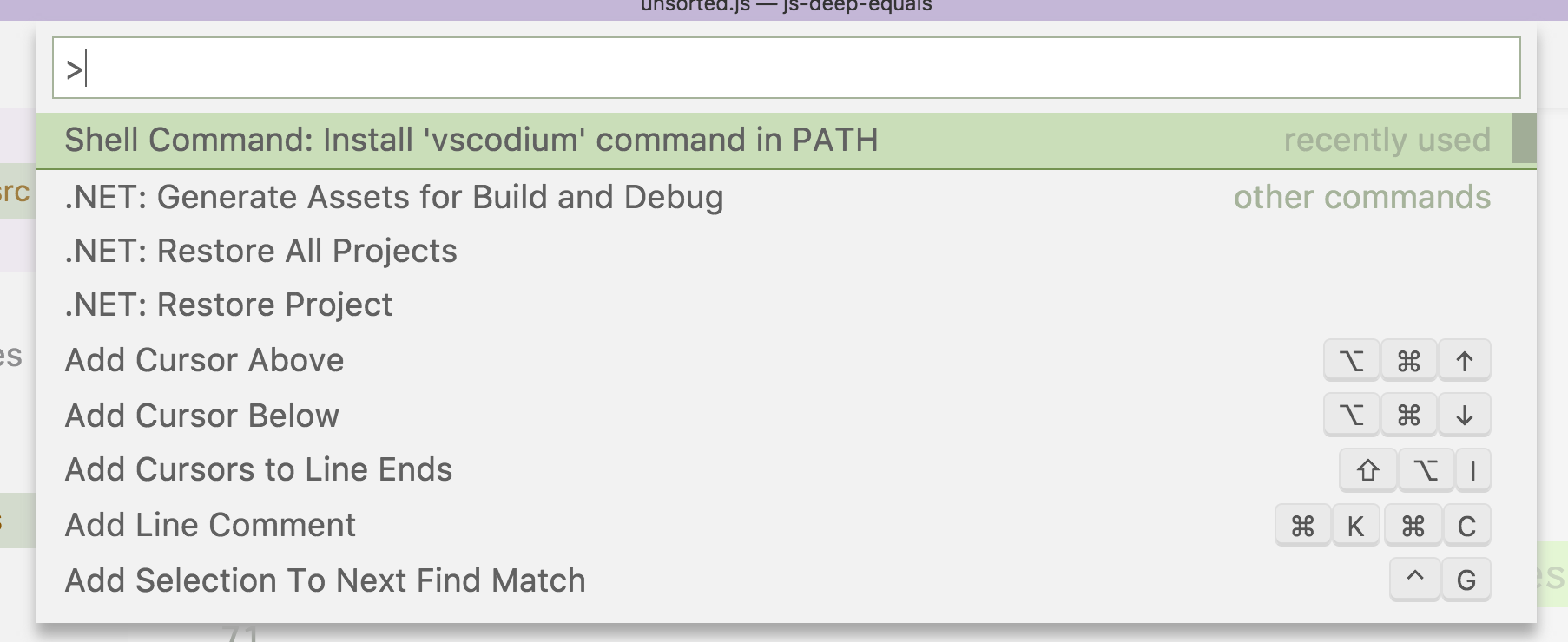
|
||||
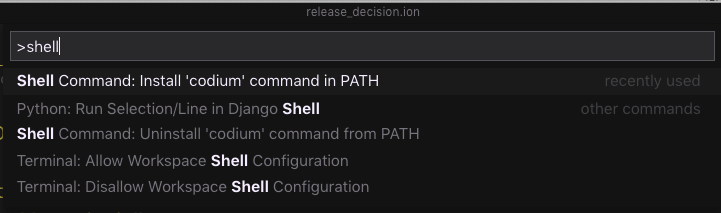
|
||||
|
||||
This allows you to open files or directories in VSCodium directly from your terminal:
|
||||
|
||||
```bash
|
||||
~/in-my-project $ vscodium . # open this directory
|
||||
~/in-my-project $ vscodium file.txt # open this file
|
||||
~/in-my-project $ codium . # open this directory
|
||||
~/in-my-project $ codium file.txt # open this file
|
||||
```
|
||||
|
||||
Feel free to alias this command to something easier to type in your shell profile (e.g. `alias code=vscodium`).
|
||||
Feel free to alias this command to something easier to type in your shell profile (e.g. `alias code=codium`).
|
||||
|
||||
## <a id="gentoo-overlay"></a>Gentoo ebuild/overlay
|
||||
|
||||
|
||||
@@ -77,7 +77,7 @@ This repo exists so that you don't have to download+build from source. The build
|
||||
|
||||
If you want to build from source yourself, head over to [Microsoft's vscode repo](https://github.com/Microsoft/vscode) and follow their [instructions](https://github.com/Microsoft/vscode/wiki/How-to-Contribute#build-and-run). This repo exists to make it easier to get the latest version of MIT-licensed VSCode.
|
||||
|
||||
Microsoft's build process does download additional files. This was brought up in [Microsoft/vscode#49159](https://github.com/Microsoft/vscode/issues/49159) and [Microsoft/vscode#45978](https://github.com/Microsoft/vscode/issues/45978). These are the packages downloaded during build:
|
||||
Microsoft's build process (which we are running to build the binaries) does download additional files. This was brought up in [Microsoft/vscode#49159](https://github.com/Microsoft/vscode/issues/49159) and [Microsoft/vscode#45978](https://github.com/Microsoft/vscode/issues/45978). These are the packages downloaded during build:
|
||||
|
||||
- Extensions from the Microsoft Marketplace:
|
||||
- ms-vscode.node-debug2
|
||||
@@ -94,7 +94,7 @@ For more information on getting all the telemetry disabled and tips for migratin
|
||||
### Extension Licensing
|
||||
Please note that some Visual Studio Code extensions have licenses that restrict their use to the official Visual Studio Code builds and therefore do not work with VSCodium. See [this note](https://github.com/VSCodium/vscodium/blob/master/DOCS.md#proprietary-debugging-tools) on the Docs page for what's been found so far and possible workarounds.
|
||||
|
||||
### How do are the VSCodium binaries built?
|
||||
### How are the VSCodium binaries built?
|
||||
If you would like to see the commands we run to build `vscode` into VSCodium binaries, have a look at the [`.travis.yml` file](https://github.com/VSCodium/vscodium/blob/master/.travis.yml) (for Linux and OS X builds) and the [`win32-build.yml` file](https://github.com/VSCodium/vscodium/blob/master/win32-build.yml) (for Windows builds). These build files call all the other scripts in the repo. If you find something that doesn't make sense, feel free to ask about it [on Gitter](https://gitter.im/VSCodium/Lobby).
|
||||
|
||||
The builds are run every day, but exit early if there isn't a new release from Microsoft. To examine the build logs, go [here for Linux / OS X](https://travis-ci.com/VSCodium/vscodium) and [here for Windows](https://dev.azure.com/vscodium/VSCodium/_build?definitionId=1)
|
||||
|
||||
@@ -17,13 +17,13 @@ ingredients:
|
||||
script:
|
||||
- pwd
|
||||
- cp ../.build/linux/deb/amd64/deb/*.deb .
|
||||
- ls vscodium_*.deb | cut -d _ -f 2 > VERSION
|
||||
- ls codium_*.deb | cut -d _ -f 2 > VERSION
|
||||
|
||||
script:
|
||||
- sed -i -e 's|/usr/share/vscodium/||g' usr/share/applications/vscodium.desktop
|
||||
- sed -i -e 's|com.visualstudio.code.oss|vscodium|g' usr/share/applications/vscodium.desktop
|
||||
- cp usr/share/applications/vscodium.desktop .
|
||||
- cp usr/share/pixmaps/com.visualstudio.code.oss.png vscodium.png
|
||||
- sed -i -e 's|/usr/share/codium/||g' usr/share/applications/codium.desktop
|
||||
- sed -i -e 's|com.visualstudio.code.oss|vscodium|g' usr/share/applications/codium.desktop
|
||||
- cp usr/share/applications/codium.desktop .
|
||||
- cp usr/share/pixmaps/vscodium.png vscodium.png
|
||||
- convert vscodium.png -resize 512x512 usr/share/icons/hicolor/512x512/apps/vscodium.png
|
||||
- convert vscodium.png -resize 256x256 usr/share/icons/hicolor/256x256/apps/vscodium.png
|
||||
- convert vscodium.png -resize 128x128 usr/share/icons/hicolor/128x128/apps/vscodium.png
|
||||
@@ -32,4 +32,4 @@ script:
|
||||
- convert vscodium.png -resize 32x32 usr/share/icons/hicolor/32x32/apps/vscodium.png
|
||||
- convert vscodium.png -resize 24x24 usr/share/icons/hicolor/24x24/apps/vscodium.png
|
||||
- convert vscodium.png -resize 22x22 usr/share/icons/hicolor/22x22/apps/vscodium.png
|
||||
- ( cd usr/bin/ ; ln -s ../share/vscodium/codium . )
|
||||
- ( cd usr/bin/ ; ln -s ../share/codium/codium . )
|
||||
|
||||
10
build.sh
10
build.sh
@@ -11,6 +11,11 @@ if [[ "$SHOULD_BUILD" == "yes" ]]; then
|
||||
mv product.json product.json.bak
|
||||
|
||||
# set fields in product.json
|
||||
tipsAndTricksUrl='setpath(["tipsAndTricksUrl"]; "https://go.microsoft.com/fwlink/?linkid=852118")'
|
||||
twitterUrl='setpath(["twitterUrl"]; "https://go.microsoft.com/fwlink/?LinkID=533687")'
|
||||
requestFeatureUrl='setpath(["requestFeatureUrl"]; "https://go.microsoft.com/fwlink/?LinkID=533482")'
|
||||
documentationUrl='setpath(["documentationUrl"]; "https://go.microsoft.com/fwlink/?LinkID=533484#vscode")'
|
||||
introductoryVideosUrl='setpath(["introductoryVideosUrl"]; "https://go.microsoft.com/fwlink/?linkid=832146")'
|
||||
extensionAllowedBadgeProviders='setpath(["extensionAllowedBadgeProviders"]; ["api.bintray.com", "api.travis-ci.com", "api.travis-ci.org", "app.fossa.io", "badge.fury.io", "badge.waffle.io", "badgen.net", "badges.frapsoft.com", "badges.gitter.im", "badges.greenkeeper.io", "cdn.travis-ci.com", "cdn.travis-ci.org", "ci.appveyor.com", "circleci.com", "cla.opensource.microsoft.com", "codacy.com", "codeclimate.com", "codecov.io", "coveralls.io", "david-dm.org", "deepscan.io", "dev.azure.com", "flat.badgen.net", "gemnasium.com", "githost.io", "gitlab.com", "godoc.org", "goreportcard.com", "img.shields.io", "isitmaintained.com", "marketplace.visualstudio.com", "nodesecurity.io", "opencollective.com", "snyk.io", "travis-ci.com", "travis-ci.org", "visualstudio.com", "vsmarketplacebadge.apphb.com", "www.bithound.io", "www.versioneye.com"])'
|
||||
updateUrl='setpath(["updateUrl"]; "https://vscodium.now.sh")'
|
||||
releaseNotesUrl='setpath(["releaseNotesUrl"]; "https://go.microsoft.com/fwlink/?LinkID=533483#vscode")'
|
||||
@@ -21,6 +26,7 @@ if [[ "$SHOULD_BUILD" == "yes" ]]; then
|
||||
extensionsGallery='setpath(["extensionsGallery"]; {"serviceUrl": "https://marketplace.visualstudio.com/_apis/public/gallery", "cacheUrl": "https://vscode.blob.core.windows.net/gallery/index", "itemUrl": "https://marketplace.visualstudio.com/items"})'
|
||||
nameShort='setpath(["nameShort"]; "VSCodium")'
|
||||
nameLong='setpath(["nameLong"]; "VSCodium")'
|
||||
linuxIconName='setpath(["linuxIconName"]; "vscodium")'
|
||||
applicationName='setpath(["applicationName"]; "codium")'
|
||||
win32MutexName='setpath(["win32MutexName"]; "vscodium")'
|
||||
win32DirName='setpath(["win32DirName"]; "VSCodium")'
|
||||
@@ -32,7 +38,7 @@ if [[ "$SHOULD_BUILD" == "yes" ]]; then
|
||||
urlProtocol='setpath(["urlProtocol"]; "vscodium")'
|
||||
extensionAllowedProposedApi='setpath(["extensionAllowedProposedApi"]; getpath(["extensionAllowedProposedApi"]) + ["ms-vsliveshare.vsliveshare"])'
|
||||
|
||||
product_json_changes="${extensionAllowedBadgeProviders} | ${updateUrl} | ${releaseNotesUrl} | ${keyboardShortcutsUrlMac} | ${keyboardShortcutsUrlLinux} | ${keyboardShortcutsUrlWin} | ${quality} | ${extensionsGallery} | ${nameShort} | ${nameLong} | ${applicationName} | ${win32MutexName} | ${win32DirName} | ${win32NameVersion} | ${win32RegValueName} | ${win32AppUserModelId} | ${win32ShellNameShort} | ${win32x64UserAppId} | ${urlProtocol} | ${extensionAllowedProposedApi}"
|
||||
product_json_changes="${tipsAndTricksUrl} | ${twitterUrl} | ${requestFeatureUrl} | ${documentationUrl} | ${introductoryVideosUrl} | ${extensionAllowedBadgeProviders} | ${updateUrl} | ${releaseNotesUrl} | ${keyboardShortcutsUrlMac} | ${keyboardShortcutsUrlLinux} | ${keyboardShortcutsUrlWin} | ${quality} | ${extensionsGallery} | ${nameShort} | ${nameLong} | ${linuxIconName} | ${applicationName} | ${win32MutexName} | ${win32DirName} | ${win32NameVersion} | ${win32RegValueName} | ${win32AppUserModelId} | ${win32ShellNameShort} | ${win32x64UserAppId} | ${urlProtocol} | ${extensionAllowedProposedApi}"
|
||||
cat product.json.bak | jq "${product_json_changes}" > product.json
|
||||
cat product.json
|
||||
../undo_telemetry.sh
|
||||
@@ -44,7 +50,7 @@ if [[ "$SHOULD_BUILD" == "yes" ]]; then
|
||||
# unless the app name is code-oss
|
||||
# as we are renaming the application to vscodium
|
||||
# we need to edit a line in the post install template
|
||||
sed -i "s/code-oss/vscodium/" resources/linux/debian/postinst.template
|
||||
sed -i "s/code-oss/codium/" resources/linux/debian/postinst.template
|
||||
fi
|
||||
|
||||
if [[ "$TRAVIS_OS_NAME" == "osx" ]]; then
|
||||
|
||||
@@ -136,6 +136,9 @@ git pull origin master # in case another build just pushed
|
||||
git add .
|
||||
dateAndMonth=`date "+%D %T"`
|
||||
git commit -m "Travis update: $dateAndMonth (Build $TRAVIS_BUILD_NUMBER)"
|
||||
git push origin master --quiet
|
||||
if ! git push origin master --quiet; then
|
||||
git pull origin master
|
||||
git push origin master --quiet
|
||||
fi
|
||||
|
||||
cd ..
|
||||
|
||||
@@ -1,7 +1,7 @@
|
||||
steps:
|
||||
- task: NodeTool@0
|
||||
inputs:
|
||||
versionSpec: '8.x'
|
||||
versionSpec: '10.x'
|
||||
- script: |
|
||||
choco install jq
|
||||
displayName: 'install jq from choco'
|
||||
@@ -20,6 +20,7 @@ steps:
|
||||
$LATEST_MS_TAG="$(git -C vscode describe --tags)"
|
||||
Write-Host "##vso[task.setvariable variable=LATEST_MS_TAG]$LATEST_MS_TAG"
|
||||
Write-Host "##vso[task.setvariable variable=LATEST_MS_COMMIT]$LATEST_MS_COMMIT"
|
||||
Write-Host "##vso[task.setvariable variable=BUILD_SOURCEVERSION]$LATEST_MS_COMMIT"
|
||||
displayName: 'set env LATEST_MS_TAG, LATEST_MS_COMMIT'
|
||||
- task: PowerShell@2
|
||||
inputs:
|
||||
|
||||
Reference in New Issue
Block a user